
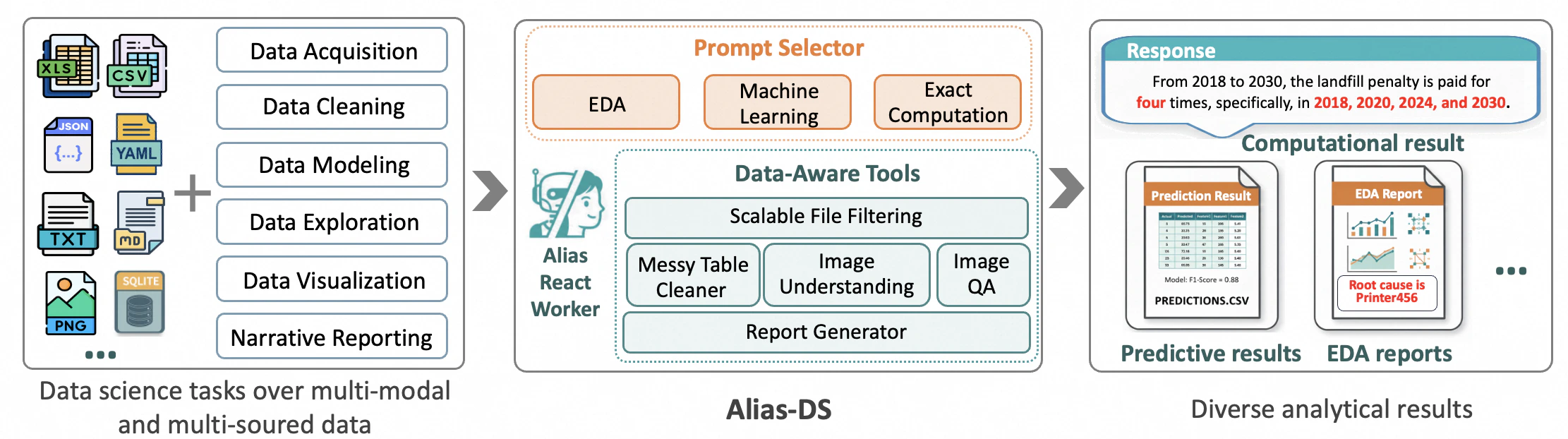
Data Science Agent is an autonomous, end-to-end assistant that transforms high-level analytical questions into executable data science workflows. It seamlessly handles the full pipeline from data acquisition and cleaning to modeling, visualization, and narrative reporting with minimal human intervention, enabling users to move efficiently from intent to insight in real-world scenarios. The agent is equipped with proven analytical methodologies including Pareto Drill-Down Analysis for identifying root causes, Hypothesis-Driven Analysis for rigorous validation, and Root Cause Analysis for systematic problem investigation, ensuring high-quality insights across diverse data science tasks.Documentation Index
Fetch the complete documentation index at: https://docs.agentscope.io/llms.txt
Use this file to discover all available pages before exploring further.
Quick Start
Prerequisites
- Python 3.10 or higher
- Docker (for sandbox execution environment)
- DashScope API key from Alibaba Cloud
Sandbox Setup
The Data Science Agent requires a sandbox environment for secure code execution. Start the sandbox server:
Usage
You can start running the Data Science agent in your terminal with the following command:The Data Science Agent supports multiple data source formats:
- Local Files: CSV, Excel, JSON files — example:
--datasource ./data.csv ./data.xlsx - Databases: PostgreSQL, SQLite, and other SQL databases — example:
--datasource postgresql://user:pass@host:5432/db - Multiple Sources: Combine different data sources — example:
--datasource ./file1.csv ./file2.xlsx postgresql://...
/workspace directory in the sandbox for secure processing.The Data Science Agent is built with DashScope chat models. If you want to change the model, ensure you also update the formatter accordingly. The correspondence between built-in models and formatters is listed in the Provider Reference.
Key Features
Intelligent Scenario Routing
At startup, the Data Science Agent uses an intelligent router to automatically assign user tasks to one of three core scenarios:- Exploratory Data Analysis (EDA): For understanding data distributions, patterns, and relationships
- Predictive Modeling: For building machine learning models and forecasts
- Exact Data Computation: For precise calculations and aggregations
_scenario_explorative_data_analysis.md) and registering them in available_prompts.
Scalable File Filtering Pipeline
The agent features a sophisticated file filtering system that quickly locates relevant files in massive data lakes. This is particularly useful when working with:- Large directories with hundreds of files
- Mixed file types and formats
- Complex data hierarchies
Robust Spreadsheet Parsing
The Data Science Agent can handle irregular spreadsheets that are common in real-world scenarios through theclean_messy_spreadsheet function:
- Merged Cells: Correctly interprets cells spanning multiple rows/columns
- Multi-level Headers: Handles complex header structures
- Embedded Notes: Extracts and processes metadata and annotations stored in
__metadatafield - Mixed Data Types: Intelligently handles numeric, text, and date data
Multimodal Understanding
Beyond tabular data, the agent supports multimodal analysis capabilities through vision-language models:Image Summarization
Extracts comprehensive information from images including text, objects, layout, and chart insights:Question Answering About Images
Answers natural language questions about image content:Automatic Report Generation
For EDA tasks, the Data Science Agent automatically generates comprehensive interactive HTML reports that combine:- Insights: Key findings and patterns discovered in the data
- Visualizations: Interactive charts and graphs
- Executable Code: Python code used for analysis (ensuring reproducibility)
- Narrative: Clear explanations of analytical steps and conclusions