
Alias-Agent (short for Alias) is an LLM-empowered agent built on AgentScope and AgentScope-runtime, designed as a general-purpose intelligent assistant. Alias excels at decomposing complicated problems, constructing roadmaps, and applying appropriate strategies to tackle diverse real-world tasks. Alias employs five operational modes:Documentation Index
Fetch the complete documentation index at: https://docs.agentscope.io/llms.txt
Use this file to discover all available pages before exploring further.
General, Browser Use, Deep Research, Financial Analysis, and Data Science. Each mode comes with tailored instructions, specialized tool sets, and the capability to orchestrate expert agents, enabling Alias to serve both as an out-of-the-box solution and a foundational template for custom development.

General
Meta Planner with automatic mode switching
Browser Use
Multimodal web automation
Deep Research
Tree-structured research with user steering
Financial Analysis
Hypothesis-driven financial reasoning
Data Science
End-to-end autonomous data analysis
Features
Various Operational Modes for Diverse Scenarios
General Mode
The General mode features the Meta Planner, which orchestrates task execution with automatic mode switching and interrupt support, intelligently routing tasks to specialized agents while maintaining state preservation throughout execution. It also provides an out-of-the-box AgentScope QA Agent, pre-configured with high-frequency Q&A pairs. By integrating RAG and GitHub MCP tools, it dynamically retrieves the latest source code, tutorials, and community discussions, combined with a private knowledge base.Browser Use Mode
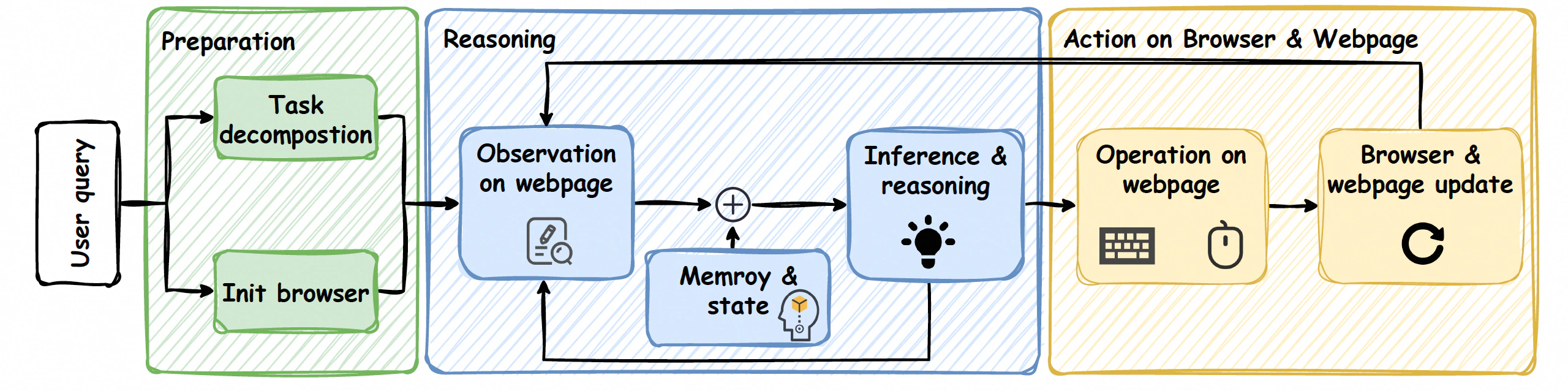
Deep Research Mode
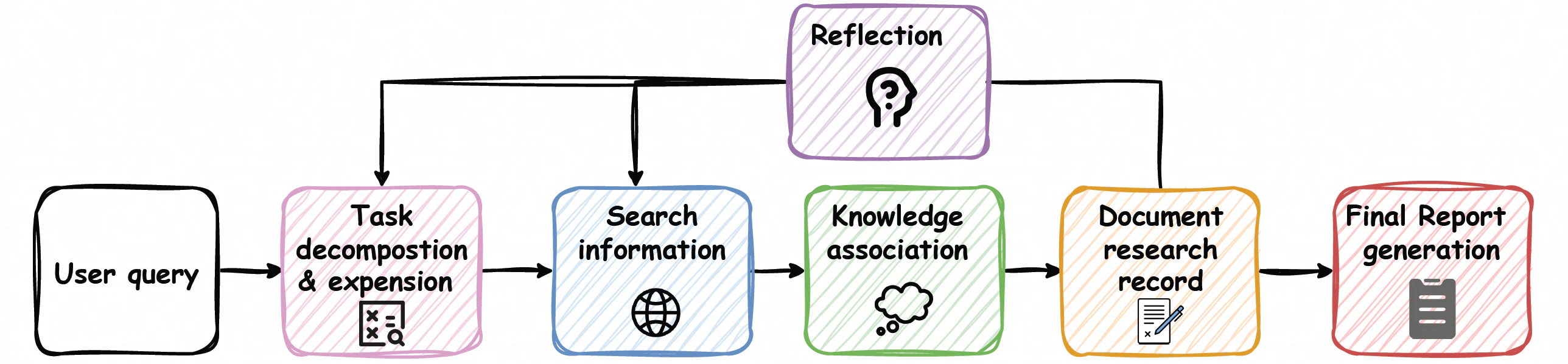
Financial Analysis Mode
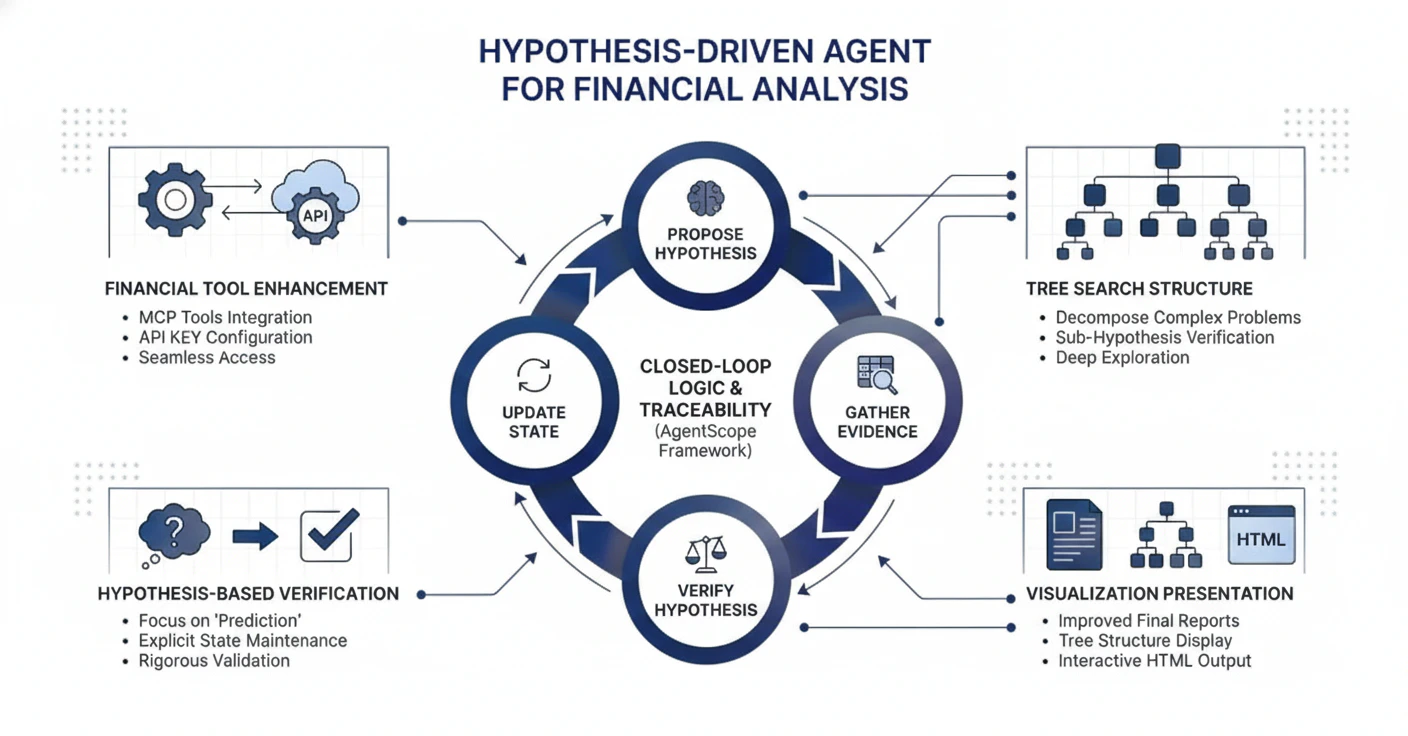
Data Science Mode
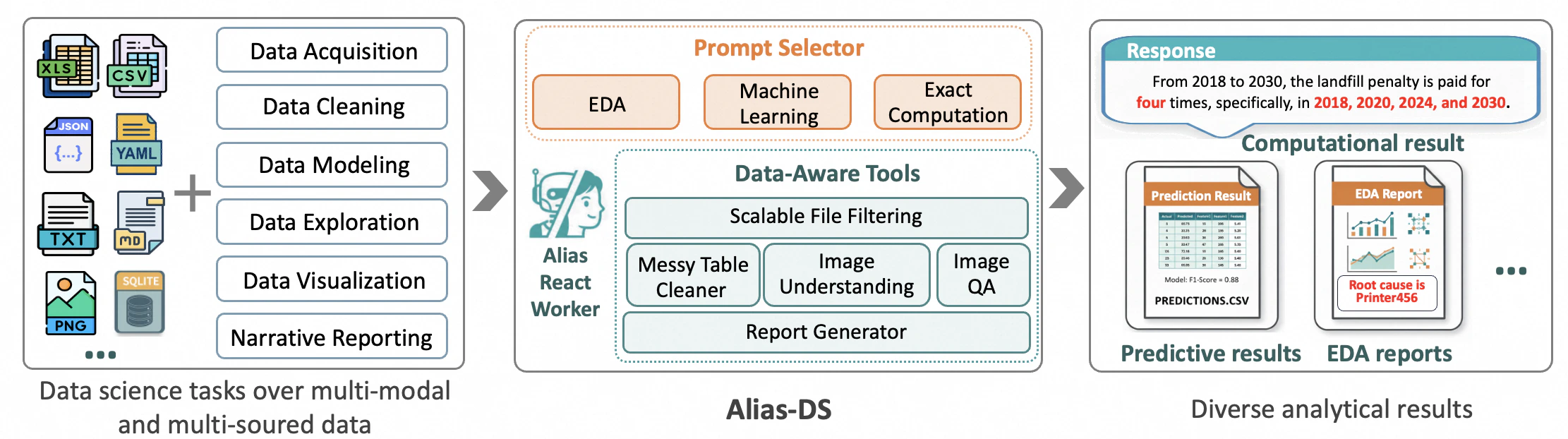
Enhanced Memory System
- Tool Memory (Long-term): Persistent storage for tool invocation traces via ReMe, enabling automated summarization and usage guidance.
- User Profiling (Long-term): Captures and refines user behavior through dynamic candidate scoring and promotion to stable profiles via mem0, seamlessly integrated with frontend interactions.
CLI & Full-Stack Deployment Available
CLI Deployment
- Command-Line Interface: Direct execution via
alias_agent runcommand with mode selection and configuration options.
Full-Stack Deployment
- Frontend: Spark Design-based React application with runtime interrupt controls, artifact inspectors, and editable outputs.
- Backend: Lightweight single-node deployment on AgentScope-runtime with simplified user management and mode-specific bootstrapping.
Quickstart
Installation
Alias requires Python 3.10 or higher.
alias_agent command-line tool.
Sandbox Setup (Optional)
API Keys Configuration
Basic Usage — CLI Deployment
Execute an agent task with different modes:Input/Output Management
Input:- Use the
--datasourceparameter (with aliases--filesfor backward compatibility) to specify data sources, supporting multiple formats:- Local files: such as
./data.txtor/absolute/path/file.json - Database DSN: supports relational databases like PostgreSQL and SQLite, with format like
postgresql://user:password@host:port/database
- Local files: such as
Data sources are automatically profiled and uploaded files are copied to
/workspace in the sandbox.- Generated files are stored in subdirectories of
sessions_mount_dir, where all output results can be found.
Enable Long-Term Memory Service (General Mode Only)
To enable the long-term memory service in General mode, you need to:- Start the Memory Service first (see Start the Memory Service Server section below)
- Use the
--use_long_term_memoryflag when running in General mode:
Long-term memory is disabled by default, only available in General mode, and requires the memory service to be running beforehand.
Basic Usage — Full-Stack Deployment
To run Alias-Agent with the full-stack deployment (frontend + backend), follow these steps:Prerequisites
- Install Frontend Dependencies:
- Configure Environment Variables:
- Start Redis (required for caching and session management):
Start the Sandbox Server (Optional but Recommended)
For full functionality including code execution and file operations, start the sandbox server in another terminal:Start the Backend Server
In a terminal, first export all required API Keys (see API Keys Configuration section above) and then start the backend API server:http://localhost:8000/api/v1/health.
Start the Frontend
In a separate terminal, start the frontend development server:http://localhost:5173 (or the port specified in vite.config.ts). The frontend is configured to proxy API requests to the backend server at http://localhost:8000.
Start the Memory Service Server
The Memory Service is required if you want to enable long-term memory features in General mode. Make sure to start the Memory Service before using the
--use_long_term_memory flag in CLI or setting use_long_term_memory_service: true in API requests.- First, add the following environment variables to your
.envfile:
- Then run the startup script:
Access the Application
Once both servers are running:- Frontend UI: Open
http://localhost:5173in your browser - Backend API: Available at
http://localhost:8000 - API Documentation: Available at
http://localhost:8000/docs(Swagger UI) orhttp://localhost:8000/api/v1/openapi.json(OpenAPI JSON) - Health Check:
http://localhost:8000/api/v1/health
Default Login Credentials
After the first startup, you can log in with the superuser credentials configured in.env:
- Email: As specified in
FIRST_SUPERUSER_EMAIL(default:alias@agentscope.com) - Username: As specified in
FIRST_SUPERUSER_USERNAME(default:alias) - Password: As specified in
FIRST_SUPERUSER_PASSWORD
Basic Usage — AgentScope Runtime Deployment
1. Prerequisites
- Sandbox & API Keys: Please refer to the previous sections Sandbox Setup and API Keys Configuration to complete the basic environment setup.
- Environment Variables: Copy the example environment file from the project root:
- Start Redis: Required for caching and session management:
2. Installation & Sandbox Launch
3. Launching AgentScope Runtime Service
Option A: Using CLI (Recommended)
Use thealias_agent_runtime command to launch the backend service with one click:
--host/--port: Specify the service address and port (default port is 8090).--chat-mode: Set the running mode. Options:general,dr,browser,ds,finance(default:general).--web-ui: (Optional) Enable AgentScope Runtime WebUI for a visual interaction interface. Skip this if you only need the API.
When enabling
--web-ui for the first time, the system will automatically install necessary frontend dependencies. This may take a few minutes.Option B: Using Python Code (Recommended for Developers)
4. Accessing the Application
Once the service is running, you can access Alias via:- Runtime API Access: Send standard HTTP POST requests to
http://localhost:8090/process. This is the primary method for integrating Alias into third-party frontends or backend workflows. - Visual Monitoring (Optional): If started with the
--web-uiflag, visithttp://localhost:5173. This interface allows developers to observe the agent’s reasoning process, tool execution traces, and other debugging information.