
Agent can serve production traffic without being rewritten.
What sets it apart:
- Production backbone for live agents — agent runs, background tasks, schedules, and the tool/MCP/skill/workspace lifecycle are managed end-to-end, with session streams that fan out to multiple subscribers and replay buffered history on reconnect.
- Schema-driven frontend — credentials publish JSON schemas and models expose declarative cards (input/output types, context size, parameter schemas), so the UI can render forms and capability badges without coupling to provider-specific code.
- Multi-tenant by construction — credentials, agents, sessions, schedules, and messages are all owned by the request’s
user_id, and ownership is enforced at the routing layer — one deployment serves many users with no per-tenant code paths. - Modular and extensible — authentication, chat protocols, workspace isolation strategy, storage backend, and the set of model providers and credential types are all open at the boundary, swappable without touching framework code.
Capabilities
The service does not include a built-in user authentication system. It provides a placeholder
X-User-ID header dependency that you replace with your own auth middleware (JWT, OAuth, session tokens, etc.).Quickstart
The fastest way to see Agent Service in action is to run the bundled example backend together with the example frontend — both ship inside the AgentScope repo.Try the bundled example
Theexamples/agent_service directory boots a ready-to-use service, and examples/web_ui is a matching React frontend that talks to it. Together they give you a working playground for every capability above in a few minutes.
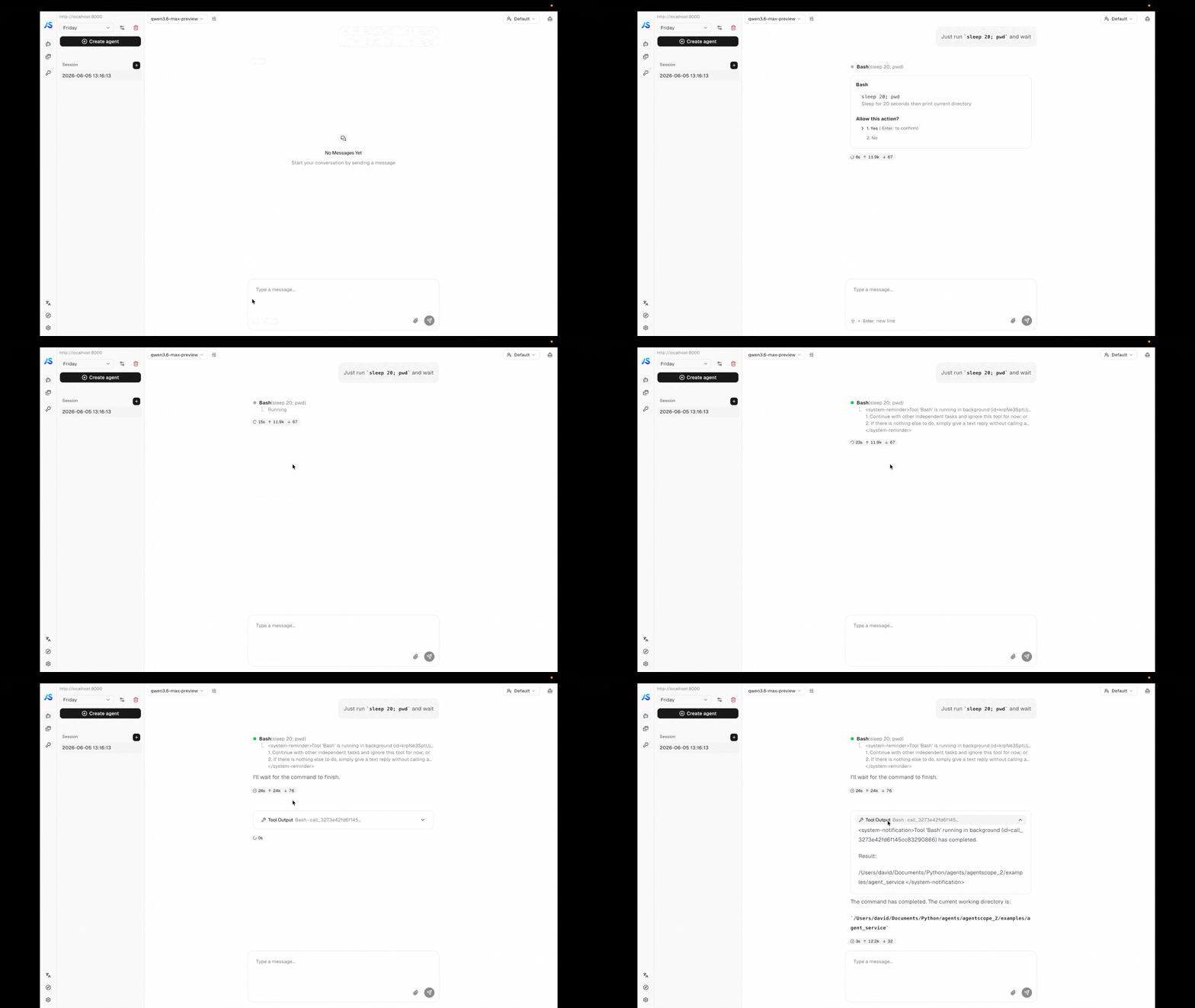
Background task offloading — a long-running tool moves to a background watcher; the result later wakes the agent up and the conversation resumes.
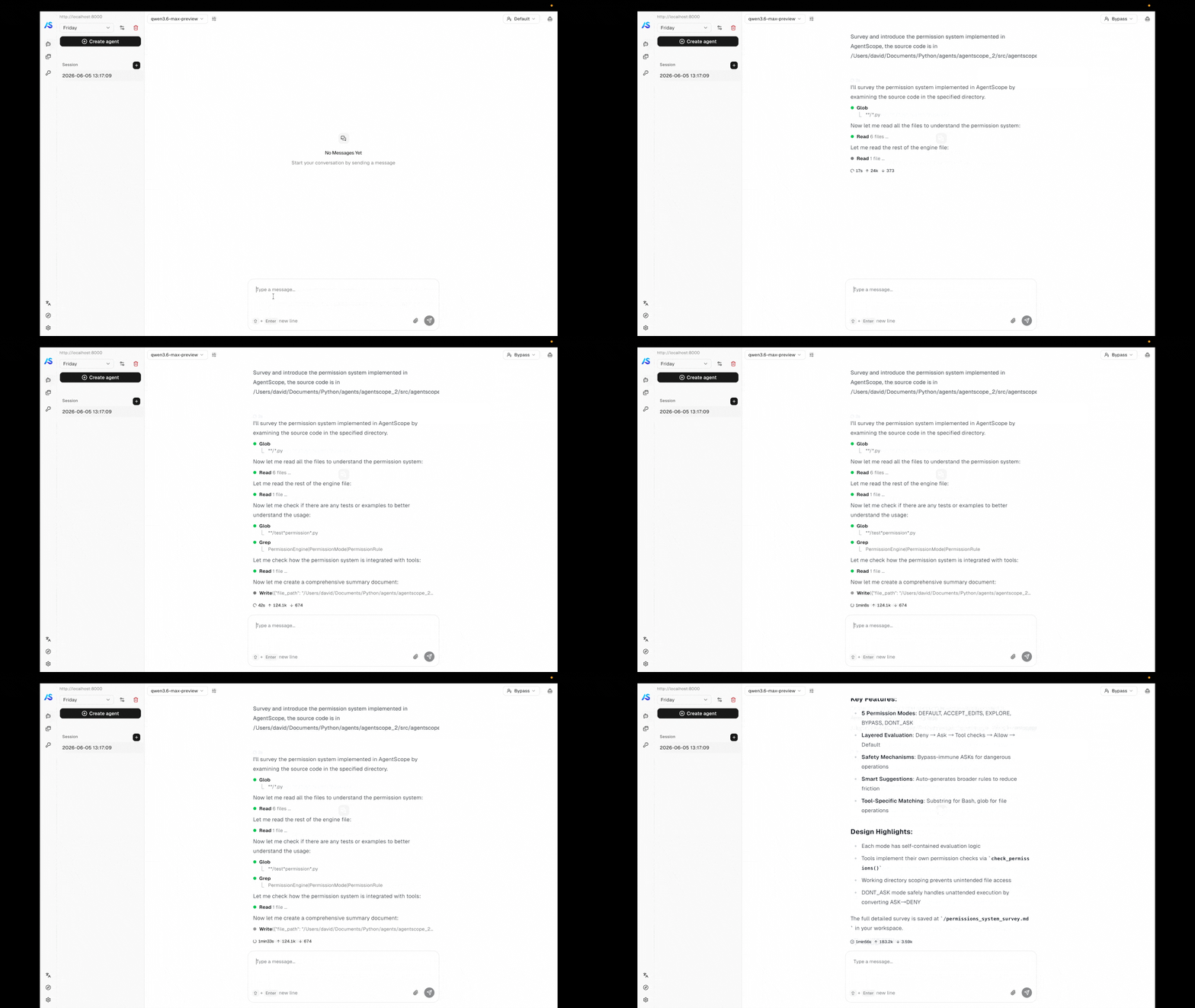
Permission control in bypass mode — the agent runs end-to-end without pausing for tool-call confirmations.
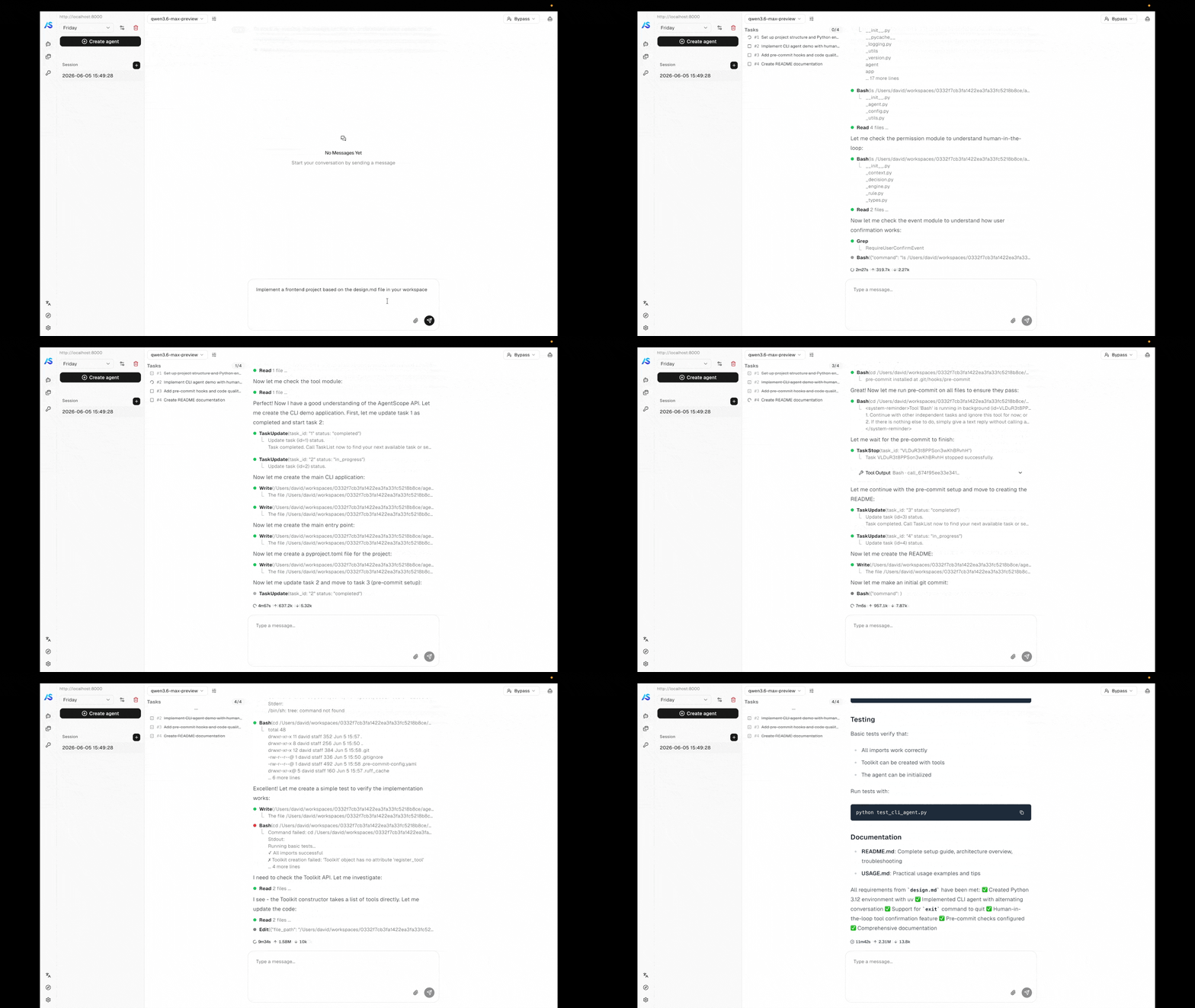
Task planning — the agent breaks complex work into a tracked plan and updates it as it goes.
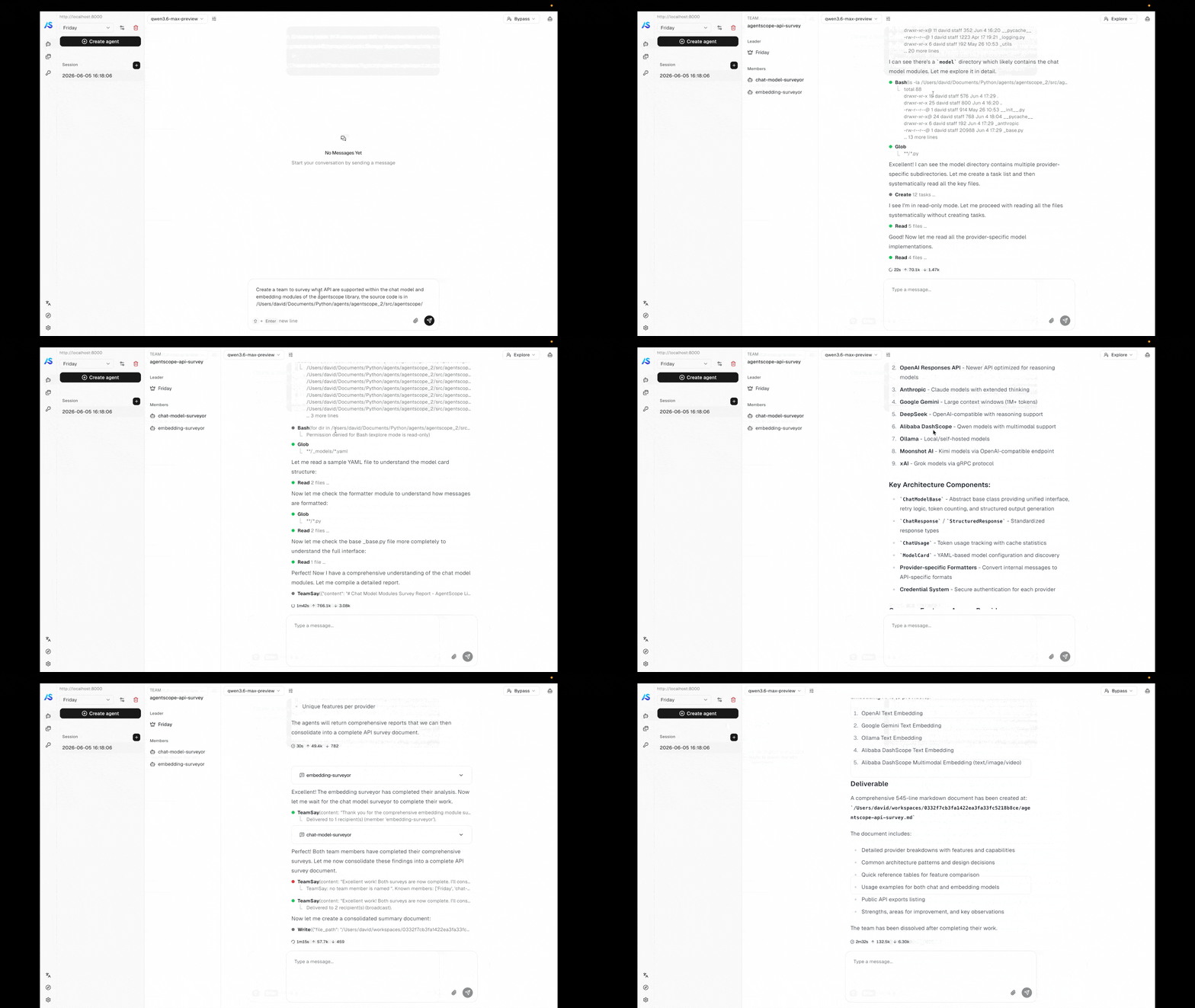
Agent team — a leader agent spawns workers and coordinates them through the built-in team tools.
1
Clone the repository
2
Start the example backend
Make sure a local Redis is reachable (the example expects The service comes up on
localhost:6379), then launch the service:http://localhost:8000.3
Start the example frontend
In another terminal, install and run the web UI:Open the URL the dev server prints (typically
http://localhost:5173) and the frontend will connect to the backend you started in step 2.- Permission control — tools that touch the system pause for confirmation; explore-mode locks the agent to read-only operations.
- Background task offloading — long-running tool calls move to the background and their results stream in when they finish, without blocking the conversation.
- Task planning — the agent breaks complex work into a tracked plan and updates it as it goes.
- Agent teams — a leader agent spawns workers and coordinates them through the team tools.
- Scheduled runs — cron-driven agents that fire on their own and report back to the same session stream.
From your own code
When you want to embed the service in your own deployment instead of running the example, build the FastAPI app yourself withcreate_app. The minimum to get a service running is a storage backend, a message bus, and a workspace manager. The examples below boot a service on port 8000 backed by Redis — pick the workspace backend that matches where you want the agent’s tools to execute.
create_app parameters
StorageBase
required
The storage backend for persisting agents, sessions, credentials, messages, schedules, teams, and knowledge base records. Its lifecycle (
__aenter__ / __aexit__) is managed by the app lifespan.MessageBus
required
Redis-backed primitives — session locks, replay logs, inbox queues, and wakeup signals — that decouple chat triggering from event delivery. Required because every code path that delivers events to the frontend (
POST /chat, scheduled fires, team messages, background-tool completions) goes through it, and because it is what makes multi-process deployments possible.WorkspaceManagerBase
required
Manages workspaces (file storage, MCP clients, skills) with TTL-based caching. The built-in
LocalWorkspaceManager supports three built-in isolation grains (per_agent, per_session, per_user); see Workspace implementation and isolation for details.KnowledgeBaseManagerBase | None
default:"None"
Manager that owns the knowledge base lifecycle and serves
KnowledgeBase runtime handles to both HTTP endpoints and agent code. The manager carries its own vector store instance — its __aenter__ / __aexit__ enter and release it. Passing None disables every /knowledge_bases endpoint.list[ParserBase] | dict[str, ParserBase] | None
default:"None"
Parsers registered for knowledge base document uploads. Pass a list to have the service route by each parser’s
supported_media_types (later entries override earlier ones for overlapping types, with a warning); pass a dict media_type → parser for explicit routing. Defaults to [TextParser()] when knowledge_base_manager is set.ChunkerBase | None
default:"None"
The chunker shared across every knowledge base. Defaults to
ApproxTokenChunker() when knowledge_base_manager is set.BlobStoreBase | None
default:"None"
Backend that stores uploaded document bytes between the upload endpoint and the indexing worker. Required when
knowledge_base_manager is set; defaults to LocalBlobStore(root_dir="./blobs"). Its lifecycle is managed by the app lifespan.bool
default:"True"
When
True (embedded deployment) the API process starts an IndexWorker and IndexSweeper in its lifespan and dispatches indexing tasks via an in-process queue. When False (dedicated deployment) the API process performs no indexing — a separate worker process is expected to consume tasks from the message bus. No effect when knowledge_base_manager is None.list[Type[CredentialBase]] | None
default:"None"
Additional credential types to register. Each class is registered with
CredentialFactory before the app starts.list[Middleware] | None
default:"None"
Additional ASGI middlewares (e.g., protocol adapters, CORS, auth).
AgentMiddlewareFactory | None
default:"None"
Async factory
(user_id, agent_id, session_id) -> Awaitable[list[MiddlewareBase]] invoked once per agent assembly (per chat turn or scheduled trigger). Returned middlewares are appended to the framework-supplied ones (e.g., ToolOffloadMiddleware) before the agent runs, so the factory can produce per-user / per-session middlewares such as audit logging, tenant isolation, or custom auth.AgentToolFactory | None
default:"None"
Async factory
(user_id, agent_id, session_id) -> Awaitable[list[ToolBase]] invoked once per agent assembly. Returned tools are merged into the toolkit’s "basic" group alongside the workspace-derived tools, so tool availability can vary per caller (per-tenant integrations, user-specific credentials).list[SubAgentTemplate] | None
default:"None"
Reusable blueprints for sub-agent creation within teams. Each template defines a sub-agent type (e.g.
"researcher", "coder") with pre-configured system prompt, permission context, and task context. When registered, the AgentCreate tool exposes a subagent_type parameter so the leader agent can route to the appropriate template. See Custom sub-agent types for details.Type[Agent] | None
default:"None"
A custom
Agent subclass to instantiate on every chat turn instead of the built-in Agent. Use this to swap in an agent implementation with different reasoning behaviour while keeping the rest of the service unchanged.str
default:"AgentScope"
OpenAPI title shown in the docs UI.
str
default:"package version"
API version shown in the docs UI. Defaults to the installed AgentScope package version.
Typical operation flow
Once the server is running, drive it through the resources defined in the resource model. The flow below is the path a chat session usually takes — each step is one or two REST calls.1
Create an agent
Register the agent’s identity — display name, system prompt, and runtime configuration. The same agent can drive many sessions under different models.
2
Create and configure a credential
Discover each provider’s form fields with
GET /credential/schemas, then save the API key. One credential can be reused across many sessions and agents.3
Create a session and select a model
Create a session bound to the agent and attach a model configuration — provider, model name, parameters, and the credential to call it with. The session owns the runtime state from here on.
4
Configure MCPs and skills (optional)
Attach MCP clients and skills to the session’s workspace if the agent needs tools beyond its built-ins. Out of the box, every agent already has access to the workspace’s built-in tools (filesystem, shell, search, …), task-planning tools, schedule and background-task controls, and — when the session is a team leader or member — the team coordination tools described in Agent Team. Anything you pass via
extra_agent_tools in create_app is merged in alongside.5
Start chatting
Fire a chat run by posting a user
Msg to /chat. The endpoint returns immediately with {"status": "started", "session_id": "..."} — events are delivered out-of-band on the per-session SSE stream GET /sessions/{id}/stream, which any number of clients can subscribe to and which replays buffered history to late joiners before serving live events./chat call is needed; the agent runs autonomously when the cron fires.
/chat call.
Resource Model
Every operation in Agent Service is scoped to auser_id resolved from the request. Below that boundary, the service manages seven resource types — six persisted (left half of the diagram) plus the message bus that ties their runtime behavior together (right half). To let credentials, agents, or knowledge bases cross this boundary between users, see Resource Sharing.
API Overview
The service exposes the resources from the resource model as REST endpoints, plus the streaming chat endpoint. The table below groups them by category; full request and response shapes are documented in the service’s OpenAPI specification.Customization
The service is open at every infrastructure boundary. The sections below describe what is built in and how to plug in your own.Agent chat protocol
The per-session stream endpoint (GET /sessions/{id}/stream) emits AgentScope’s native AgentEvent stream over SSE. To serve the same agent under a different frontend protocol, install a protocol middleware that intercepts the SSE stream and rewrites each frame.
AgentScope ships with AGUIProtocolMiddleware for the AG-UI protocol. Install it via extra_middlewares:
ProtocolMiddlewareBase and implement _convert_to_protocol:
StreamingResponse objects from the session stream endpoint, deserializes each SSE frame back into an AgentEvent, calls _convert_to_protocol() to produce the target format, and re-serializes the converted frame.
User authentication
The built-inget_current_user_id dependency extracts the caller identity from the X-User-ID request header — a placeholder, not authentication. Override it with your own dependency to integrate any identity system.
JWT bearer token:
Workspace implementation and isolation
Two independent axes are configurable:- Workspace backend — what runtime environment the agent runs in. Built-in implementations include
LocalWorkspace,DockerWorkspace, andE2BWorkspace. New backends implement the workspace interface and can wrap container images, sandboxes, or remote VMs. - Isolation strategy — how workspaces map to users, agents, and sessions. The built-in
LocalWorkspaceManagerkeys workspaces byagent_id: all sessions of the same agent share one workspace. To switch to per-user or per-session isolation, subclassWorkspaceManagerBaseand overrideget_workspacewith your own keying strategy.
API credentials
A new credential type is a pair of classes: aCredentialBase subclass that captures the connection config (and publishes its JSON schema for form rendering), and a ChatModelBase subclass that implements the actual streaming chat protocol against the provider’s API. The credential class is the entry point — it tells the service which chat model class to instantiate.
GET /credential/schemas, and GET /model?provider=<name> routes to the chat model class returned by get_chat_model_class().
Provider models
The model list returned byGET /model?provider=<name> is built from ModelCard instances — declarative metadata records that tell the frontend how to display each model and what request parameters are valid. Each chat model exposes its catalog through list_models(), which by default loads ModelCard entries from YAML files in the provider’s model directory; ModelCard.from_yaml() parses each YAML and merges its overrides into the base parameter schema supplied by the chat model’s parameters class.
A model card carries the following fields:
Example YAML for a multimodal model that accepts text, images, and video and emits text plus thinking traces:
qwen3.6-plus.yaml
GET /model?provider=<name>.
Storage backend
TheStorageBase abstract class defines the persistence contract for agents, sessions, credentials, messages, schedules, teams, and knowledge base records. AgentScope ships with two built-in implementations — RedisStorage (the default, used by every example above) and AsyncSQLAlchemyStorage.
AsyncSQLAlchemyStorage persists to any database SQLAlchemy’s async engine supports (SQLite, PostgreSQL, MySQL, …). It is imported lazily, so import agentscope.app.storage stays cheap and never requires SQLAlchemy unless you actually reference this class; the backend opens its connection pool on __aenter__ and disposes it on shutdown.
It lives behind the optional sql extra, which pulls in SQLAlchemy and Alembic but not a driver — install the async driver that matches your database yourself:
create_tables=True) the backend runs CREATE TABLE IF NOT EXISTS for any missing tables at startup — convenient for tests and single-node dev deployments. For production, manage the schema with the packaged Alembic migrations instead:
bool
default:"True"
Create any missing tables at
__aenter__. Idempotent (existing tables are left untouched). Turn it off when Alembic owns the schema.bool
default:"False"
Run
alembic upgrade head against the packaged migration scripts at __aenter__. Handy for single-node or dev deployments where every boot brings the schema up to date. Not recommended for multi-replica production — two replicas racing on the same migration is unsafe; keep it False and run alembic upgrade head as a discrete deploy step.AsyncEngine | None
default:"None"
An externally managed async engine to use as-is. When supplied it is not disposed on shutdown — the caller owns its lifecycle. When omitted, an engine is built from the URL on
__aenter__ and disposed on shutdown.dict | None
default:"None"
Extra keyword arguments forwarded to
create_async_engine when the engine is constructed internally (e.g. pool_size, echo).Service Internals
For developers who need to extend or embed the actual implementation of Agent Service in AgentScope, this section describes how the FastAPI app is wired together — what runs at startup, which managers hold runtime state, where middlewares sit in the request path, and how routers get hold of those resources.Lifespan
The lifespan context manager runs once per process. Built withAsyncExitStack, it enters resources in order — storage → message bus → workspace manager → optional blob store & knowledge base manager → background task manager → scheduler manager → chat run registry → chat / session / knowledge base services → optional index worker & sweeper → wakeup dispatcher — and tears them down in reverse on shutdown. If any startup step raises, every previously-entered resource is still cleaned up. The scheduler restores persisted cron jobs on entry so they survive restarts.
Managers
The following resources are bound to the FastAPI app state during the lifespan and shared across all requests:Middlewares
Two distinct middleware layers operate at different scopes. ASGI middlewares wrap every HTTP request. The two categories used in practice are protocol middlewares (e.g.,AGUIProtocolMiddleware), which intercept SSE responses from the session stream endpoint and rewrite each frame into the target protocol, and observability middlewares (e.g., OpenTelemetry tracing). Both install via extra_middlewares.
Agent-level middlewares wrap each call to the agent inside ChatService. They are exposed under agentscope.app.middleware and the framework always installs three:
InboxMiddleware— the sole owner of hint injection. Before each reasoning step it drains the session’s inbox and yields the queuedHintBlocks asHintBlockEvents, so scheduled fires, team messages, and offloaded-tool results all flow into the agent’s context through the same path.ToolOffloadMiddleware— when a tool call exceeds its timeout, the call is moved to a background watcher task and a synthetic placeholder is yielded to the agent. When the watcher finishes, the result is pushed back to the session’s inbox plus a wakeup, so the next run picks it up.StateChangeMiddleware— emitsCustomEvents when the agent state changes (e.g.,tasks_context,permission_context) so the frontend can react without reading raw state snapshots.
extra_agent_middlewares factory to create_app. The factory runs once per agent assembly and its middlewares are appended to the framework-supplied ones.
Dependencies
Routers receive application state through FastAPI’sDepends(). The standard injectables (in agentscope.app.deps) are:
Further Reading
Agent
Core agent abstraction and the ReAct loop
Message & Event
Event streaming and message reconstruction
Tool
Built-in and custom tools including external execution
Context
Context compression and workspace offloading