Agent Service is the FastAPI-based hosting layer that turns AgentScope agents into a multi-tenant, multi-session HTTP service. It owns everything around the agent — request routing, per-user resource lifecycle, session state, persistence, scheduling, and tool offloading — so that the agent code you wrote against Agent can serve production traffic without being rewritten. What sets it apart:
  • Production backbone for live agents — agent runs, background tasks, schedules, and the tool/MCP/skill/workspace lifecycle are managed end-to-end, with session streams that fan out to multiple subscribers and replay buffered history on reconnect.
  • Schema-driven frontend — credentials publish JSON schemas and models expose declarative cards (input/output types, context size, parameter schemas), so the UI can render forms and capability badges without coupling to provider-specific code.
  • Multi-tenant by construction — credentials, agents, sessions, schedules, and messages are all owned by the request’s user_id, and ownership is enforced at the routing layer — one deployment serves many users with no per-tenant code paths.
  • Modular and extensible — authentication, chat protocols, workspace isolation strategy, storage backend, and the set of model providers and credential types are all open at the boundary, swappable without touching framework code.

Capabilities

CapabilityDescription
Agent teamsA leader agent spawns worker agents and coordinates them through built-in team tools; see the Agent Team chapter.
Workspace managementPluggable workspace isolation (built-in: per-agent; extensible to per-session or per-user) for the agent’s filesystem, MCP clients, and skills.
Background task offloadingLong-running tool calls move to background; their results are delivered back through the session’s event stream when they finish.
Cron schedulingTime-based agent execution with stateful or stateless sessions; schedules persist across restarts.
Session replayLate-joining clients to the per-session SSE stream receive buffered history before live events, so multiple tabs or a reconnecting frontend stay in sync.
Protocol adaptationMiddleware-based conversion to external protocols (AG-UI, A2A, etc.) on top of AgentScope’s native event stream.
Distributed deployment WIPAll shared state lives in Redis (storage + message bus), so multiple worker processes — or multiple nodes — can serve one logical service.
The service does not include a built-in user authentication system. It provides a placeholder X-User-ID header dependency that you replace with your own auth middleware (JWT, OAuth, session tokens, etc.).

Quickstart

The fastest way to see Agent Service in action is to run the bundled example backend together with the example frontend — both ship inside the AgentScope repo.

Try the bundled example

The examples/agent_service directory boots a ready-to-use service, and examples/web_ui is a matching React frontend that talks to it. Together they give you a working playground for every capability above in a few minutes.
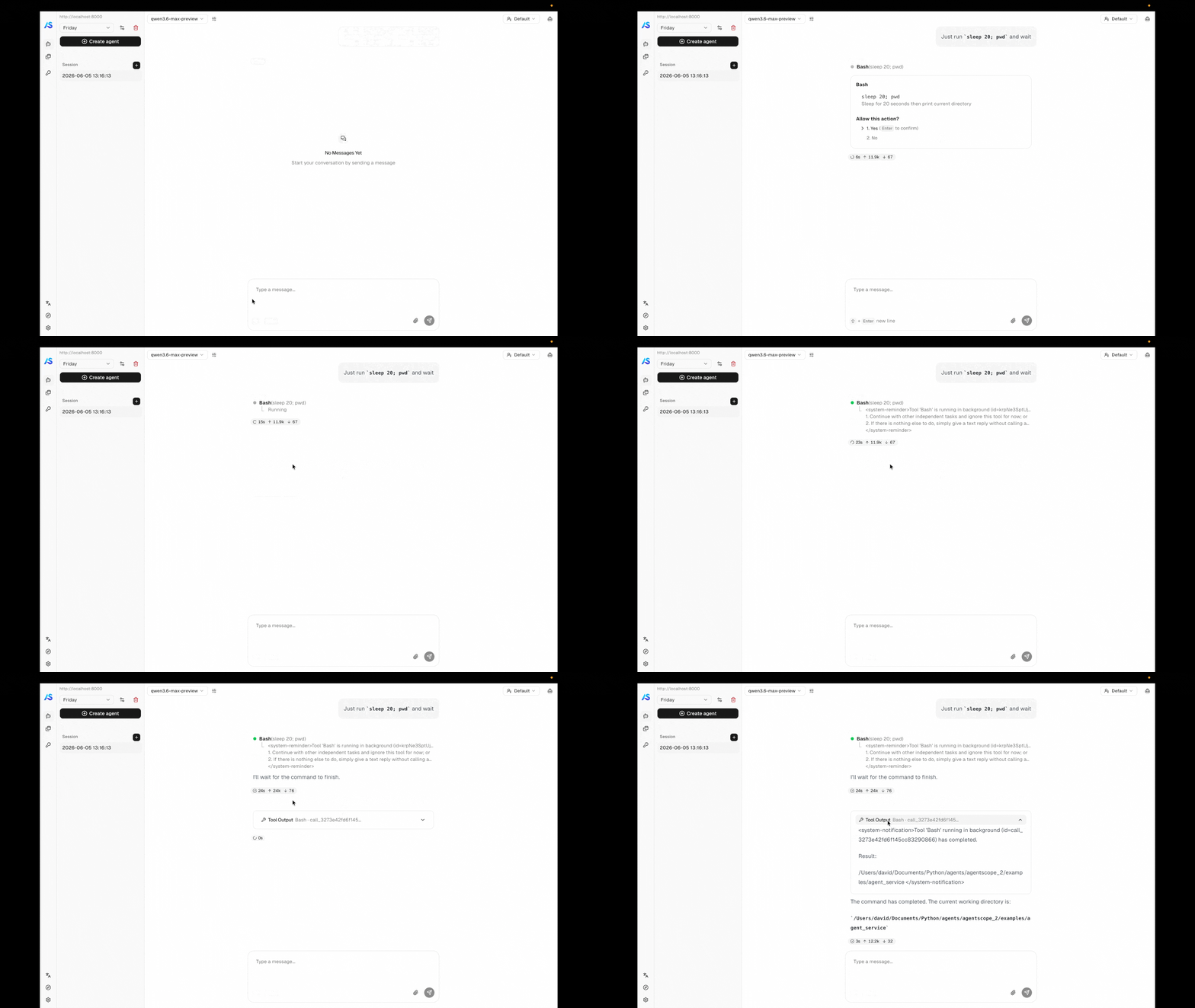
Background tool offloading and wakeup demo
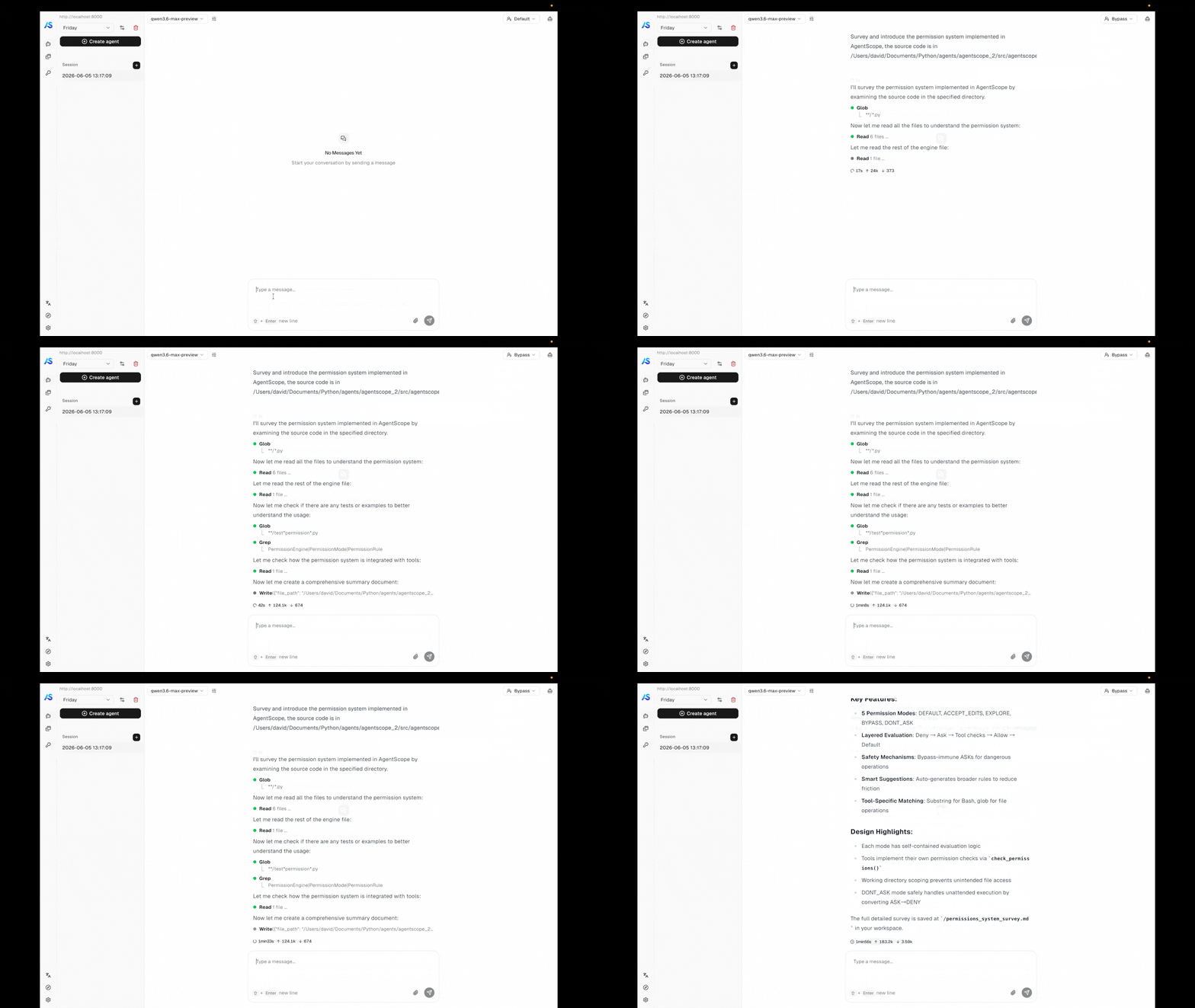
Permission system in bypass mode
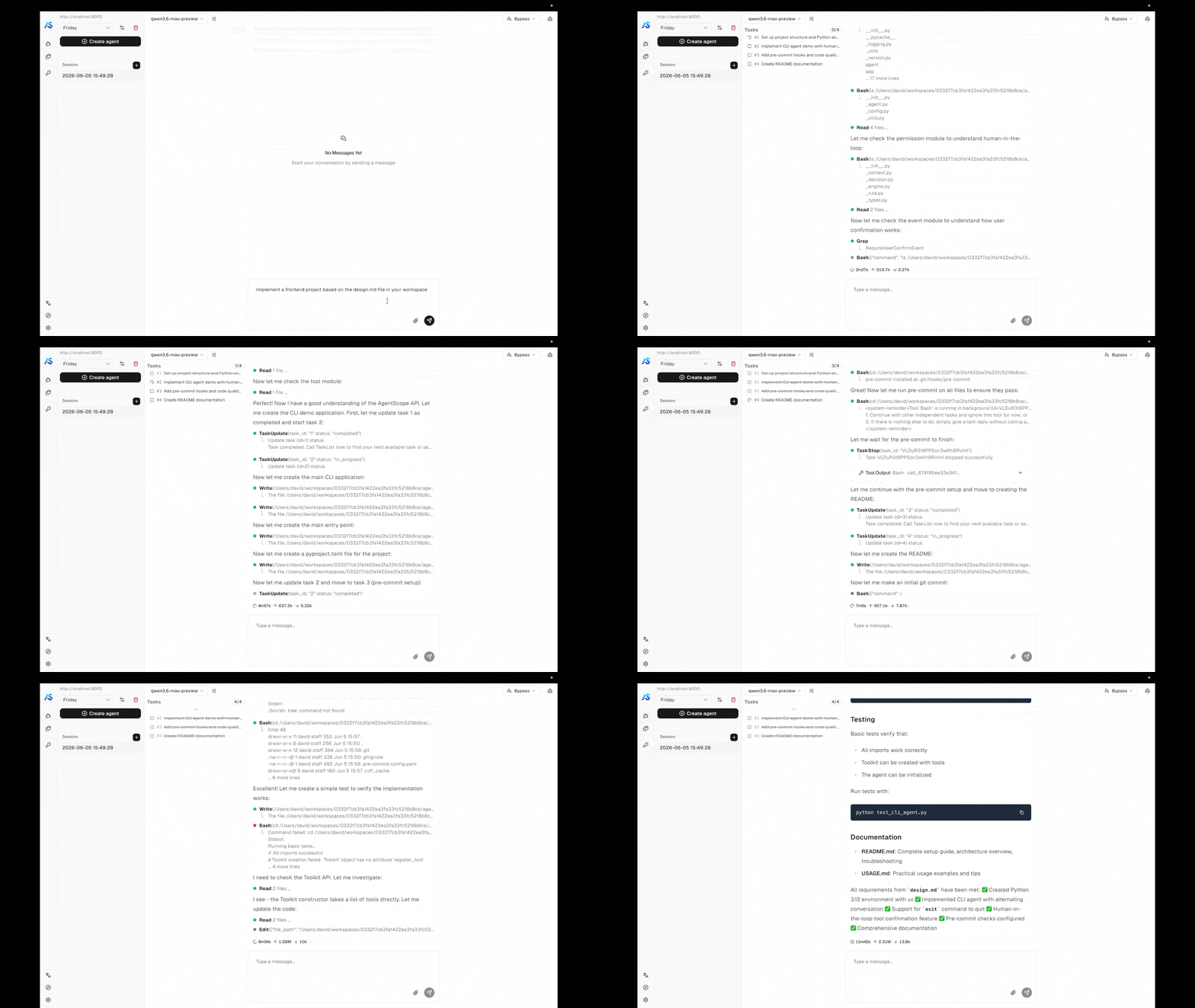
Task planning demo
Agent team coordination demo
1

Clone the repository

git clone https://github.com/agentscope-ai/agentscope.git
cd agentscope
2

Start the example backend

Make sure a local Redis is reachable (the example expects localhost:6379), then launch the service:
cd examples/agent_service
python main.py
The service comes up on http://localhost:8000.
3

Start the example frontend

In another terminal, install and run the web UI:
cd examples/web_ui
pnpm install
pnpm dev
Open the URL the dev server prints (typically http://localhost:5173) and the frontend will connect to the backend you started in step 2.
Once both are running, the same UI lets you exercise every capability the service ships with:
  • Permission control — tools that touch the system pause for confirmation; explore-mode locks the agent to read-only operations.
  • Background task offloading — long-running tool calls move to the background and their results stream in when they finish, without blocking the conversation.
  • Task planning — the agent breaks complex work into a tracked plan and updates it as it goes.
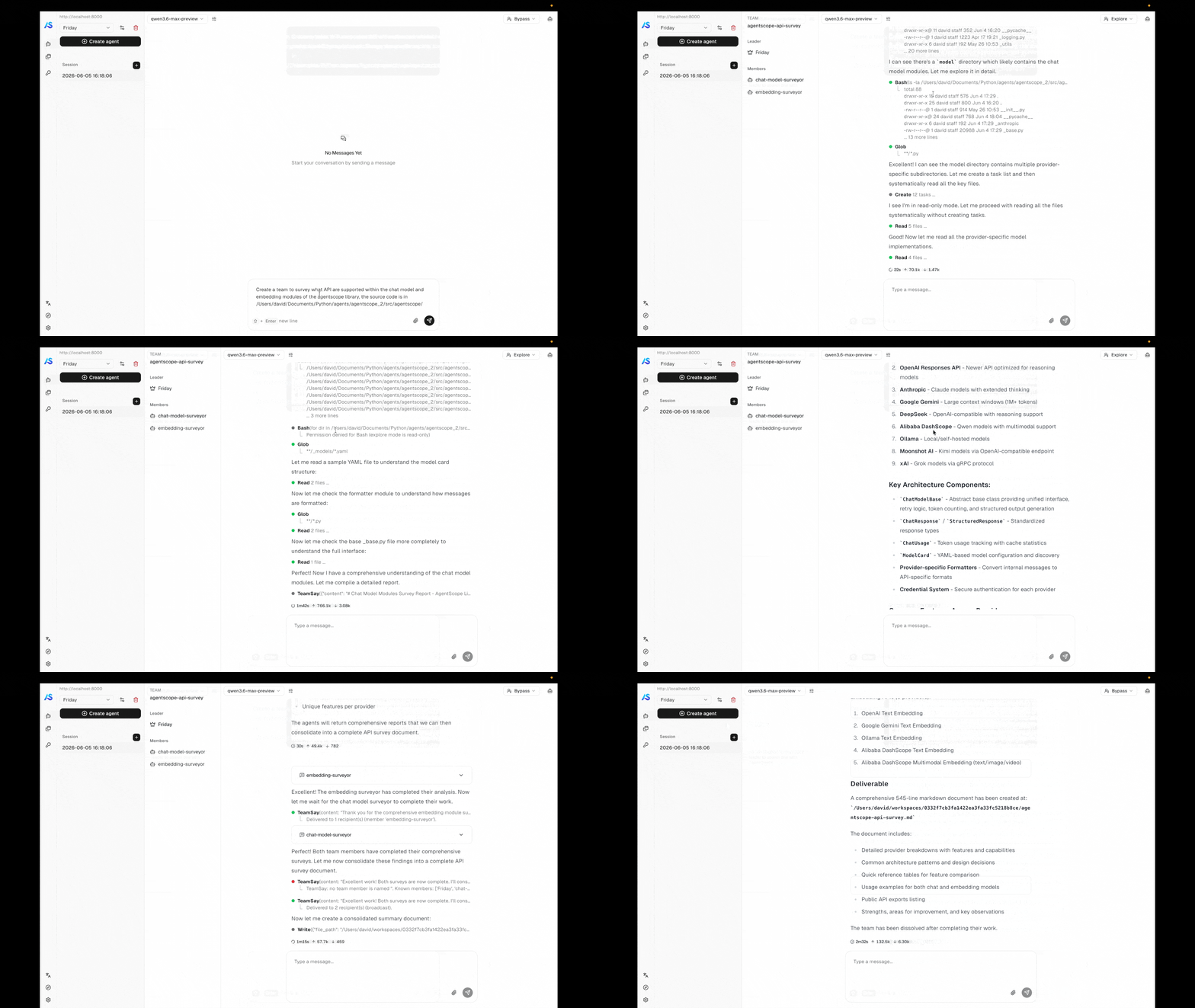
  • Agent teams — a leader agent spawns workers and coordinates them through the team tools.
  • Scheduled runs — cron-driven agents that fire on their own and report back to the same session stream.

From your own code

When you want to embed the service in your own deployment instead of running the example, build the FastAPI app yourself with create_app. The minimum to get a service running is a storage backend, a message bus, and a workspace manager. The examples below boot a service on port 8000 backed by Redis — pick the workspace backend that matches where you want the agent’s tools to execute.
import uvicorn
from agentscope.app import create_app
from agentscope.app.storage import RedisStorage
from agentscope.app.message_bus import RedisMessageBus
from agentscope.app.workspace_manager import LocalWorkspaceManager

# Persistence layer for agents, sessions, credentials, messages, and schedules.
# Its connection pool is opened on app startup and closed on shutdown.
storage = RedisStorage(host="localhost", port=6379)

# Redis-backed message bus: session locks, replay logs, inbox queues, and
# wakeup signals that decouple chat triggering from event delivery and
# let multiple worker processes share one logical service.
message_bus = RedisMessageBus(host="localhost", port=6379)

# Workspace lifecycle — working directory, MCP clients, skills.
# The built-in manager isolates per agent: sessions of the same agent
# share one workspace. Idle workspaces are evicted after `ttl` seconds.
workspace_manager = LocalWorkspaceManager(
    basedir="/data/workspaces",
    ttl=3600.0,
)

app = create_app(
    storage=storage,
    message_bus=message_bus,
    workspace_manager=workspace_manager,
)

uvicorn.run(app, host="0.0.0.0", port=8000)

create_app parameters

storage
StorageBase
required
The storage backend for persisting agents, sessions, credentials, messages, and schedules. Its lifecycle (__aenter__ / __aexit__) is managed by the app lifespan.
message_bus
MessageBus
required
Redis-backed primitives — session locks, replay logs, inbox queues, and wakeup signals — that decouple chat triggering from event delivery. Required because every code path that delivers events to the frontend (POST /chat, scheduled fires, team messages, background-tool completions) goes through it, and because it is what makes multi-process deployments possible.
workspace_manager
WorkspaceManagerBase
required
Manages workspaces (file storage, MCP servers, skills) with TTL-based caching. The built-in LocalWorkspaceManager isolates per agent; see Workspace implementation and isolation for other strategies.
extra_credentials
list[Type[CredentialBase]] | None
default:"None"
Additional credential types to register. Each class is registered with CredentialFactory before the app starts.
extra_middlewares
list[Middleware] | None
default:"None"
Additional ASGI middlewares (e.g., protocol adapters, CORS, auth).
extra_agent_middlewares
AgentMiddlewareFactory | None
default:"None"
Async factory (user_id, agent_id, session_id) -> Awaitable[list[MiddlewareBase]] invoked once per agent assembly (per chat turn or scheduled trigger). Returned middlewares are appended to the framework-supplied ones (e.g., ToolOffloadMiddleware) before the agent runs, so the factory can produce per-user / per-session middlewares such as audit logging, tenant isolation, or custom auth.
extra_agent_tools
AgentToolFactory | None
default:"None"
Async factory (user_id, agent_id, session_id) -> Awaitable[list[ToolBase]] invoked once per agent assembly. Returned tools are merged into the toolkit’s "basic" group alongside the workspace-derived tools, so tool availability can vary per caller (per-tenant integrations, user-specific credentials).
sub_agent_templates
list[SubAgentTemplate] | None
default:"None"
Reusable blueprints for sub-agent creation within teams. Each template defines a sub-agent type (e.g. "researcher", "coder") with pre-configured system prompt, permission context, and task context. When registered, the AgentCreate tool exposes a subagent_type parameter so the leader agent can route to the appropriate template. See Custom sub-agent types for details.
title
str
default:"AgentScope"
OpenAPI title shown in the docs UI.
version
str
default:"2.0.0"
API version shown in the docs UI.
The default X-User-ID header provides no authentication. Replace it with a real auth integration before deploying — see User authentication.

Typical operation flow

Once the server is running, drive it through the resources defined in the resource model. The flow below is the path a chat session usually takes — each step is one or two REST calls.
1

Create an agent

Register the agent’s identity — display name, system prompt, and runtime configuration. The same agent can drive many sessions under different models.
POST /agent
2

Create and configure a credential

Discover each provider’s form fields with GET /credential/schemas, then save the API key. One credential can be reused across many sessions and agents.
GET  /credential/schemas
POST /credential
3

Create a session and select a model

Create a session bound to the agent and attach a model configuration — provider, model name, parameters, and the credential to call it with. The session owns the runtime state from here on.
POST /sessions
4

Configure MCPs and skills (optional)

Attach MCP clients and skills to the session’s workspace if the agent needs tools beyond its built-ins. Out of the box, every agent already has access to the workspace’s built-in tools (filesystem, shell, search, …), task-planning tools, schedule and background-task controls, and — when the session is a team leader or member — the team coordination tools described in Agent Team. Anything you pass via extra_agent_tools in create_app is merged in alongside.
POST /workspace/mcp
POST /workspace/skill
5

Start chatting

Fire a chat run by posting a user Msg to /chat. The endpoint returns immediately with {"status": "started", "session_id": "..."} — events are delivered out-of-band on the per-session SSE stream GET /sessions/{id}/stream, which any number of clients can subscribe to and which replays buffered history to late joiners before serving live events.
POST /chat
GET  /sessions/{session_id}/stream
Trigger a run:
curl -X POST http://localhost:8000/chat \
  -H "X-User-ID: alice" \
  -H "Content-Type: application/json" \
  -d '{
    "agent_id": "agent-xxx",
    "session_id": "session-xxx",
    "input": {
      "name": "alice",
      "role": "user",
      "content": [{"type": "text", "text": "Hello"}]
    }
  }'
Subscribe to the session’s event stream in parallel (or before triggering — the stream stays open across runs and broadcasts everything the session produces, including scheduled fires and background-tool completions):
curl -N -H "X-User-ID: alice" \
  "http://localhost:8000/sessions/session-xxx/stream?agent_id=agent-xxx"
For a scheduled run, complete steps 1 and 2, then create a schedule that targets the agent — the scheduler creates the session (stateful or stateless) and triggers the run on the cron expression you provide. No /chat call is needed; the agent runs autonomously when the cron fires.
POST /schedule

Resource Model

Every operation in Agent Service is scoped to a user_id resolved from the request. Below that boundary, the service manages seven resource types — six persisted (left half of the diagram) plus the message bus that ties their runtime behavior together (right half):
ResourceDescription
UserOpaque tenant identifier resolved from the request. The service models no user system of its own; you plug yours in via get_current_user_id.
CredentialConnection configuration for a model provider — an API key plus provider-specific settings. Reusable across many agents and sessions.
AgentDisplay name, system prompt, and runtime configuration (context, ReAct loop). The reusable template — identity belongs to the agent, runtime state belongs to the session.
WorkspaceThe agent’s runtime environment — working directory, MCP clients, skills, offloaded context. How workspaces map to users / agents / sessions is decided by the workspace manager.
SessionOne ongoing exchange between a user and an agent. Carries the agent state (working memory, in-flight reply, permission context), persisted message transcript, and the LLM configuration the session runs under.
ScheduleFires an agent on a cron expression. Each fire runs inside a session — fresh per execution (stateless) or reused so context accumulates (stateful). Schedules persist across restarts.
MessageBusRedis-backed runtime layer — session locks, replay logs, inbox queues, wakeup signals. The single delivery channel for scheduled fires, team messages, and background-tool completions to reach idle sessions; also what makes multi-process operation possible.
The shape to remember: agents are reusable templates, sessions are the unit of runtime state, and the message bus is what brings idle sessions back to life when something external (a schedule, a teammate, a background tool) has something to say.

API Overview

The service exposes the resources from the resource model as REST endpoints, plus the streaming chat endpoint. The table below groups them by category; full request and response shapes are documented in the service’s OpenAPI specification.
CategoryEndpointsDescription
ChatPOST /chatFire a chat run for a session; returns ChatTriggerResponse JSON. Events are delivered out-of-band on the per-session stream.
Session streamGET /sessions/{id}/streamPer-session SSE stream of AgentEvent objects, with buffered replay for late joiners and multi-subscriber fan-out.
SessionsGET/POST/PATCH/DELETE /sessionsCreate and manage chat sessions, including model binding and permission level.
MessagesGET /sessions/{id}/messagesPaginated message transcript for a session.
AgentsGET/POST/PATCH/DELETE /agentManage agent records — display name, system prompt, runtime config.
CredentialsGET/POST/PATCH/DELETE /credentialCRUD for per-provider API keys and connection configs.
Credential schemasGET /credential/schemasDiscover all registered credential types and their JSON parameter schemas for form rendering.
ModelsGET /model?provider=<name>List candidate models for a provider, with their declarative ModelCard (capabilities and parameter schemas).
SchedulesGET/POST/PATCH/DELETE /schedule, GET /schedule/{id}/sessionsManage cron-based agent execution, stateful or stateless.
Workspace MCPsGET/POST /workspace/mcp, DELETE /workspace/mcp/{mcp_name}Manage MCP clients attached to the session’s workspace.
Workspace skillsGET/POST /workspace/skill, DELETE /workspace/skill/{skill_name}Manage skills available in the session’s workspace.

Customization

The service is open at every infrastructure boundary. The sections below describe what is built in and how to plug in your own.

Agent chat protocol

The per-session stream endpoint (GET /sessions/{id}/stream) emits AgentScope’s native AgentEvent stream over SSE. To serve the same agent under a different frontend protocol, install a protocol middleware that intercepts the SSE stream and rewrites each frame. AgentScope ships with AGUIProtocolMiddleware for the AG-UI protocol. Install it via extra_middlewares:
from fastapi.middleware import Middleware
from agentscope.app import create_app, AGUIProtocolMiddleware

app = create_app(
    storage=storage,
    extra_middlewares=[
        Middleware(AGUIProtocolMiddleware),
    ],
)
To add a new protocol, subclass ProtocolMiddlewareBase and implement _convert_to_protocol:
from agentscope.app import ProtocolMiddlewareBase
from agentscope.event import AgentEvent

class MyProtocolMiddleware(ProtocolMiddlewareBase):
    def _convert_to_protocol(self, event: AgentEvent) -> dict:
        # Convert AgentEvent to your protocol's frame format.
        return {"type": event.type, "data": event.model_dump()}
The middleware automatically intercepts StreamingResponse objects from the session stream endpoint, deserializes each SSE frame back into an AgentEvent, calls _convert_to_protocol() to produce the target format, and re-serializes the converted frame.

User authentication

The built-in get_current_user_id dependency extracts the caller identity from the X-User-ID request header — a placeholder, not authentication. Override it with your own dependency to integrate any identity system. JWT bearer token:
from fastapi import Header, HTTPException, status

async def get_current_user_id(
    authorization: str = Header(...),
) -> str:
    try:
        payload = decode_jwt(authorization.removeprefix("Bearer "))
        return payload["sub"]
    except InvalidTokenError:
        raise HTTPException(
            status_code=status.HTTP_401_UNAUTHORIZED,
            detail="Invalid authentication token.",
        )
OAuth2 password flow:
from fastapi import Depends, HTTPException, status
from fastapi.security import OAuth2PasswordBearer

oauth2_scheme = OAuth2PasswordBearer(tokenUrl="token")

async def get_current_user_id(token: str = Depends(oauth2_scheme)) -> str:
    user = await verify_oauth_token(token)
    if user is None:
        raise HTTPException(status_code=status.HTTP_401_UNAUTHORIZED)
    return user.id
Wire your override by replacing the dependency on the FastAPI app:
from agentscope.app.deps import get_current_user_id as default_dependency

app.dependency_overrides[default_dependency] = get_current_user_id
The default X-User-ID header provides no authentication. Always replace it with a secure mechanism before deploying to production.

Workspace implementation and isolation

Two independent axes are configurable:
  • Workspace backend — what runtime environment the agent runs in. Built-in implementations include LocalWorkspace, DockerWorkspace, and E2BWorkspace. New backends implement the workspace interface and can wrap container images, sandboxes, or remote VMs.
  • Isolation strategy — how workspaces map to users, agents, and sessions. The built-in LocalWorkspaceManager keys workspaces by agent_id: all sessions of the same agent share one workspace. To switch to per-user or per-session isolation, subclass WorkspaceManagerBase and override get_workspace with your own keying strategy.
from agentscope.app.workspace_manager import WorkspaceManagerBase
from agentscope.workspace import WorkspaceBase


class PerSessionWorkspaceManager(WorkspaceManagerBase):
    async def get_workspace(
        self,
        user_id: str,
        agent_id: str,
        session_id: str,
        workspace_id: str,
    ) -> WorkspaceBase:
        # Resolve an initialized workspace; key by session_id for per-session isolation.
        ...

    async def create_workspace(
        self,
        user_id: str,
        agent_id: str,
        session_id: str,
    ) -> WorkspaceBase:
        # Allocate a fresh workspace and register it in the cache.
        ...

    async def close(self, workspace_id: str) -> None:
        # Close and evict a single workspace.
        ...

    async def close_all(self) -> None:
        # Close every cached workspace; called on app shutdown.
        ...

API credentials

A new credential type is a pair of classes: a CredentialBase subclass that captures the connection config (and publishes its JSON schema for form rendering), and a ChatModelBase subclass that implements the actual streaming chat protocol against the provider’s API. The credential class is the entry point — it tells the service which chat model class to instantiate.
from agentscope.credential import CredentialBase
from agentscope.model import ChatModelBase

class MyProviderChatModel(ChatModelBase):
    # Implement the streaming chat interface against the provider's API.
    ...

class MyProviderCredential(CredentialBase):
    api_key: str
    endpoint: str = "https://api.my-provider.com"

    @classmethod
    def get_chat_model_class(cls):
        return MyProviderChatModel
Register the credential class with the app — it becomes immediately usable by clients:
app = create_app(
    storage=storage,
    extra_credentials=[MyProviderCredential],
)
The service automatically exposes the credential’s JSON schema under GET /credential/schemas, and GET /model?provider=<name> routes to the chat model class returned by get_chat_model_class().

Provider models

The model list returned by GET /model?provider=<name> is built from ModelCard instances — declarative metadata records that tell the frontend how to display each model and what request parameters are valid. Each chat model exposes its catalog through list_models(), which by default loads ModelCard entries from YAML files in the provider’s model directory; ModelCard.from_yaml() parses each YAML and merges its overrides into the base parameter schema supplied by the chat model’s parameters class. A model card carries the following fields:
FieldDescription
nameProvider-side model identifier.
labelDisplay name shown in the UI.
statusOne of active, deprecated, sunset.
deprecated_atDeprecation timestamp, if any.
input_typesMIME types the model accepts (e.g., text/plain, image/png, video/mp4).
output_typesMIME types the model emits (e.g., text/plain, application/x-thinking).
context_sizeMaximum context window in tokens.
output_sizeMaximum output tokens.
parameter_schemaJSON schema for the request parameters, auto-merged with per-model overrides.
parameters_overridesPer-model deltas applied on top of the base parameter schema.
Example YAML for a multimodal model that accepts text, images, and video and emits text plus thinking traces:
qwen3.6-plus.yaml
name: qwen3.6-plus
label: Qwen3.6-Plus
status: active

input_types:
  - text/plain
  - application/x-thinking
  - image/bmp
  - image/jpeg
  - image/png
  - image/tiff
  - image/webp
  - image/heic
  - video/mp4

output_types:
  - text/plain
  - application/x-thinking

context_size: 1000000
output_size: 65536

parameter_overrides:
  max_tokens: {"maximum": 65536}
To add a new model under an existing provider, drop a YAML file alongside the others in the provider’s model directory — the loader picks it up automatically and the new entry shows up in GET /model?provider=<name>.

Storage backend

The StorageBase abstract class defines the persistence contract for agents, sessions, credentials, messages, and schedules. AgentScope ships with RedisStorage as the built-in implementation:
from agentscope.app.storage import RedisStorage

storage = RedisStorage(
    host="localhost",
    port=6379,
    db=0,
    password="your-password",
)
To use another database, implement the same interface:
from agentscope.app.storage import StorageBase


class PostgresStorage(StorageBase):
    async def __aenter__(self):
        # Open connection pool.
        ...

    async def __aexit__(self, exc_type, exc_val, exc_tb):
        # Close connection pool.
        ...

    # Implement CRUD methods for each record type:
    # agents, sessions, credentials, messages, schedules, teams.
    ...

app = create_app(
    storage=PostgresStorage(dsn="postgresql://..."),
    message_bus=message_bus,
    workspace_manager=workspace_manager,
)
The records the storage layer manages:
RecordDescription
AgentRecordAgent configuration (name, system prompt, context config, react config).
SessionRecordSession state including AgentState, model config, and workspace binding.
CredentialRecordEncrypted model provider API keys.
ScheduleRecordCron schedule definitions with execution history.
TeamRecordTeam identity, leader binding, and worker member list.
MsgPersisted messages per session with pagination support.

Service Internals

For developers who need to extend or embed the actual implementation of Agent Service in AgentScope, this section describes how the FastAPI app is wired together — what runs at startup, which managers hold runtime state, where middlewares sit in the request path, and how routers get hold of those resources.

Lifespan

The lifespan context manager runs once per process. Built with AsyncExitStack, it enters resources in order — storage → message bus → workspace manager → background task manager → scheduler manager → chat service → wakeup dispatcher — and tears them down in reverse on shutdown. If any startup step raises, every previously-entered resource is still cleaned up. The scheduler restores persisted cron jobs on entry so they survive restarts.

Managers

The following resources are bound to the FastAPI app state during the lifespan and shared across all requests:
ResourceResponsibility
MessageBusRedis-backed primitives (session locks + replay log, inbox queues, wakeup signals). The single delivery channel for scheduled fires, team messages, and background-tool completions to reach idle sessions; also what enables multi-process operation.
WakeupDispatcherOne per process. Subscribes to the wakeup signal and, for each enqueued wakeup, drives ChatService.run for the target session.
BackgroundTaskManagerPure asyncio task registry. ToolOffloadMiddleware spawns watcher tasks here; results are pushed back through the message bus (inbox + wakeup), not held in this manager.
SchedulerManagerAPScheduler-backed cron execution. On fire, the trigger pushes a HintBlock to the target session’s inbox and enqueues a wakeup — no direct call into ChatService.
WorkspaceManagerWorkspace lifecycle and TTL-based caching; the isolation key (per-agent, per-user, per-session) is decided by the subclass.
ChatServiceSingle entry point for running a session. Loads records, assembles the toolkit, builds middlewares, takes the bus session lock, and drives the agent’s reply stream.

Middlewares

Two distinct middleware layers operate at different scopes. ASGI middlewares wrap every HTTP request. The two categories used in practice are protocol middlewares (e.g., AGUIProtocolMiddleware), which intercept SSE responses from the session stream endpoint and rewrite each frame into the target protocol, and observability middlewares (e.g., OpenTelemetry tracing). Both install via extra_middlewares. Agent-level middlewares wrap each call to the agent inside ChatService. They are exposed under agentscope.app.middleware and the framework always installs three:
  • InboxMiddleware — the sole owner of hint injection. Before each reasoning step it drains the session’s inbox and yields the queued HintBlocks as HintBlockEvents, so scheduled fires, team messages, and offloaded-tool results all flow into the agent’s context through the same path.
  • ToolOffloadMiddleware — when a tool call exceeds its timeout, the call is moved to a background watcher task and a synthetic placeholder is yielded to the agent. When the watcher finishes, the result is pushed back to the session’s inbox plus a wakeup, so the next run picks it up.
  • StateChangeMiddleware — emits CustomEvents when the agent state changes (e.g., tasks_context, permission_context) so the frontend can react without reading raw state snapshots.
To add your own (audit logging, tenant isolation, custom auth, …), pass an extra_agent_middlewares factory to create_app. The factory runs once per agent assembly and its middlewares are appended to the framework-supplied ones.

Dependencies

Routers receive application state through FastAPI’s Depends(). The standard injectables (in agentscope.app.deps) are:
DependencyReturns
get_current_user_idThe caller’s user id — overridable to integrate any auth system.
get_storageThe StorageBase instance bound to the app.
get_message_busThe MessageBus instance bound to the app.
get_workspace_managerThe lifespan-bound WorkspaceManager.
get_background_task_managerThe lifespan-bound BackgroundTaskManager.
get_scheduler_managerThe lifespan-bound SchedulerManager.
get_chat_serviceThe lifespan-bound ChatService.

Further Reading

Agent

Core agent abstraction and the ReAct loop

Message & Event

Event streaming and message reconstruction

Tool

Built-in and custom tools including external execution

Context

Context compression and workspace offloading