> ## Documentation Index
> Fetch the complete documentation index at: https://docs.agentscope.io/llms.txt
> Use this file to discover all available pages before exploring further.
# MCP Hub
> Let users install MCP servers from a registry with their own credentials.
An MCP hub is a catalog of [MCP](/versions/2.0.6dev/en/building-blocks/tool/mcp) servers your users browse and install from inside the app. Register one and nobody has to hand-write an MCP configuration, or wait for a redeploy when the catalog grows.
Installing does not equip an agent. It adds the server to the user's own pool of installed MCP servers, and equipping an agent is a separate step:
The user picks a server, fills in whatever it asks for, and it joins their pool. Every hub feeds the same pool, so what came from which registry stops mattering once it is installed.
In a chat, the user picks from the pool to add the server to that agent's [workspace](/versions/2.0.6dev/en/deploy/workspace-manager). Its tools reach the agent immediately.
Splitting the two is what makes credentials a one-time cost. An API key is entered once at install time, and equipping that server in ten different workspaces never asks for it again. The pool belongs to the user, so it also outlives any single chat.
## Available MCP Hubs
AgentScope ships one MCP hub today, and any other catalog can be wrapped with a [custom hub](#custom-mcp-hub):
| Class | Registry | Description |
| -------------- | --------------------------------------------- | ------------------------------------------------------------------------------------------ |
| `GitHubMCPHub` | [GitHub MCP Registry](https://github.com/mcp) | GitHub's public registry of MCP servers. Works anonymously; a token raises the rate limit. |
| *Coming soon* | — | More registries are being built. |
`GitHubMCPHub` works with no arguments, and every field below has a default:
```python Configure GitHubMCPHub theme={null}
from agentscope.app.hub import GitHubMCPHub
hub = GitHubMCPHub(
# Addresses this hub in the API and the frontend URL. Keep it stable.
hub_id="github",
# Shown in the frontend's hub switcher.
display_name="GitHub MCP Registry",
# Optional token. Anonymous requests work, but are rate-limited.
api_token=None,
)
```
| Parameter | Default | Description |
| -------------- | ------------------------------ | ----------------------------------------------------- |
| `hub_id` | `"github"` | The identifier addressing this hub in routes and URLs |
| `display_name` | `"GitHub MCP Registry"` | The name shown in the hub switcher |
| `description` | GitHub's registry blurb | The one-line description under the name |
| `icon_url` | GitHub's avatar | The icon shown beside the name |
| `base_url` | `"https://api.mcp.github.com"` | The registry endpoint |
| `api_token` | `None` | A GitHub token, affecting rate limits only |
| `timeout` | `30.0` | Per-request timeout in seconds |
## Quickstart
MCP hubs are a feature of [Agent Service](/versions/2.0.6dev/en/deploy/agent-service), so you need a running service and a frontend to browse from. Follow the [Agent Service quickstart](/versions/2.0.6dev/en/deploy/agent-service#try-the-bundled-example) to boot the bundled [`examples/agent_service`](https://github.com/agentscope-ai/agentscope/tree/main/examples/agent_service) backend together with the [`examples/web_ui`](https://github.com/agentscope-ai/agentscope/tree/main/examples/web_ui) frontend.
Pass your hubs to `create_app` through `mcp_hubs`. That one argument brings the routes, the store page, and the install flow with it:
```python Register an MCP hub theme={null}
from agentscope.app import create_app
from agentscope.app.hub import GitHubMCPHub
app = create_app(
# ...existing code...
mcp_hubs=[GitHubMCPHub()],
)
```
Register several to give users a choice of catalogs, each with its own `hub_id`:
```python Register several MCP hubs theme={null}
app = create_app(
# ...existing code...
mcp_hubs=[
GitHubMCPHub(),
# A second instance pointed at your own registry.
GitHubMCPHub(
hub_id="internal",
display_name="Internal Registry",
base_url="https://mcp.corp.example.com",
),
],
)
```
Registering two MCP hubs under the same `hub_id` fails at startup rather than silently shadowing one.
Restart the service and open the **MCP** page. The sidebar lists your registered hubs plus **Mine**, the user's own collection. Pick a hub, search, and open a card to see what the server does and what it needs.
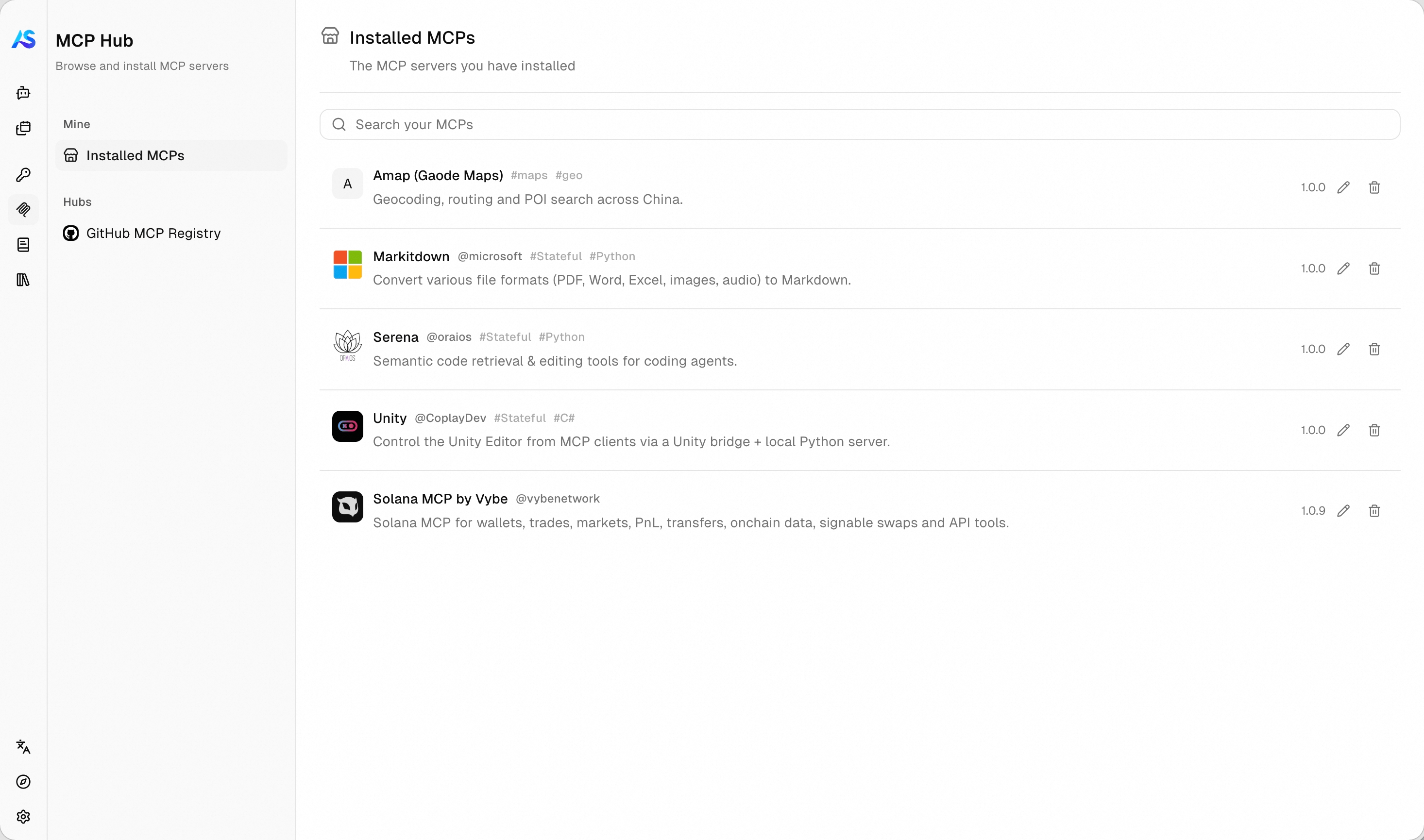
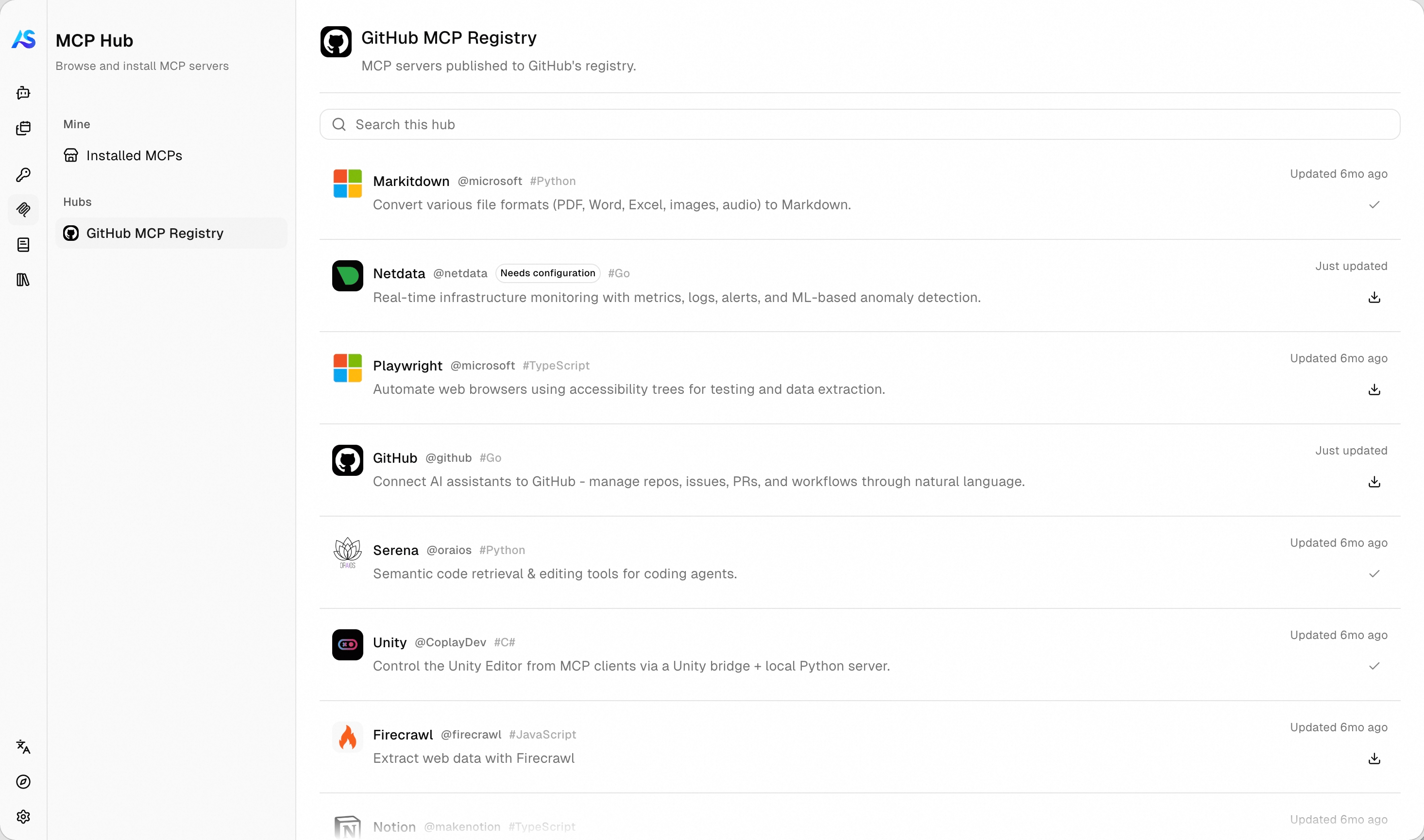 **Install** opens a form built from what the listing declares. On submit, the server is contacted straight away, so wrong credentials come back as an error on the form instead of a broken install. Everything installed shows up under **Installed MCPs**:
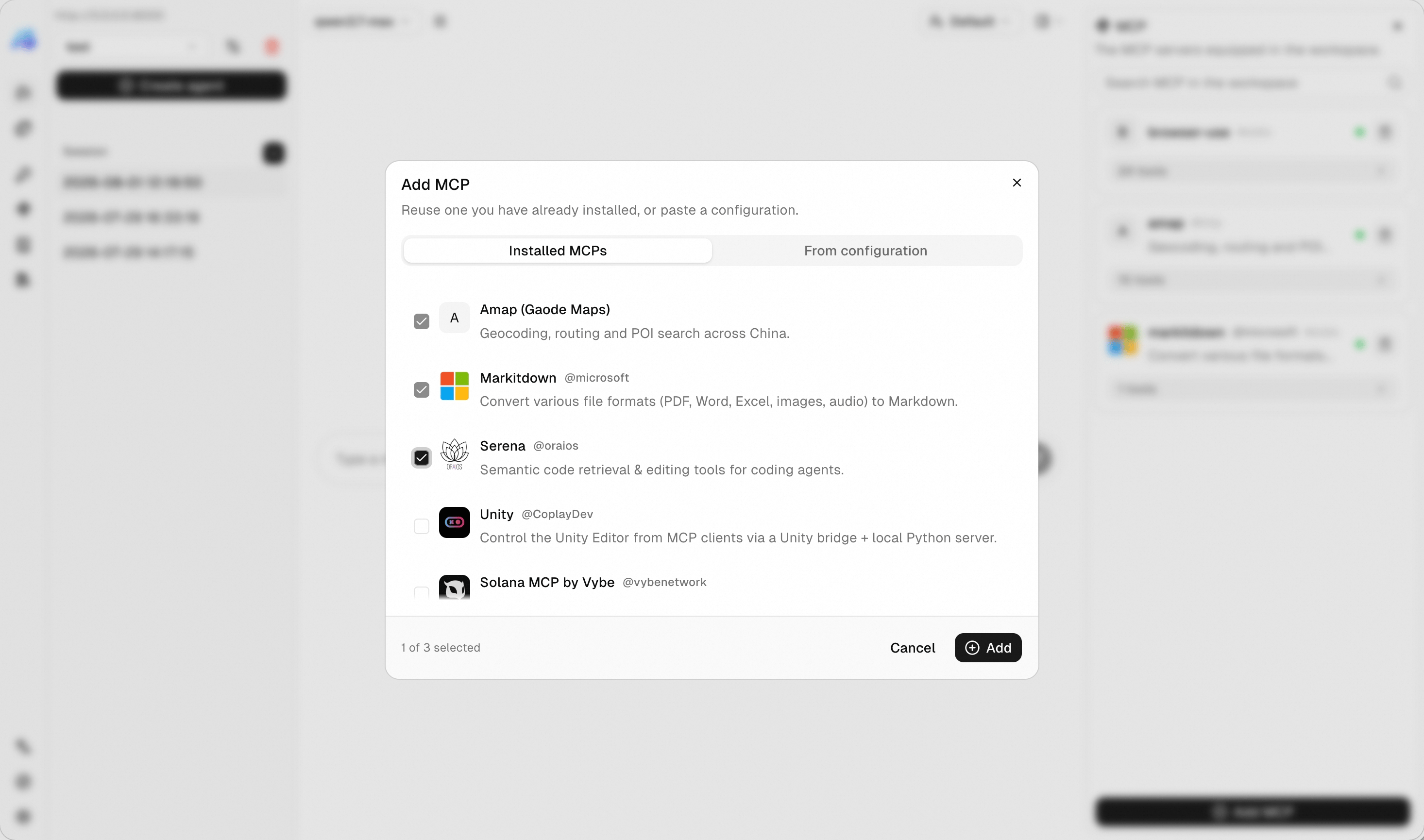
 Open a chat, expand the **MCP** panel, choose **Add**, and pick from **Installed MCPs**. The server's tools reach the agent immediately.
 From **Installed MCPs**, users rename an install, turn it off without losing its configuration, update a rotated key, or delete it. Deleting leaves chats that already use it untouched.
## Custom MCP Hub
Any catalog becomes a hub by subclassing `MCPHubBase`: a public registry, your company's approved list, or a fixed set of servers you want to offer. Two methods are required, one to browse and one to fetch a single listing:
```python A hub over an internal catalog theme={null}
from agentscope.app.hub import MCPCard, MCPHubBase, MCPHubPage
class InternalMCPHub(MCPHubBase):
"""The MCP servers approved for use inside our company."""
def __init__(self) -> None:
super().__init__(
hub_id="internal",
display_name="Internal Registry",
description="MCP servers approved by the platform team.",
)
async def list_mcps(
self,
user_id: str,
# The keyword the user typed, or `None` to browse everything.
q: str | None = None,
# The opaque cursor from the previous page, or `None` to start.
cursor: str | None = None,
limit: int = 20,
) -> MCPHubPage:
"""Return one page of listings."""
page = await fetch_our_catalog(query=q, after=cursor, limit=limit)
return MCPHubPage(
cards=[self._to_card(c) for c in page.items],
# `None` tells the frontend there is nothing more to load.
next_cursor=page.next_cursor,
)
async def get_mcp(self, user_id: str, card_id: str) -> MCPCard:
"""Return one listing, or raise `KeyError` if there is no such card."""
return self._to_card(await fetch_one(card_id))
```
Two more things shape how a hub behaves:
| Point | Description |
| ----------------- | ------------------------------------------------------------------------------------------------------------------------------------ |
| Cursor pagination | Return whatever opaque string lets you resume, and `None` when the catalog is exhausted. The frontend loads more as the user scrolls |
| Missing cards | Raise `KeyError` from `get_mcp` for an unknown id, and the service answers 404 |
### Control Visibility Per User
Both methods receive `user_id` as their first argument, so a catalog does not have to look the same to everybody. Filter on it to run a per-team allowlist, gate paid listings on entitlements from your billing system, or keep an unreleased server visible only to its authors:
```python A catalog that differs per user theme={null}
class InternalMCPHub(MCPHubBase):
async def list_mcps(
self,
user_id: str,
q: str | None = None,
cursor: str | None = None,
limit: int = 20,
) -> MCPHubPage:
"""Return only the listings this user is allowed to see."""
# Whatever your own system says this user may install.
allowed = await our_entitlements(user_id)
page = await fetch_our_catalog(query=q, after=cursor, limit=limit)
return MCPHubPage(
cards=[
self._to_card(c) for c in page.items if c.id in allowed
],
next_cursor=page.next_cursor,
)
async def get_mcp(self, user_id: str, card_id: str) -> MCPCard:
"""Refuse a hidden card, so guessing an id gains nothing."""
if card_id not in await our_entitlements(user_id):
raise KeyError(card_id)
return self._to_card(await fetch_one(card_id))
```
Apply the same filter in `get_mcp` that you apply in `list_mcps`. Hiding a card from the listing alone is not access control: `get_mcp` is reachable with any id the caller cares to guess.
### Declare Required Inputs
A card is a template rather than a ready connection. Write the parts the user supplies as `${placeholder}`, then describe them with a standard [JSON Schema](https://json-schema.org/) so the frontend can render the form:
```python A card that asks for an API key theme={null}
MCPCard(
hub_id=self.hub_id,
id="weather",
name="weather",
display_name="Weather",
description="Current conditions and forecasts.",
config_template=HttpMCPConfig(
url="https://weather.example.com/mcp",
# Placeholders work in any string: URLs, headers, env vars, args.
headers={"Authorization": "Bearer ${api_key}"},
),
inputs_schema={
"type": "object",
"required": ["api_key"],
"properties": {
"api_key": {
"type": "string",
"title": "API key",
"description": "Found under Settings, API in your account.",
# Renders as a masked field, and is never echoed back.
"writeOnly": True,
"format": "password",
},
},
},
)
```
Mark every credential field with `"writeOnly": true` and `"format": "password"`. That is what tells the frontend to mask the value and to leave the field blank when the user edits the install later.
### Reuse One HTTP Client
A hub lives for the whole lifetime of the service, so it can hold a connection pool instead of opening one per request. Implement the async context manager methods and the service enters every hub on startup, closing them on shutdown:
```python Open and close a shared client theme={null}
class InternalMCPHub(MCPHubBase):
async def __aenter__(self) -> "InternalMCPHub":
self._client = httpx.AsyncClient(timeout=30.0)
return self
async def __aexit__(self, *exc: object) -> None:
await self._client.aclose()
```
## Further Reading
The same idea for skills.
How the agent calls an MCP server's tools.
From **Installed MCPs**, users rename an install, turn it off without losing its configuration, update a rotated key, or delete it. Deleting leaves chats that already use it untouched.
## Custom MCP Hub
Any catalog becomes a hub by subclassing `MCPHubBase`: a public registry, your company's approved list, or a fixed set of servers you want to offer. Two methods are required, one to browse and one to fetch a single listing:
```python A hub over an internal catalog theme={null}
from agentscope.app.hub import MCPCard, MCPHubBase, MCPHubPage
class InternalMCPHub(MCPHubBase):
"""The MCP servers approved for use inside our company."""
def __init__(self) -> None:
super().__init__(
hub_id="internal",
display_name="Internal Registry",
description="MCP servers approved by the platform team.",
)
async def list_mcps(
self,
user_id: str,
# The keyword the user typed, or `None` to browse everything.
q: str | None = None,
# The opaque cursor from the previous page, or `None` to start.
cursor: str | None = None,
limit: int = 20,
) -> MCPHubPage:
"""Return one page of listings."""
page = await fetch_our_catalog(query=q, after=cursor, limit=limit)
return MCPHubPage(
cards=[self._to_card(c) for c in page.items],
# `None` tells the frontend there is nothing more to load.
next_cursor=page.next_cursor,
)
async def get_mcp(self, user_id: str, card_id: str) -> MCPCard:
"""Return one listing, or raise `KeyError` if there is no such card."""
return self._to_card(await fetch_one(card_id))
```
Two more things shape how a hub behaves:
| Point | Description |
| ----------------- | ------------------------------------------------------------------------------------------------------------------------------------ |
| Cursor pagination | Return whatever opaque string lets you resume, and `None` when the catalog is exhausted. The frontend loads more as the user scrolls |
| Missing cards | Raise `KeyError` from `get_mcp` for an unknown id, and the service answers 404 |
### Control Visibility Per User
Both methods receive `user_id` as their first argument, so a catalog does not have to look the same to everybody. Filter on it to run a per-team allowlist, gate paid listings on entitlements from your billing system, or keep an unreleased server visible only to its authors:
```python A catalog that differs per user theme={null}
class InternalMCPHub(MCPHubBase):
async def list_mcps(
self,
user_id: str,
q: str | None = None,
cursor: str | None = None,
limit: int = 20,
) -> MCPHubPage:
"""Return only the listings this user is allowed to see."""
# Whatever your own system says this user may install.
allowed = await our_entitlements(user_id)
page = await fetch_our_catalog(query=q, after=cursor, limit=limit)
return MCPHubPage(
cards=[
self._to_card(c) for c in page.items if c.id in allowed
],
next_cursor=page.next_cursor,
)
async def get_mcp(self, user_id: str, card_id: str) -> MCPCard:
"""Refuse a hidden card, so guessing an id gains nothing."""
if card_id not in await our_entitlements(user_id):
raise KeyError(card_id)
return self._to_card(await fetch_one(card_id))
```
Apply the same filter in `get_mcp` that you apply in `list_mcps`. Hiding a card from the listing alone is not access control: `get_mcp` is reachable with any id the caller cares to guess.
### Declare Required Inputs
A card is a template rather than a ready connection. Write the parts the user supplies as `${placeholder}`, then describe them with a standard [JSON Schema](https://json-schema.org/) so the frontend can render the form:
```python A card that asks for an API key theme={null}
MCPCard(
hub_id=self.hub_id,
id="weather",
name="weather",
display_name="Weather",
description="Current conditions and forecasts.",
config_template=HttpMCPConfig(
url="https://weather.example.com/mcp",
# Placeholders work in any string: URLs, headers, env vars, args.
headers={"Authorization": "Bearer ${api_key}"},
),
inputs_schema={
"type": "object",
"required": ["api_key"],
"properties": {
"api_key": {
"type": "string",
"title": "API key",
"description": "Found under Settings, API in your account.",
# Renders as a masked field, and is never echoed back.
"writeOnly": True,
"format": "password",
},
},
},
)
```
Mark every credential field with `"writeOnly": true` and `"format": "password"`. That is what tells the frontend to mask the value and to leave the field blank when the user edits the install later.
### Reuse One HTTP Client
A hub lives for the whole lifetime of the service, so it can hold a connection pool instead of opening one per request. Implement the async context manager methods and the service enters every hub on startup, closing them on shutdown:
```python Open and close a shared client theme={null}
class InternalMCPHub(MCPHubBase):
async def __aenter__(self) -> "InternalMCPHub":
self._client = httpx.AsyncClient(timeout=30.0)
return self
async def __aexit__(self, *exc: object) -> None:
await self._client.aclose()
```
## Further Reading
The same idea for skills.
How the agent calls an MCP server's tools.