> ## Documentation Index
> Fetch the complete documentation index at: https://docs.agentscope.io/llms.txt
> Use this file to discover all available pages before exploring further.
# Agent Team
> Leader agents that spawn and coordinate worker agents through built-in team tools
Agent Team is the multi-agent layer built on top of [Agent Service](/versions/2.0.3/en/deploy/agent-service). A leader agent — the session the user talks to — can spawn worker agents on demand and exchange messages with them, while every member is just another session with its own state, workspace binding, and event stream. The whole coordination story is expressed through four built-in tools rather than a separate orchestration framework.
## Quickstart
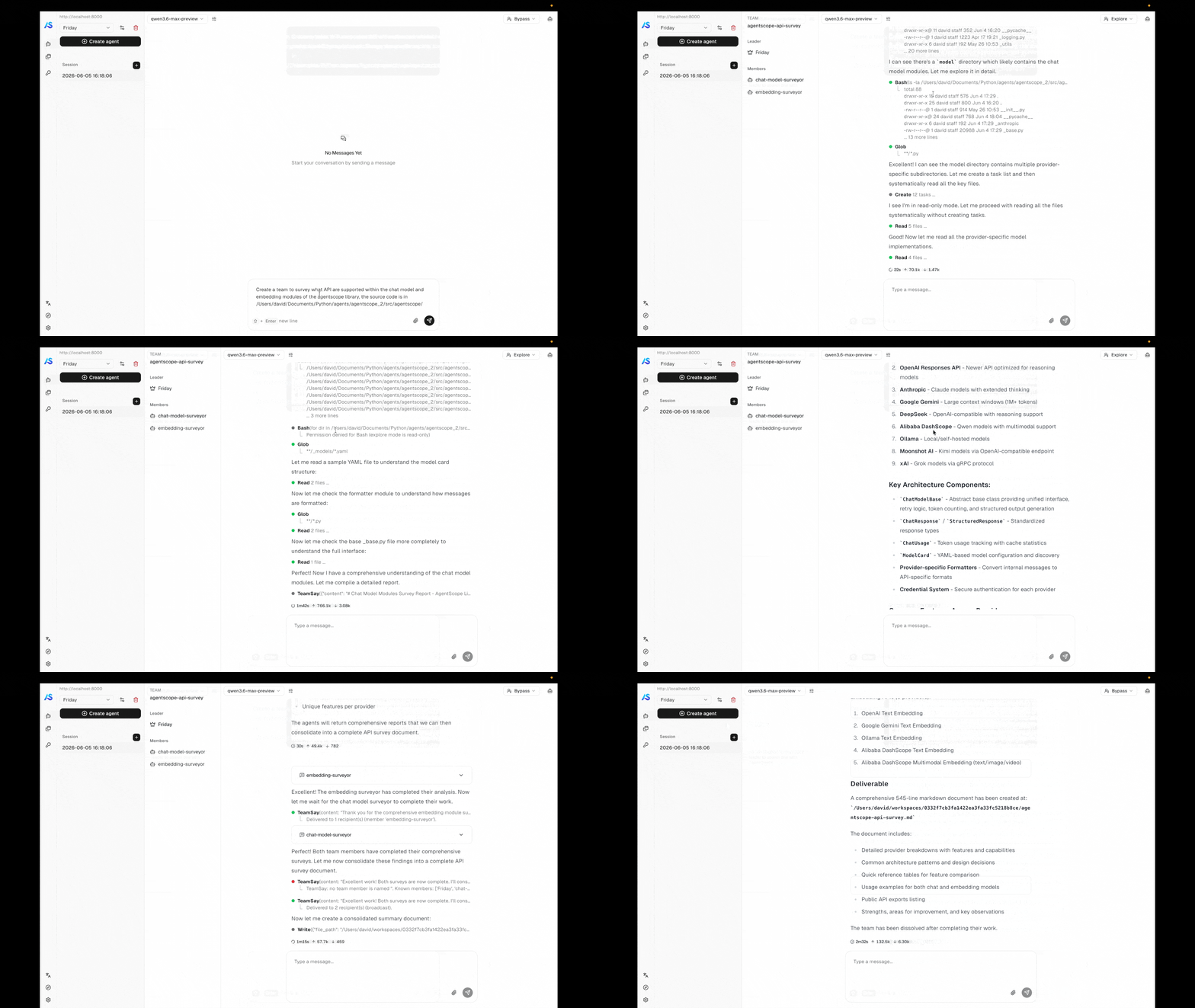
The bundled [`examples/agent_service`](https://github.com/agentscope-ai/agentscope/tree/main/examples/agent_service) backend ships with the team tools enabled, and the matching [`examples/web_ui`](https://github.com/agentscope-ai/agentscope/tree/main/examples/web_ui) frontend renders team membership and per-worker streams out of the box. Follow the [Agent Service quickstart](/versions/2.0.3/en/deploy/agent-service#try-the-bundled-example) to boot both — once they are running, ask the leader agent to assemble a team and you will see it call `TeamCreate` / `AgentCreate` automatically, watch workers come online, and observe them exchange messages in the UI.
 ## Concepts
| Concept | Description |
| ---------------- | ---------------------------------------------------------------------------------------------------------------------------------------------------------------------------------------------------- |
| **Team** | A persistent group of agent members owned by one user. A `TeamRecord` carries the team's identity (name, description) and its member list. |
| **Leader** | The session that created the team. Only the leader can add or remove members or end the team. |
| **Worker** | A session spawned as a team member. Workers run their own ReAct loop in their own session and inherit the leader's chat model + workspace context. |
| **Team message** | A message routed between members through the message bus. Delivered as a `HintBlock` wrapped in a `` tag so the recipient's LLM can disambiguate it from a regular user turn. |
## Usage
### Creating a team
The team feature is built into Agent Service — no extra configuration is required. When a user sends a task that benefits from multi-agent collaboration, the leader agent automatically uses the built-in team tools to assemble and coordinate a team of workers.
Out of the box, the leader agent can:
* **Create a team** with a name and description that frames the collaboration goal.
* **Spawn workers** by giving each a name, role description, and an initial task. Workers begin executing immediately upon creation.
* **Exchange messages** with workers to provide follow-up instructions or collect results.
* **Dissolve the team** when the task is complete, cleaning up all worker sessions.
Every worker runs concurrently in its own session with its own event stream, visible in the frontend UI alongside the leader's conversation. The leader orchestrates work by reading worker outputs and sending messages — all through the same chat interface.
By default, all workers share the same system prompt template and permission settings. To give different worker roles different capabilities — for example, a read-only explorer versus a full-access coder — register custom sub-agent templates as described in the next section.
### Custom sub-agent types
By default every worker spawned by `AgentCreate` uses the same built-in system prompt and permission context. In practice, different roles need different capability boundaries — an agent that only explores the codebase should not be able to modify files, while one that writes code needs full edit access. `SubAgentTemplate` solves this by letting you define reusable blueprints that the leader agent can choose from when creating workers.
#### Registering templates
Pass a list of `SubAgentTemplate` instances to `create_app` via the `sub_agent_templates` parameter:
```python theme={null}
from agentscope.app import create_app, SubAgentTemplate
from agentscope.permission import PermissionContext, PermissionMode
app = create_app(
storage=storage,
message_bus=message_bus,
workspace_manager=workspace_manager,
sub_agent_templates=[
SubAgentTemplate(
type="explorer",
description=(
"Read-only agents specialized in exploration tasks. "
"Use this type when you need to investigate the "
"codebase without making any changes."
),
system_prompt_template="""You are {member_name}, an explorer \
agent in team '{team_name}' led by {leader_name}.
Team purpose: {team_description}
Your role: {member_description}
## Responsibilities
- Complete the exploration tasks assigned by the team leader.
- You are read-only: you may inspect files and the codebase, but \
you must never modify, create, or delete anything.
## Reporting
- Always report the task result back to {leader_name} using the \
TeamSay tool, whether the task succeeds or fails.""",
permission_context=PermissionContext(
mode=PermissionMode.EXPLORE,
),
),
],
)
```
#### Template fields
| Field | Required | Default | Description |
| ------------------------ | -------- | --------------------- | ---------------------------------------------------------------------------------------------------------------------------------- |
| `type` | Yes | — | Template identifier (e.g. `"explorer"`, `"coder"`). Becomes an enum value of the `subagent_type` parameter in `AgentCreate`. |
| `description` | Yes | — | Agent-readable description exposed in the `AgentCreate` tool schema so the leader can choose the appropriate type. |
| `system_prompt_template` | Yes | — | Python format string for the worker's system prompt. See [available placeholders](#system-prompt-placeholders) below. |
| `permission_context` | No | `PermissionContext()` | Permission context applied to the worker. Controls what the worker is allowed to do (e.g. `PermissionMode.EXPLORE` for read-only). |
| `context_config` | No | `ContextConfig()` | Context window configuration for the worker. |
| `react_config` | No | `ReActConfig()` | ReAct loop configuration for the worker. |
| `tasks_context` | No | `TaskContext()` | Pre-defined task context, allowing the template to seed an initial workflow. |
#### System prompt placeholders
The `system_prompt_template` string is formatted with these variables when a worker is created:
| Placeholder | Value |
| ---------------------- | ------------------------------------------------------ |
| `{team_name}` | The team's name as set by `TeamCreate`. |
| `{team_description}` | The team's description as set by `TeamCreate`. |
| `{member_name}` | The worker's name as set by `AgentCreate`. |
| `{member_description}` | The worker's role description as set by `AgentCreate`. |
| `{leader_name}` | The leader agent's display name. |
#### Runtime behavior
* **No custom templates registered** — `AgentCreate` does not expose a `subagent_type` parameter at all. All workers use the built-in default template. This keeps the tool schema clean when templates are not needed.
* **Custom templates registered** — `AgentCreate` automatically gains a `subagent_type` enum field listing all available types (including `"default"`). The leader agent sees each type's description and can choose which one to use.
* **Overriding the default** — registering a template with `type="default"` replaces the built-in default template entirely.
* **Uniqueness** — template type names must be unique. Duplicate types cause a `ValueError` at startup.
## Architecture
### Built-in tools
A leader session is automatically given these tools. Workers see only `TeamSay`.
| Tool | Purpose |
| ------------- | ------------------------------------------------------------------------------------------------------------------------------------------------------ |
| `TeamCreate` | Create a new team rooted at the current session and become its leader. |
| `AgentCreate` | Spawn a new worker into the team with a name, role description, first task, and permission mode. The worker begins executing as soon as it is created. |
| `TeamSay` | Send a message to a named member (or broadcast). The recipient's session receives the message through its inbox and resumes on the next wakeup. |
| `TeamDelete` | Dissolve the team and clean up every member session. Only the leader can call this. |
### Coordination model
Agent Team is designed for distributed deployments by default. All inter-member communication is mediated by the [message bus](/versions/2.0.3/en/deploy/agent-service#resource-model) — a Redis-backed abstraction — so leader and worker sessions can live in different processes or different nodes without any code change. The sender writes to the recipient's inbox; any wakeup dispatcher in the cluster can then claim the wakeup signal and drive that session on its own process. This is the same mechanism that powers scheduled fires and background-tool completions, which is why the team feature scales out the same way the rest of the service does.
Team communication reuses the same inbox + wakeup primitives the service uses for scheduled fires and background-tool completions:
1. The sender's tool call (`TeamSay`, `AgentCreate`'s initial prompt, …) pushes a `HintBlock` onto the recipient session's inbox via the message bus.
2. A wakeup is enqueued for the recipient.
3. The wakeup dispatcher running on any process picks up the wakeup and drives `ChatService.run` for that session.
4. `InboxMiddleware` drains the inbox before the next reasoning step, so the queued team messages land in the recipient's context as `HintBlockEvent`s.
This means workers run *concurrently* on the same service — they are not nested coroutines under the leader. The leader observes a worker's progress by reading its session stream, or by having the worker `TeamSay` back to it.
## See also
The hosting layer that powers teams — sessions, message bus, workspace lifecycle.
The agent abstraction each team member runs.
## Concepts
| Concept | Description |
| ---------------- | ---------------------------------------------------------------------------------------------------------------------------------------------------------------------------------------------------- |
| **Team** | A persistent group of agent members owned by one user. A `TeamRecord` carries the team's identity (name, description) and its member list. |
| **Leader** | The session that created the team. Only the leader can add or remove members or end the team. |
| **Worker** | A session spawned as a team member. Workers run their own ReAct loop in their own session and inherit the leader's chat model + workspace context. |
| **Team message** | A message routed between members through the message bus. Delivered as a `HintBlock` wrapped in a `` tag so the recipient's LLM can disambiguate it from a regular user turn. |
## Usage
### Creating a team
The team feature is built into Agent Service — no extra configuration is required. When a user sends a task that benefits from multi-agent collaboration, the leader agent automatically uses the built-in team tools to assemble and coordinate a team of workers.
Out of the box, the leader agent can:
* **Create a team** with a name and description that frames the collaboration goal.
* **Spawn workers** by giving each a name, role description, and an initial task. Workers begin executing immediately upon creation.
* **Exchange messages** with workers to provide follow-up instructions or collect results.
* **Dissolve the team** when the task is complete, cleaning up all worker sessions.
Every worker runs concurrently in its own session with its own event stream, visible in the frontend UI alongside the leader's conversation. The leader orchestrates work by reading worker outputs and sending messages — all through the same chat interface.
By default, all workers share the same system prompt template and permission settings. To give different worker roles different capabilities — for example, a read-only explorer versus a full-access coder — register custom sub-agent templates as described in the next section.
### Custom sub-agent types
By default every worker spawned by `AgentCreate` uses the same built-in system prompt and permission context. In practice, different roles need different capability boundaries — an agent that only explores the codebase should not be able to modify files, while one that writes code needs full edit access. `SubAgentTemplate` solves this by letting you define reusable blueprints that the leader agent can choose from when creating workers.
#### Registering templates
Pass a list of `SubAgentTemplate` instances to `create_app` via the `sub_agent_templates` parameter:
```python theme={null}
from agentscope.app import create_app, SubAgentTemplate
from agentscope.permission import PermissionContext, PermissionMode
app = create_app(
storage=storage,
message_bus=message_bus,
workspace_manager=workspace_manager,
sub_agent_templates=[
SubAgentTemplate(
type="explorer",
description=(
"Read-only agents specialized in exploration tasks. "
"Use this type when you need to investigate the "
"codebase without making any changes."
),
system_prompt_template="""You are {member_name}, an explorer \
agent in team '{team_name}' led by {leader_name}.
Team purpose: {team_description}
Your role: {member_description}
## Responsibilities
- Complete the exploration tasks assigned by the team leader.
- You are read-only: you may inspect files and the codebase, but \
you must never modify, create, or delete anything.
## Reporting
- Always report the task result back to {leader_name} using the \
TeamSay tool, whether the task succeeds or fails.""",
permission_context=PermissionContext(
mode=PermissionMode.EXPLORE,
),
),
],
)
```
#### Template fields
| Field | Required | Default | Description |
| ------------------------ | -------- | --------------------- | ---------------------------------------------------------------------------------------------------------------------------------- |
| `type` | Yes | — | Template identifier (e.g. `"explorer"`, `"coder"`). Becomes an enum value of the `subagent_type` parameter in `AgentCreate`. |
| `description` | Yes | — | Agent-readable description exposed in the `AgentCreate` tool schema so the leader can choose the appropriate type. |
| `system_prompt_template` | Yes | — | Python format string for the worker's system prompt. See [available placeholders](#system-prompt-placeholders) below. |
| `permission_context` | No | `PermissionContext()` | Permission context applied to the worker. Controls what the worker is allowed to do (e.g. `PermissionMode.EXPLORE` for read-only). |
| `context_config` | No | `ContextConfig()` | Context window configuration for the worker. |
| `react_config` | No | `ReActConfig()` | ReAct loop configuration for the worker. |
| `tasks_context` | No | `TaskContext()` | Pre-defined task context, allowing the template to seed an initial workflow. |
#### System prompt placeholders
The `system_prompt_template` string is formatted with these variables when a worker is created:
| Placeholder | Value |
| ---------------------- | ------------------------------------------------------ |
| `{team_name}` | The team's name as set by `TeamCreate`. |
| `{team_description}` | The team's description as set by `TeamCreate`. |
| `{member_name}` | The worker's name as set by `AgentCreate`. |
| `{member_description}` | The worker's role description as set by `AgentCreate`. |
| `{leader_name}` | The leader agent's display name. |
#### Runtime behavior
* **No custom templates registered** — `AgentCreate` does not expose a `subagent_type` parameter at all. All workers use the built-in default template. This keeps the tool schema clean when templates are not needed.
* **Custom templates registered** — `AgentCreate` automatically gains a `subagent_type` enum field listing all available types (including `"default"`). The leader agent sees each type's description and can choose which one to use.
* **Overriding the default** — registering a template with `type="default"` replaces the built-in default template entirely.
* **Uniqueness** — template type names must be unique. Duplicate types cause a `ValueError` at startup.
## Architecture
### Built-in tools
A leader session is automatically given these tools. Workers see only `TeamSay`.
| Tool | Purpose |
| ------------- | ------------------------------------------------------------------------------------------------------------------------------------------------------ |
| `TeamCreate` | Create a new team rooted at the current session and become its leader. |
| `AgentCreate` | Spawn a new worker into the team with a name, role description, first task, and permission mode. The worker begins executing as soon as it is created. |
| `TeamSay` | Send a message to a named member (or broadcast). The recipient's session receives the message through its inbox and resumes on the next wakeup. |
| `TeamDelete` | Dissolve the team and clean up every member session. Only the leader can call this. |
### Coordination model
Agent Team is designed for distributed deployments by default. All inter-member communication is mediated by the [message bus](/versions/2.0.3/en/deploy/agent-service#resource-model) — a Redis-backed abstraction — so leader and worker sessions can live in different processes or different nodes without any code change. The sender writes to the recipient's inbox; any wakeup dispatcher in the cluster can then claim the wakeup signal and drive that session on its own process. This is the same mechanism that powers scheduled fires and background-tool completions, which is why the team feature scales out the same way the rest of the service does.
Team communication reuses the same inbox + wakeup primitives the service uses for scheduled fires and background-tool completions:
1. The sender's tool call (`TeamSay`, `AgentCreate`'s initial prompt, …) pushes a `HintBlock` onto the recipient session's inbox via the message bus.
2. A wakeup is enqueued for the recipient.
3. The wakeup dispatcher running on any process picks up the wakeup and drives `ChatService.run` for that session.
4. `InboxMiddleware` drains the inbox before the next reasoning step, so the queued team messages land in the recipient's context as `HintBlockEvent`s.
This means workers run *concurrently* on the same service — they are not nested coroutines under the leader. The leader observes a worker's progress by reading its session stream, or by having the worker `TeamSay` back to it.
## See also
The hosting layer that powers teams — sessions, message bus, workspace lifecycle.
The agent abstraction each team member runs.