> ## Documentation Index
> Fetch the complete documentation index at: https://docs.agentscope.io/llms.txt
> Use this file to discover all available pages before exploring further.
# Architecture
> Host your agent as a multi-tenant, multi-session HTTP service
Agent Service is the FastAPI-based hosting layer that turns AgentScope agents into a **multi-tenant, multi-session HTTP service**. It owns everything *around* the agent — request routing, per-user resource lifecycle, session state, persistence, scheduling, and tool offloading — so that the agent code you wrote against [`Agent`](/versions/2.0.3/en/building-blocks/agent) can serve production traffic without being rewritten.
What sets it apart:
* **Production backbone for live agents** — agent runs, background tasks, schedules, and the tool/MCP/skill/workspace lifecycle are managed end-to-end, with session streams that fan out to multiple subscribers and replay buffered history on reconnect.
* **Schema-driven frontend** — credentials publish JSON schemas and models expose declarative cards (input/output types, context size, parameter schemas), so the UI can render forms and capability badges without coupling to provider-specific code.
* **Multi-tenant by construction** — credentials, agents, sessions, schedules, and messages are all owned by the request's `user_id`, and ownership is enforced at the routing layer — one deployment serves many users with no per-tenant code paths.
* **Modular and extensible** — authentication, chat protocols, workspace isolation strategy, storage backend, and the set of model providers and credential types are all open at the boundary, swappable without touching framework code.
### Capabilities
| Capability | Description |
| ------------------------------------------------------------------ | --------------------------------------------------------------------------------------------------------------------------------------------------------- |
| Agent teams | A leader agent spawns worker agents and coordinates them through built-in team tools; see the [Agent Team](/versions/2.0.3/en/deploy/agent-team) chapter. |
| Workspace management | Pluggable workspace isolation (built-in: per-agent; extensible to per-session or per-user) for the agent's filesystem, MCP clients, and skills. |
| Background task offloading | Long-running tool calls move to background; their results are delivered back through the session's event stream when they finish. |
| Cron scheduling | Time-based agent execution with stateful or stateless sessions; schedules persist across restarts. |
| Session replay | Late-joining clients to the per-session SSE stream receive buffered history before live events, so multiple tabs or a reconnecting frontend stay in sync. |
| Protocol adaptation | Middleware-based conversion to external protocols (AG-UI, A2A, etc.) on top of AgentScope's native event stream. |
| Distributed deployment WIP | All shared state lives in Redis (storage + message bus), so multiple worker processes — or multiple nodes — can serve one logical service. |
The service does **not** include a built-in user authentication system. It provides a placeholder `X-User-ID` header dependency that you replace with your own auth middleware (JWT, OAuth, session tokens, etc.).
## Quickstart
The fastest way to see Agent Service in action is to run the bundled example backend together with the example frontend — both ship inside the AgentScope repo.
### Try the bundled example
The [`examples/agent_service`](https://github.com/agentscope-ai/agentscope/tree/main/examples/agent_service) directory boots a ready-to-use service, and [`examples/web_ui`](https://github.com/agentscope-ai/agentscope/tree/main/examples/web_ui) is a matching React frontend that talks to it. Together they give you a working playground for every capability above in a few minutes.
 ```bash theme={null}
git clone https://github.com/agentscope-ai/agentscope.git
cd agentscope
```
Make sure a local Redis is reachable (the example expects `localhost:6379`), then launch the service:
```bash theme={null}
cd examples/agent_service
python main.py
```
The service comes up on `http://localhost:8000`.
In another terminal, install and run the web UI:
```bash theme={null}
cd examples/web_ui
pnpm install
pnpm dev
```
Open the URL the dev server prints (typically `http://localhost:5173`) and the frontend will connect to the backend you started in step 2.
Once both are running, the same UI lets you exercise every capability the service ships with:
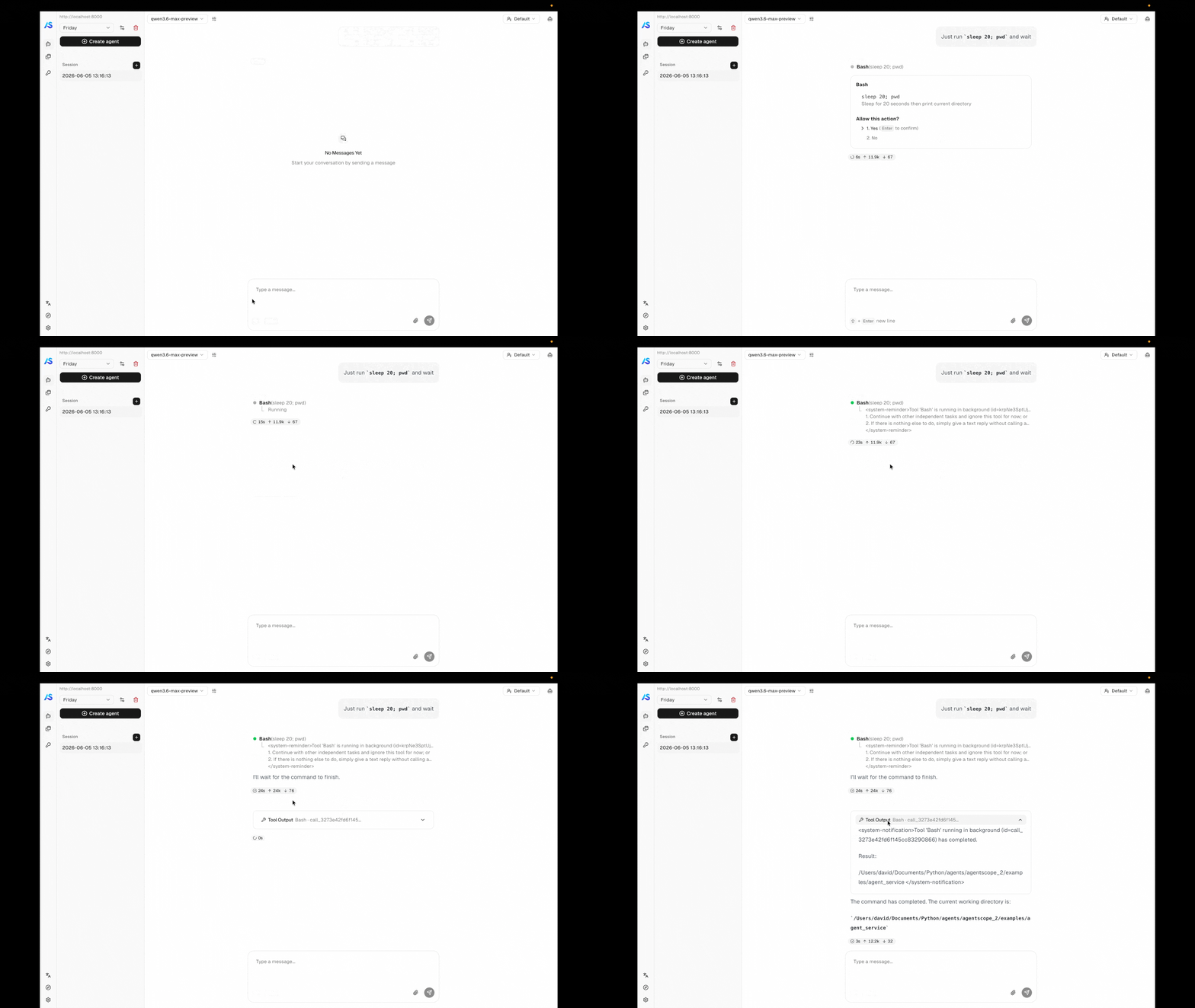
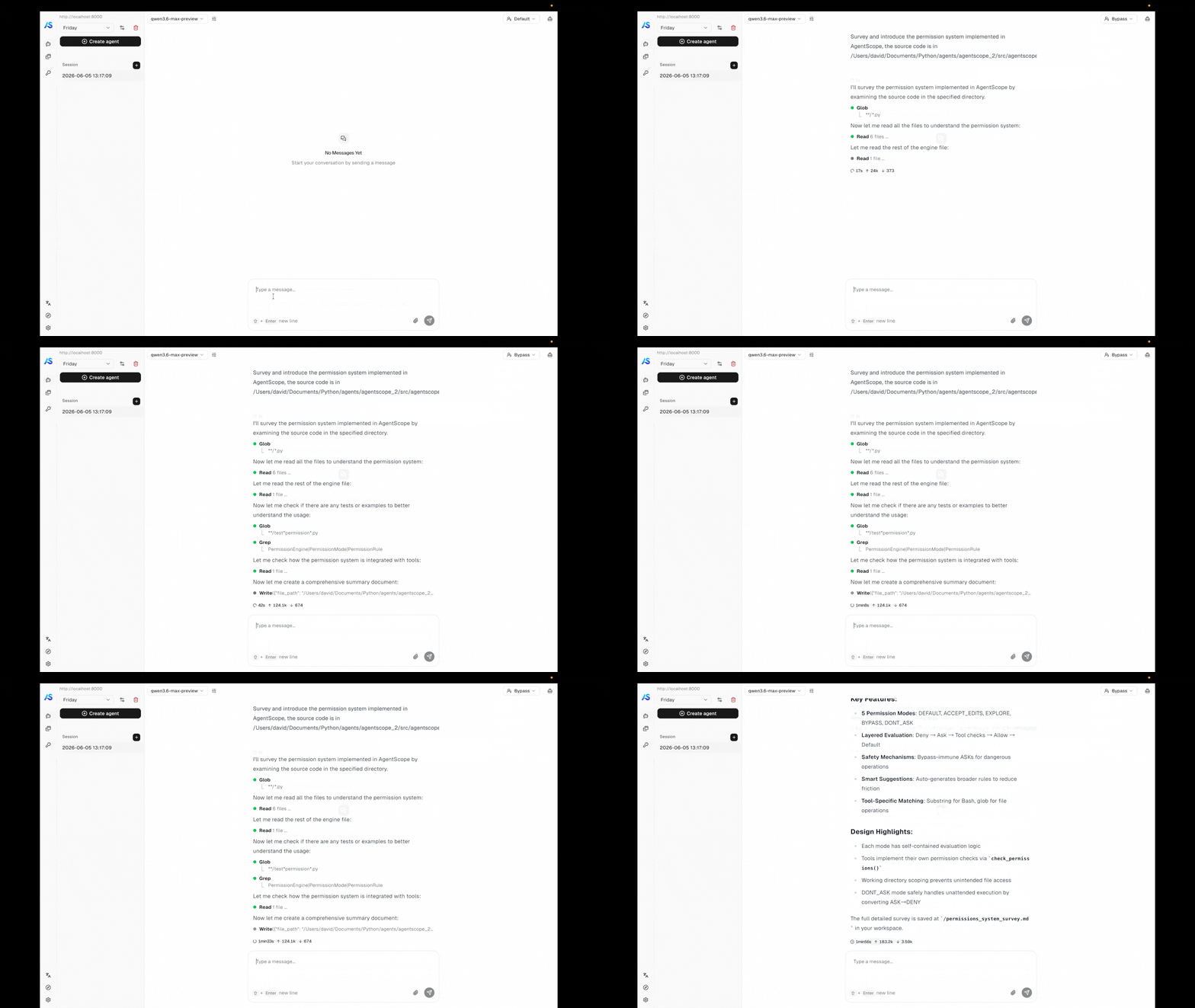
* **Permission control** — tools that touch the system pause for confirmation; explore-mode locks the agent to read-only operations.
* **Background task offloading** — long-running tool calls move to the background and their results stream in when they finish, without blocking the conversation.
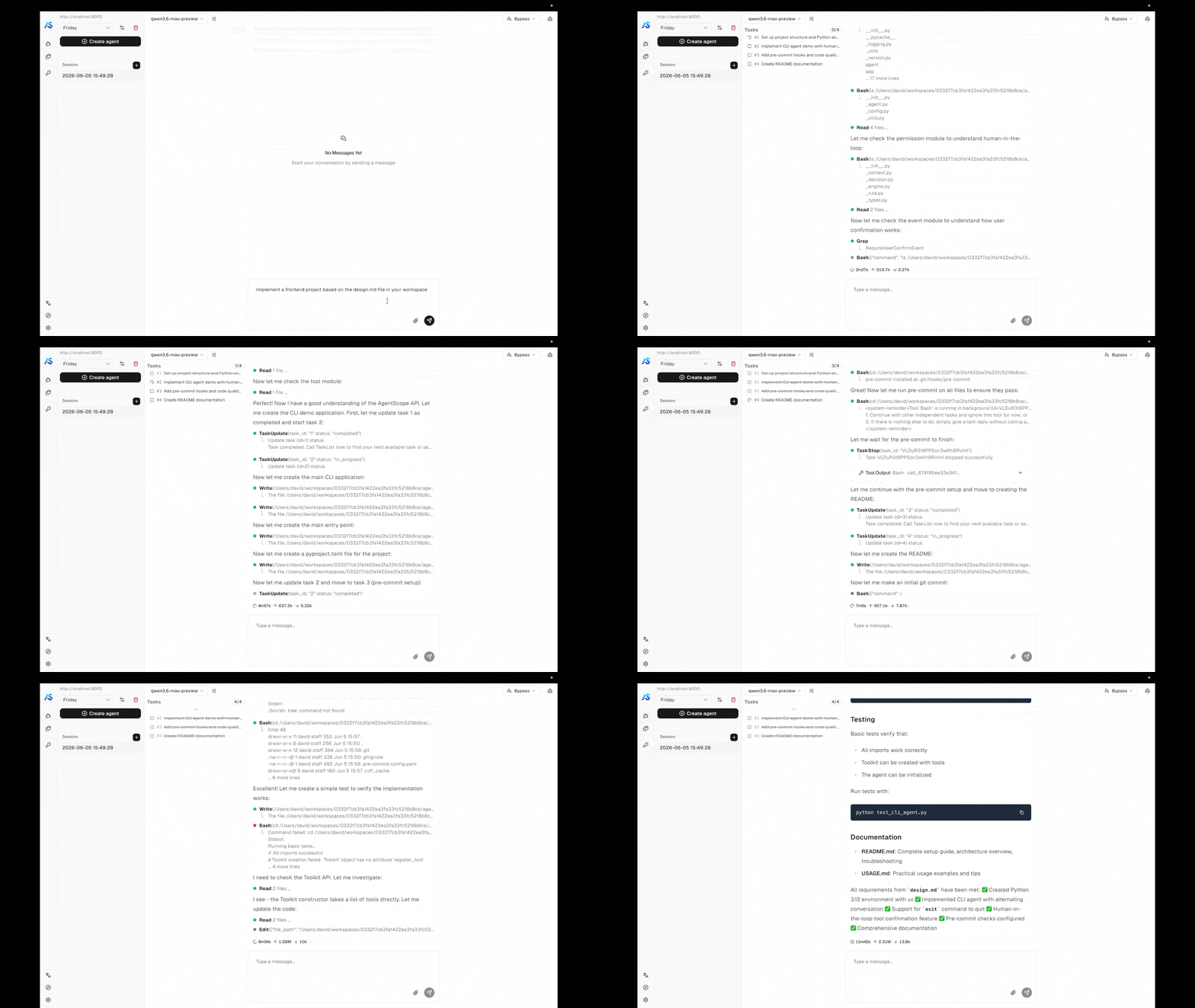
* **Task planning** — the agent breaks complex work into a tracked plan and updates it as it goes.
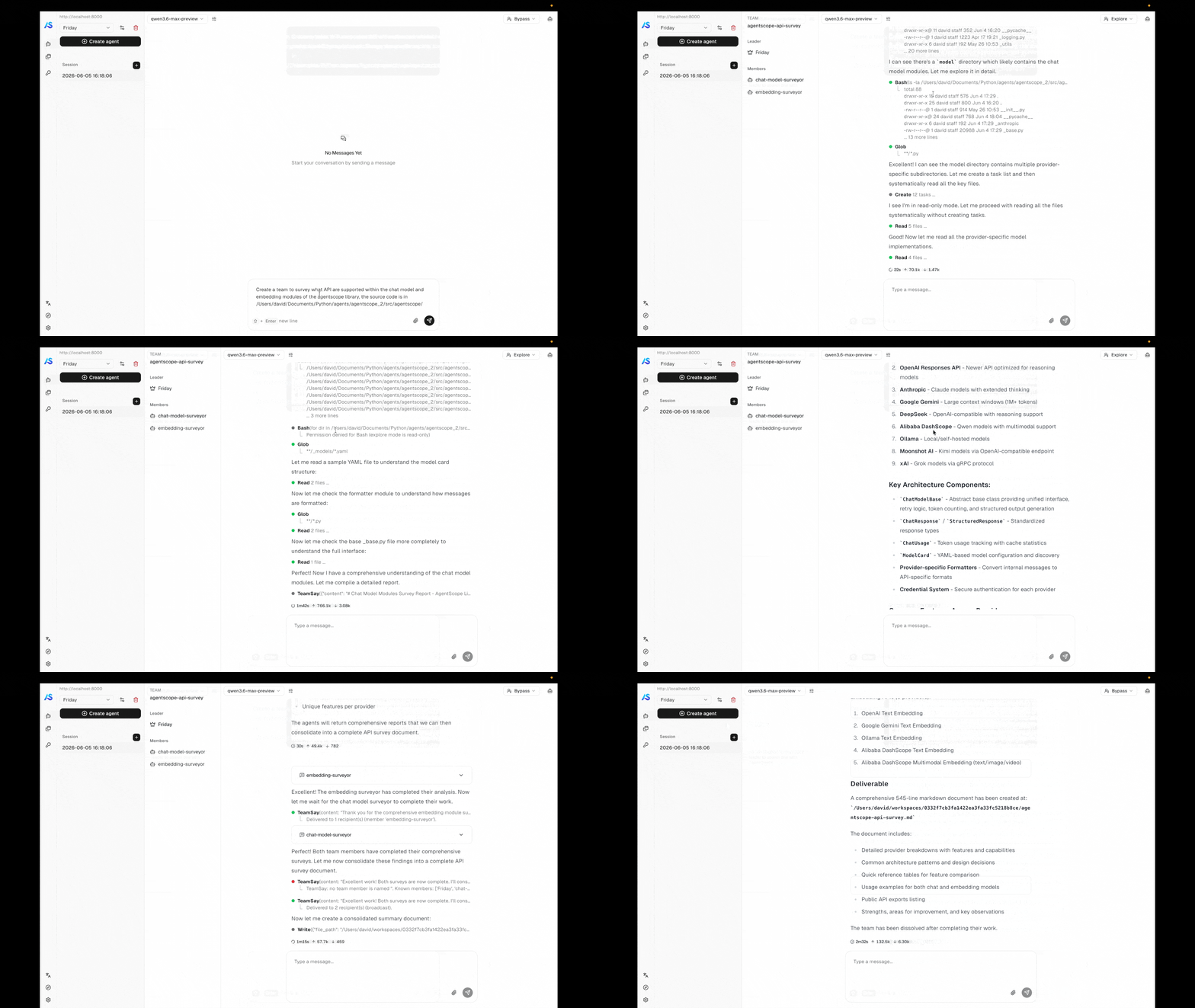
* **Agent teams** — a leader agent spawns workers and coordinates them through the team tools.
* **Scheduled runs** — cron-driven agents that fire on their own and report back to the same session stream.
### From your own code
When you want to embed the service in your own deployment instead of running the example, build the FastAPI app yourself with `create_app`. The minimum to get a service running is a storage backend, a message bus, and a workspace manager. The examples below boot a service on port 8000 backed by Redis — pick the workspace backend that matches where you want the agent's tools to execute.
```python Local filesystem theme={null}
import uvicorn
from agentscope.app import create_app
from agentscope.app.storage import RedisStorage
from agentscope.app.message_bus import RedisMessageBus
from agentscope.app.workspace_manager import LocalWorkspaceManager
# Persistence layer for agents, sessions, credentials, messages, and schedules.
# Its connection pool is opened on app startup and closed on shutdown.
storage = RedisStorage(host="localhost", port=6379)
# Redis-backed message bus: session locks, replay logs, inbox queues, and
# wakeup signals that decouple chat triggering from event delivery and
# let multiple worker processes share one logical service.
message_bus = RedisMessageBus(host="localhost", port=6379)
# Workspace lifecycle — working directory, MCP clients, skills.
# The built-in manager isolates per agent: sessions of the same agent
# share one workspace. Idle workspaces are evicted after `ttl` seconds.
workspace_manager = LocalWorkspaceManager(
basedir="/data/workspaces",
ttl=3600.0,
)
app = create_app(
storage=storage,
message_bus=message_bus,
workspace_manager=workspace_manager,
)
uvicorn.run(app, host="0.0.0.0", port=8000)
```
```python Docker sandbox theme={null}
import uvicorn
from agentscope.app import create_app
from agentscope.app.storage import RedisStorage
from agentscope.app.message_bus import RedisMessageBus
from agentscope.app.workspace_manager import DockerWorkspaceManager
storage = RedisStorage(host="localhost", port=6379)
message_bus = RedisMessageBus(host="localhost", port=6379)
# Each workspace runs inside its own local Docker container for isolation.
# Per-user/per-agent host workdirs live under `basedir` and are bind-mounted
# into each container.
workspace_manager = DockerWorkspaceManager(basedir="/data/docker-workspaces")
app = create_app(
storage=storage,
message_bus=message_bus,
workspace_manager=workspace_manager,
)
uvicorn.run(app, host="0.0.0.0", port=8000)
```
```python E2B theme={null}
import uvicorn
from agentscope.app import create_app
from agentscope.app.storage import RedisStorage
from agentscope.app.message_bus import RedisMessageBus
from agentscope.app.workspace_manager import E2BWorkspaceManager
storage = RedisStorage(host="localhost", port=6379)
message_bus = RedisMessageBus(host="localhost", port=6379)
# Each workspace runs inside a remote E2B cloud sandbox.
# Provide `api_key` here or set the `E2B_API_KEY` environment variable.
workspace_manager = E2BWorkspaceManager()
app = create_app(
storage=storage,
message_bus=message_bus,
workspace_manager=workspace_manager,
)
uvicorn.run(app, host="0.0.0.0", port=8000)
```
### create\_app parameters
The storage backend for persisting agents, sessions, credentials, messages, and schedules. Its lifecycle (`__aenter__` / `__aexit__`) is managed by the app lifespan.
Redis-backed primitives — session locks, replay logs, inbox queues, and wakeup signals — that decouple chat triggering from event delivery. Required because every code path that delivers events to the frontend (`POST /chat`, scheduled fires, team messages, background-tool completions) goes through it, and because it is what makes multi-process deployments possible.
Manages workspaces (file storage, MCP servers, skills) with TTL-based caching. The built-in `LocalWorkspaceManager` isolates per agent; see [Workspace implementation and isolation](#workspace-implementation-and-isolation) for other strategies.
Additional credential types to register. Each class is registered with `CredentialFactory` before the app starts.
Additional ASGI middlewares (e.g., protocol adapters, CORS, auth).
Async factory `(user_id, agent_id, session_id) -> Awaitable[list[MiddlewareBase]]` invoked once per agent assembly (per chat turn or scheduled trigger). Returned middlewares are appended to the framework-supplied ones (e.g., `ToolOffloadMiddleware`) before the agent runs, so the factory can produce per-user / per-session middlewares such as audit logging, tenant isolation, or custom auth.
Async factory `(user_id, agent_id, session_id) -> Awaitable[list[ToolBase]]` invoked once per agent assembly. Returned tools are merged into the toolkit's `"basic"` group alongside the workspace-derived tools, so tool availability can vary per caller (per-tenant integrations, user-specific credentials).
Reusable blueprints for sub-agent creation within teams. Each template defines a sub-agent *type* (e.g. `"researcher"`, `"coder"`) with pre-configured system prompt, permission context, and task context. When registered, the `AgentCreate` tool exposes a `subagent_type` parameter so the leader agent can route to the appropriate template. See [Custom sub-agent types](/versions/2.0.3/en/deploy/agent-team#custom-sub-agent-types) for details.
OpenAPI title shown in the docs UI.
API version shown in the docs UI.
The default `X-User-ID` header provides no authentication. Replace it with a real auth integration before deploying — see [User authentication](#user-authentication).
### Typical operation flow
Once the server is running, drive it through the resources defined in the resource model. The flow below is the path a chat session usually takes — each step is one or two REST calls.
Register the agent's identity — display name, system prompt, and runtime configuration. The same agent can drive many sessions under different models.
```http theme={null}
POST /agent
```
Discover each provider's form fields with `GET /credential/schemas`, then save the API key. One credential can be reused across many sessions and agents.
```http theme={null}
GET /credential/schemas
POST /credential
```
Create a session bound to the agent and attach a model configuration — provider, model name, parameters, and the credential to call it with. The session owns the runtime state from here on.
```http theme={null}
POST /sessions
```
Attach MCP clients and skills to the session's workspace if the agent needs tools beyond its built-ins. Out of the box, every agent already has access to the workspace's built-in tools (filesystem, shell, search, …), task-planning tools, schedule and background-task controls, and — when the session is a team leader or member — the team coordination tools described in [Agent Team](/versions/2.0.3/en/deploy/agent-team). Anything you pass via `extra_agent_tools` in `create_app` is merged in alongside.
```http theme={null}
POST /workspace/mcp
POST /workspace/skill
```
Fire a chat run by posting a user `Msg` to `/chat`. The endpoint returns immediately with `{"status": "started", "session_id": "..."}` — events are delivered out-of-band on the per-session SSE stream `GET /sessions/{id}/stream`, which any number of clients can subscribe to and which replays buffered history to late joiners before serving live events.
```http theme={null}
POST /chat
GET /sessions/{session_id}/stream
```
Trigger a run:
```bash theme={null}
curl -X POST http://localhost:8000/chat \
-H "X-User-ID: alice" \
-H "Content-Type: application/json" \
-d '{
"agent_id": "agent-xxx",
"session_id": "session-xxx",
"input": {
"name": "alice",
"role": "user",
"content": [{"type": "text", "text": "Hello"}]
}
}'
```
Subscribe to the session's event stream in parallel (or before triggering — the stream stays open across runs and broadcasts everything the session produces, including scheduled fires and background-tool completions):
```bash theme={null}
curl -N -H "X-User-ID: alice" \
"http://localhost:8000/sessions/session-xxx/stream?agent_id=agent-xxx"
```
For a **scheduled run**, complete steps 1 and 2, then create a schedule that targets the agent — the scheduler creates the session (stateful or stateless) and triggers the run on the cron expression you provide. No `/chat` call is needed; the agent runs autonomously when the cron fires.
```http theme={null}
POST /schedule
```
## Resource Model
Every operation in Agent Service is scoped to a `user_id` resolved from the request. Below that boundary, the service manages seven resource types — six persisted (left half of the diagram) plus the message bus that ties their runtime behavior together (right half):
```mermaid theme={null}
flowchart TB
User([User])
User --> Cred[Credential]
User --> Agent[Agent]
User --> Sched[Schedule]
Agent -- "1 : N" --> Session[Session]
Session -- "references" --> Cred
Session -- "bound to" --> WS[Workspace]
Session -- "owns" --> Msg[Messages]
Sched -- "targets" --> Agent
Sched -- "triggers" --> Session
Bus{{MessageBus}}
Sched -. "inbox + wakeup" .-> Bus
Bus -. "drives runs" .-> Session
Session -. "publishes events" .-> Bus
```
| Resource | Description |
| -------------- | ---------------------------------------------------------------------------------------------------------------------------------------------------------------------------------------------------------------------------------------------------------------- |
| **User** | Opaque tenant identifier resolved from the request. The service models no user system of its own; you plug yours in via `get_current_user_id`. |
| **Credential** | Connection configuration for a model provider — an API key plus provider-specific settings. Reusable across many agents and sessions. |
| **Agent** | Display name, system prompt, and runtime configuration (context, ReAct loop). The reusable template — identity belongs to the agent, runtime state belongs to the session. |
| **Workspace** | The agent's runtime environment — working directory, MCP clients, skills, offloaded context. How workspaces map to users / agents / sessions is decided by the workspace manager. |
| **Session** | One ongoing exchange between a user and an agent. Carries the agent state (working memory, in-flight reply, permission context), persisted message transcript, and the LLM configuration the session runs under. |
| **Schedule** | Fires an agent on a cron expression. Each fire runs inside a session — fresh per execution (stateless) or reused so context accumulates (stateful). Schedules persist across restarts. |
| **MessageBus** | Redis-backed runtime layer — session locks, replay logs, inbox queues, wakeup signals. The single delivery channel for scheduled fires, team messages, and background-tool completions to reach idle sessions; also what makes multi-process operation possible. |
The shape to remember: **agents are reusable templates, sessions are the unit of runtime state**, and the message bus is what brings idle sessions back to life when something external (a schedule, a teammate, a background tool) has something to say.
## API Overview
The service exposes the resources from the resource model as REST endpoints, plus the streaming chat endpoint. The table below groups them by category; full request and response shapes are documented in the service's OpenAPI specification.
| Category | Endpoints | Description |
| ------------------ | ------------------------------------------------------------------- | ------------------------------------------------------------------------------------------------------------------------------ |
| Chat | `POST /chat` | Fire a chat run for a session; returns `ChatTriggerResponse` JSON. Events are delivered out-of-band on the per-session stream. |
| Session stream | `GET /sessions/{id}/stream` | Per-session SSE stream of `AgentEvent` objects, with buffered replay for late joiners and multi-subscriber fan-out. |
| Sessions | `GET/POST/PATCH/DELETE /sessions` | Create and manage chat sessions, including model binding and permission level. |
| Messages | `GET /sessions/{id}/messages` | Paginated message transcript for a session. |
| Agents | `GET/POST/PATCH/DELETE /agent` | Manage agent records — display name, system prompt, runtime config. |
| Credentials | `GET/POST/PATCH/DELETE /credential` | CRUD for per-provider API keys and connection configs. |
| Credential schemas | `GET /credential/schemas` | Discover all registered credential types and their JSON parameter schemas for form rendering. |
| Models | `GET /model?provider=` | List candidate models for a provider, with their declarative `ModelCard` (capabilities and parameter schemas). |
| Schedules | `GET/POST/PATCH/DELETE /schedule`, `GET /schedule/{id}/sessions` | Manage cron-based agent execution, stateful or stateless. |
| Workspace MCPs | `GET/POST /workspace/mcp`, `DELETE /workspace/mcp/{mcp_name}` | Manage MCP clients attached to the session's workspace. |
| Workspace skills | `GET/POST /workspace/skill`, `DELETE /workspace/skill/{skill_name}` | Manage skills available in the session's workspace. |
## Customization
The service is open at every infrastructure boundary. The sections below describe what is built in and how to plug in your own.
### Agent chat protocol
The per-session stream endpoint (`GET /sessions/{id}/stream`) emits AgentScope's native [`AgentEvent`](/versions/2.0.3/en/building-blocks/message-and-event) stream over SSE. To serve the same agent under a different frontend protocol, install a protocol middleware that intercepts the SSE stream and rewrites each frame.
AgentScope ships with `AGUIProtocolMiddleware` for the [AG-UI](https://docs.ag-ui.com/) protocol. Install it via `extra_middlewares`:
```python theme={null}
from fastapi.middleware import Middleware
from agentscope.app import create_app, AGUIProtocolMiddleware
app = create_app(
storage=storage,
extra_middlewares=[
Middleware(AGUIProtocolMiddleware),
],
)
```
To add a new protocol, subclass `ProtocolMiddlewareBase` and implement `_convert_to_protocol`:
```python theme={null}
from agentscope.app import ProtocolMiddlewareBase
from agentscope.event import AgentEvent
class MyProtocolMiddleware(ProtocolMiddlewareBase):
def _convert_to_protocol(self, event: AgentEvent) -> dict:
# Convert AgentEvent to your protocol's frame format.
return {"type": event.type, "data": event.model_dump()}
```
The middleware automatically intercepts `StreamingResponse` objects from the session stream endpoint, deserializes each SSE frame back into an `AgentEvent`, calls `_convert_to_protocol()` to produce the target format, and re-serializes the converted frame.
### User authentication
The built-in `get_current_user_id` dependency extracts the caller identity from the `X-User-ID` request header — a placeholder, not authentication. Override it with your own dependency to integrate any identity system.
JWT bearer token:
```python theme={null}
from fastapi import Header, HTTPException, status
async def get_current_user_id(
authorization: str = Header(...),
) -> str:
try:
payload = decode_jwt(authorization.removeprefix("Bearer "))
return payload["sub"]
except InvalidTokenError:
raise HTTPException(
status_code=status.HTTP_401_UNAUTHORIZED,
detail="Invalid authentication token.",
)
```
OAuth2 password flow:
```python theme={null}
from fastapi import Depends, HTTPException, status
from fastapi.security import OAuth2PasswordBearer
oauth2_scheme = OAuth2PasswordBearer(tokenUrl="token")
async def get_current_user_id(token: str = Depends(oauth2_scheme)) -> str:
user = await verify_oauth_token(token)
if user is None:
raise HTTPException(status_code=status.HTTP_401_UNAUTHORIZED)
return user.id
```
Wire your override by replacing the dependency on the FastAPI app:
```python theme={null}
from agentscope.app.deps import get_current_user_id as default_dependency
app.dependency_overrides[default_dependency] = get_current_user_id
```
The default `X-User-ID` header provides no authentication. Always replace it with a secure mechanism before deploying to production.
### Workspace implementation and isolation
Two independent axes are configurable:
* **Workspace backend** — what runtime environment the agent runs in. Built-in implementations include `LocalWorkspace`, `DockerWorkspace`, and `E2BWorkspace`. New backends implement the workspace interface and can wrap container images, sandboxes, or remote VMs.
* **Isolation strategy** — how workspaces map to users, agents, and sessions. The built-in `LocalWorkspaceManager` keys workspaces by `agent_id`: all sessions of the same agent share one workspace. To switch to per-user or per-session isolation, subclass `WorkspaceManagerBase` and override `get_workspace` with your own keying strategy.
```python theme={null}
from agentscope.app.workspace_manager import WorkspaceManagerBase
from agentscope.workspace import WorkspaceBase
class PerSessionWorkspaceManager(WorkspaceManagerBase):
async def get_workspace(
self,
user_id: str,
agent_id: str,
session_id: str,
workspace_id: str,
) -> WorkspaceBase:
# Resolve an initialized workspace; key by session_id for per-session isolation.
...
async def create_workspace(
self,
user_id: str,
agent_id: str,
session_id: str,
) -> WorkspaceBase:
# Allocate a fresh workspace and register it in the cache.
...
async def close(self, workspace_id: str) -> None:
# Close and evict a single workspace.
...
async def close_all(self) -> None:
# Close every cached workspace; called on app shutdown.
...
```
### API credentials
A new credential type is a pair of classes: a `CredentialBase` subclass that captures the connection config (and publishes its JSON schema for form rendering), and a `ChatModelBase` subclass that implements the actual streaming chat protocol against the provider's API. The credential class is the entry point — it tells the service which chat model class to instantiate.
```python theme={null}
from agentscope.credential import CredentialBase
from agentscope.model import ChatModelBase
class MyProviderChatModel(ChatModelBase):
# Implement the streaming chat interface against the provider's API.
...
class MyProviderCredential(CredentialBase):
api_key: str
endpoint: str = "https://api.my-provider.com"
@classmethod
def get_chat_model_class(cls):
return MyProviderChatModel
```
Register the credential class with the app — it becomes immediately usable by clients:
```python theme={null}
app = create_app(
storage=storage,
extra_credentials=[MyProviderCredential],
)
```
The service automatically exposes the credential's JSON schema under `GET /credential/schemas`, and `GET /model?provider=` routes to the chat model class returned by `get_chat_model_class()`.
### Provider models
The model list returned by `GET /model?provider=` is built from `ModelCard` instances — declarative metadata records that tell the frontend how to display each model and what request parameters are valid. Each chat model exposes its catalog through `list_models()`, which by default loads `ModelCard` entries from YAML files in the provider's model directory; `ModelCard.from_yaml()` parses each YAML and merges its overrides into the base parameter schema supplied by the chat model's parameters class.
A model card carries the following fields:
| Field | Description |
| ---------------------- | ----------------------------------------------------------------------------- |
| `name` | Provider-side model identifier. |
| `label` | Display name shown in the UI. |
| `status` | One of `active`, `deprecated`, `sunset`. |
| `deprecated_at` | Deprecation timestamp, if any. |
| `input_types` | MIME types the model accepts (e.g., `text/plain`, `image/png`, `video/mp4`). |
| `output_types` | MIME types the model emits (e.g., `text/plain`, `application/x-thinking`). |
| `context_size` | Maximum context window in tokens. |
| `output_size` | Maximum output tokens. |
| `parameter_schema` | JSON schema for the request parameters, auto-merged with per-model overrides. |
| `parameters_overrides` | Per-model deltas applied on top of the base parameter schema. |
Example YAML for a multimodal model that accepts text, images, and video and emits text plus thinking traces:
```yaml qwen3.6-plus.yaml theme={null}
name: qwen3.6-plus
label: Qwen3.6-Plus
status: active
input_types:
- text/plain
- application/x-thinking
- image/bmp
- image/jpeg
- image/png
- image/tiff
- image/webp
- image/heic
- video/mp4
output_types:
- text/plain
- application/x-thinking
context_size: 1000000
output_size: 65536
parameter_overrides:
max_tokens: {"maximum": 65536}
```
To add a new model under an existing provider, drop a YAML file alongside the others in the provider's model directory — the loader picks it up automatically and the new entry shows up in `GET /model?provider=`.
### Storage backend
The `StorageBase` abstract class defines the persistence contract for agents, sessions, credentials, messages, and schedules. AgentScope ships with `RedisStorage` as the built-in implementation:
```python theme={null}
from agentscope.app.storage import RedisStorage
storage = RedisStorage(
host="localhost",
port=6379,
db=0,
password="your-password",
)
```
To use another database, implement the same interface:
```python theme={null}
from agentscope.app.storage import StorageBase
class PostgresStorage(StorageBase):
async def __aenter__(self):
# Open connection pool.
...
async def __aexit__(self, exc_type, exc_val, exc_tb):
# Close connection pool.
...
# Implement CRUD methods for each record type:
# agents, sessions, credentials, messages, schedules, teams.
...
app = create_app(
storage=PostgresStorage(dsn="postgresql://..."),
message_bus=message_bus,
workspace_manager=workspace_manager,
)
```
The records the storage layer manages:
| Record | Description |
| ------------------ | -------------------------------------------------------------------------- |
| `AgentRecord` | Agent configuration (name, system prompt, context config, react config). |
| `SessionRecord` | Session state including `AgentState`, model config, and workspace binding. |
| `CredentialRecord` | Encrypted model provider API keys. |
| `ScheduleRecord` | Cron schedule definitions with execution history. |
| `TeamRecord` | Team identity, leader binding, and worker member list. |
| `Msg` | Persisted messages per session with pagination support. |
## Service Internals
For developers who need to extend or embed the actual implementation of Agent Service in AgentScope, this section describes how the FastAPI app is wired together — what runs at startup, which managers hold runtime state, where middlewares sit in the request path, and how routers get hold of those resources.
```mermaid theme={null}
flowchart TB
Client([Client / Frontend])
subgraph FastAPI ["FastAPI Application"]
direction TB
subgraph ASGI ["ASGI Middlewares"]
PM[Protocol Middleware]
OT[OpenTelemetry]
end
Router[API Routers]
subgraph Lifespan ["Lifespan-bound Resources"]
Bus[MessageBus]
BTM[BackgroundTaskManager]
SCH[SchedulerManager]
WM[WorkspaceManager]
WD[WakeupDispatcher]
CS[ChatService]
end
subgraph AgentMW ["Agent-level Middlewares"]
IM[InboxMiddleware]
TOM[ToolOffloadMiddleware]
SCM[StateChangeMiddleware]
end
end
Storage[(Storage)]
Client --> ASGI --> Router
Router -- "Depends()" --> Lifespan
Router --> CS
CS --> Storage
CS --> AgentMW --> Agent([Agent Instance])
SCH -- "inbox_push + enqueue_wakeup" --> Bus
TOM -- "inbox_push + enqueue_wakeup" --> Bus
Bus --> WD
WD --> CS
```
### Lifespan
The lifespan context manager runs once per process. Built with `AsyncExitStack`, it enters resources in order — storage → message bus → workspace manager → background task manager → scheduler manager → chat service → wakeup dispatcher — and tears them down in reverse on shutdown. If any startup step raises, every previously-entered resource is still cleaned up. The scheduler restores persisted cron jobs on entry so they survive restarts.
### Managers
The following resources are bound to the FastAPI app state during the lifespan and shared across all requests:
| Resource | Responsibility |
| ----------------------- | ------------------------------------------------------------------------------------------------------------------------------------------------------------------------------------------------------------------------------------------------------ |
| `MessageBus` | Redis-backed primitives (session locks + replay log, inbox queues, wakeup signals). The single delivery channel for scheduled fires, team messages, and background-tool completions to reach idle sessions; also what enables multi-process operation. |
| `WakeupDispatcher` | One per process. Subscribes to the wakeup signal and, for each enqueued wakeup, drives `ChatService.run` for the target session. |
| `BackgroundTaskManager` | Pure asyncio task registry. `ToolOffloadMiddleware` spawns watcher tasks here; results are pushed back through the message bus (inbox + wakeup), not held in this manager. |
| `SchedulerManager` | APScheduler-backed cron execution. On fire, the trigger pushes a `HintBlock` to the target session's inbox and enqueues a wakeup — no direct call into `ChatService`. |
| `WorkspaceManager` | Workspace lifecycle and TTL-based caching; the isolation key (per-agent, per-user, per-session) is decided by the subclass. |
| `ChatService` | Single entry point for running a session. Loads records, assembles the toolkit, builds middlewares, takes the bus session lock, and drives the agent's reply stream. |
### Middlewares
Two distinct middleware layers operate at different scopes.
**ASGI middlewares** wrap every HTTP request. The two categories used in practice are **protocol middlewares** (e.g., `AGUIProtocolMiddleware`), which intercept SSE responses from the session stream endpoint and rewrite each frame into the target protocol, and **observability middlewares** (e.g., OpenTelemetry tracing). Both install via `extra_middlewares`.
**Agent-level middlewares** wrap each call to the agent inside `ChatService`. They are exposed under `agentscope.app.middleware` and the framework always installs three:
* `InboxMiddleware` — the sole owner of hint injection. Before each reasoning step it drains the session's inbox and yields the queued `HintBlock`s as `HintBlockEvent`s, so scheduled fires, team messages, and offloaded-tool results all flow into the agent's context through the same path.
* `ToolOffloadMiddleware` — when a tool call exceeds its timeout, the call is moved to a background watcher task and a synthetic placeholder is yielded to the agent. When the watcher finishes, the result is pushed back to the session's inbox plus a wakeup, so the next run picks it up.
* `StateChangeMiddleware` — emits `CustomEvent`s when the agent state changes (e.g., `tasks_context`, `permission_context`) so the frontend can react without reading raw state snapshots.
To add your own (audit logging, tenant isolation, custom auth, …), pass an `extra_agent_middlewares` factory to `create_app`. The factory runs once per agent assembly and its middlewares are appended to the framework-supplied ones.
### Dependencies
Routers receive application state through FastAPI's `Depends()`. The standard injectables (in `agentscope.app.deps`) are:
| Dependency | Returns |
| ----------------------------- | ---------------------------------------------------------------- |
| `get_current_user_id` | The caller's user id — overridable to integrate any auth system. |
| `get_storage` | The `StorageBase` instance bound to the app. |
| `get_message_bus` | The `MessageBus` instance bound to the app. |
| `get_workspace_manager` | The lifespan-bound `WorkspaceManager`. |
| `get_background_task_manager` | The lifespan-bound `BackgroundTaskManager`. |
| `get_scheduler_manager` | The lifespan-bound `SchedulerManager`. |
| `get_chat_service` | The lifespan-bound `ChatService`. |
## Further Reading
Core agent abstraction and the ReAct loop
Event streaming and message reconstruction
Built-in and custom tools including external execution
Context compression and workspace offloading
```bash theme={null}
git clone https://github.com/agentscope-ai/agentscope.git
cd agentscope
```
Make sure a local Redis is reachable (the example expects `localhost:6379`), then launch the service:
```bash theme={null}
cd examples/agent_service
python main.py
```
The service comes up on `http://localhost:8000`.
In another terminal, install and run the web UI:
```bash theme={null}
cd examples/web_ui
pnpm install
pnpm dev
```
Open the URL the dev server prints (typically `http://localhost:5173`) and the frontend will connect to the backend you started in step 2.
Once both are running, the same UI lets you exercise every capability the service ships with:
* **Permission control** — tools that touch the system pause for confirmation; explore-mode locks the agent to read-only operations.
* **Background task offloading** — long-running tool calls move to the background and their results stream in when they finish, without blocking the conversation.
* **Task planning** — the agent breaks complex work into a tracked plan and updates it as it goes.
* **Agent teams** — a leader agent spawns workers and coordinates them through the team tools.
* **Scheduled runs** — cron-driven agents that fire on their own and report back to the same session stream.
### From your own code
When you want to embed the service in your own deployment instead of running the example, build the FastAPI app yourself with `create_app`. The minimum to get a service running is a storage backend, a message bus, and a workspace manager. The examples below boot a service on port 8000 backed by Redis — pick the workspace backend that matches where you want the agent's tools to execute.
```python Local filesystem theme={null}
import uvicorn
from agentscope.app import create_app
from agentscope.app.storage import RedisStorage
from agentscope.app.message_bus import RedisMessageBus
from agentscope.app.workspace_manager import LocalWorkspaceManager
# Persistence layer for agents, sessions, credentials, messages, and schedules.
# Its connection pool is opened on app startup and closed on shutdown.
storage = RedisStorage(host="localhost", port=6379)
# Redis-backed message bus: session locks, replay logs, inbox queues, and
# wakeup signals that decouple chat triggering from event delivery and
# let multiple worker processes share one logical service.
message_bus = RedisMessageBus(host="localhost", port=6379)
# Workspace lifecycle — working directory, MCP clients, skills.
# The built-in manager isolates per agent: sessions of the same agent
# share one workspace. Idle workspaces are evicted after `ttl` seconds.
workspace_manager = LocalWorkspaceManager(
basedir="/data/workspaces",
ttl=3600.0,
)
app = create_app(
storage=storage,
message_bus=message_bus,
workspace_manager=workspace_manager,
)
uvicorn.run(app, host="0.0.0.0", port=8000)
```
```python Docker sandbox theme={null}
import uvicorn
from agentscope.app import create_app
from agentscope.app.storage import RedisStorage
from agentscope.app.message_bus import RedisMessageBus
from agentscope.app.workspace_manager import DockerWorkspaceManager
storage = RedisStorage(host="localhost", port=6379)
message_bus = RedisMessageBus(host="localhost", port=6379)
# Each workspace runs inside its own local Docker container for isolation.
# Per-user/per-agent host workdirs live under `basedir` and are bind-mounted
# into each container.
workspace_manager = DockerWorkspaceManager(basedir="/data/docker-workspaces")
app = create_app(
storage=storage,
message_bus=message_bus,
workspace_manager=workspace_manager,
)
uvicorn.run(app, host="0.0.0.0", port=8000)
```
```python E2B theme={null}
import uvicorn
from agentscope.app import create_app
from agentscope.app.storage import RedisStorage
from agentscope.app.message_bus import RedisMessageBus
from agentscope.app.workspace_manager import E2BWorkspaceManager
storage = RedisStorage(host="localhost", port=6379)
message_bus = RedisMessageBus(host="localhost", port=6379)
# Each workspace runs inside a remote E2B cloud sandbox.
# Provide `api_key` here or set the `E2B_API_KEY` environment variable.
workspace_manager = E2BWorkspaceManager()
app = create_app(
storage=storage,
message_bus=message_bus,
workspace_manager=workspace_manager,
)
uvicorn.run(app, host="0.0.0.0", port=8000)
```
### create\_app parameters
The storage backend for persisting agents, sessions, credentials, messages, and schedules. Its lifecycle (`__aenter__` / `__aexit__`) is managed by the app lifespan.
Redis-backed primitives — session locks, replay logs, inbox queues, and wakeup signals — that decouple chat triggering from event delivery. Required because every code path that delivers events to the frontend (`POST /chat`, scheduled fires, team messages, background-tool completions) goes through it, and because it is what makes multi-process deployments possible.
Manages workspaces (file storage, MCP servers, skills) with TTL-based caching. The built-in `LocalWorkspaceManager` isolates per agent; see [Workspace implementation and isolation](#workspace-implementation-and-isolation) for other strategies.
Additional credential types to register. Each class is registered with `CredentialFactory` before the app starts.
Additional ASGI middlewares (e.g., protocol adapters, CORS, auth).
Async factory `(user_id, agent_id, session_id) -> Awaitable[list[MiddlewareBase]]` invoked once per agent assembly (per chat turn or scheduled trigger). Returned middlewares are appended to the framework-supplied ones (e.g., `ToolOffloadMiddleware`) before the agent runs, so the factory can produce per-user / per-session middlewares such as audit logging, tenant isolation, or custom auth.
Async factory `(user_id, agent_id, session_id) -> Awaitable[list[ToolBase]]` invoked once per agent assembly. Returned tools are merged into the toolkit's `"basic"` group alongside the workspace-derived tools, so tool availability can vary per caller (per-tenant integrations, user-specific credentials).
Reusable blueprints for sub-agent creation within teams. Each template defines a sub-agent *type* (e.g. `"researcher"`, `"coder"`) with pre-configured system prompt, permission context, and task context. When registered, the `AgentCreate` tool exposes a `subagent_type` parameter so the leader agent can route to the appropriate template. See [Custom sub-agent types](/versions/2.0.3/en/deploy/agent-team#custom-sub-agent-types) for details.
OpenAPI title shown in the docs UI.
API version shown in the docs UI.
The default `X-User-ID` header provides no authentication. Replace it with a real auth integration before deploying — see [User authentication](#user-authentication).
### Typical operation flow
Once the server is running, drive it through the resources defined in the resource model. The flow below is the path a chat session usually takes — each step is one or two REST calls.
Register the agent's identity — display name, system prompt, and runtime configuration. The same agent can drive many sessions under different models.
```http theme={null}
POST /agent
```
Discover each provider's form fields with `GET /credential/schemas`, then save the API key. One credential can be reused across many sessions and agents.
```http theme={null}
GET /credential/schemas
POST /credential
```
Create a session bound to the agent and attach a model configuration — provider, model name, parameters, and the credential to call it with. The session owns the runtime state from here on.
```http theme={null}
POST /sessions
```
Attach MCP clients and skills to the session's workspace if the agent needs tools beyond its built-ins. Out of the box, every agent already has access to the workspace's built-in tools (filesystem, shell, search, …), task-planning tools, schedule and background-task controls, and — when the session is a team leader or member — the team coordination tools described in [Agent Team](/versions/2.0.3/en/deploy/agent-team). Anything you pass via `extra_agent_tools` in `create_app` is merged in alongside.
```http theme={null}
POST /workspace/mcp
POST /workspace/skill
```
Fire a chat run by posting a user `Msg` to `/chat`. The endpoint returns immediately with `{"status": "started", "session_id": "..."}` — events are delivered out-of-band on the per-session SSE stream `GET /sessions/{id}/stream`, which any number of clients can subscribe to and which replays buffered history to late joiners before serving live events.
```http theme={null}
POST /chat
GET /sessions/{session_id}/stream
```
Trigger a run:
```bash theme={null}
curl -X POST http://localhost:8000/chat \
-H "X-User-ID: alice" \
-H "Content-Type: application/json" \
-d '{
"agent_id": "agent-xxx",
"session_id": "session-xxx",
"input": {
"name": "alice",
"role": "user",
"content": [{"type": "text", "text": "Hello"}]
}
}'
```
Subscribe to the session's event stream in parallel (or before triggering — the stream stays open across runs and broadcasts everything the session produces, including scheduled fires and background-tool completions):
```bash theme={null}
curl -N -H "X-User-ID: alice" \
"http://localhost:8000/sessions/session-xxx/stream?agent_id=agent-xxx"
```
For a **scheduled run**, complete steps 1 and 2, then create a schedule that targets the agent — the scheduler creates the session (stateful or stateless) and triggers the run on the cron expression you provide. No `/chat` call is needed; the agent runs autonomously when the cron fires.
```http theme={null}
POST /schedule
```
## Resource Model
Every operation in Agent Service is scoped to a `user_id` resolved from the request. Below that boundary, the service manages seven resource types — six persisted (left half of the diagram) plus the message bus that ties their runtime behavior together (right half):
```mermaid theme={null}
flowchart TB
User([User])
User --> Cred[Credential]
User --> Agent[Agent]
User --> Sched[Schedule]
Agent -- "1 : N" --> Session[Session]
Session -- "references" --> Cred
Session -- "bound to" --> WS[Workspace]
Session -- "owns" --> Msg[Messages]
Sched -- "targets" --> Agent
Sched -- "triggers" --> Session
Bus{{MessageBus}}
Sched -. "inbox + wakeup" .-> Bus
Bus -. "drives runs" .-> Session
Session -. "publishes events" .-> Bus
```
| Resource | Description |
| -------------- | ---------------------------------------------------------------------------------------------------------------------------------------------------------------------------------------------------------------------------------------------------------------- |
| **User** | Opaque tenant identifier resolved from the request. The service models no user system of its own; you plug yours in via `get_current_user_id`. |
| **Credential** | Connection configuration for a model provider — an API key plus provider-specific settings. Reusable across many agents and sessions. |
| **Agent** | Display name, system prompt, and runtime configuration (context, ReAct loop). The reusable template — identity belongs to the agent, runtime state belongs to the session. |
| **Workspace** | The agent's runtime environment — working directory, MCP clients, skills, offloaded context. How workspaces map to users / agents / sessions is decided by the workspace manager. |
| **Session** | One ongoing exchange between a user and an agent. Carries the agent state (working memory, in-flight reply, permission context), persisted message transcript, and the LLM configuration the session runs under. |
| **Schedule** | Fires an agent on a cron expression. Each fire runs inside a session — fresh per execution (stateless) or reused so context accumulates (stateful). Schedules persist across restarts. |
| **MessageBus** | Redis-backed runtime layer — session locks, replay logs, inbox queues, wakeup signals. The single delivery channel for scheduled fires, team messages, and background-tool completions to reach idle sessions; also what makes multi-process operation possible. |
The shape to remember: **agents are reusable templates, sessions are the unit of runtime state**, and the message bus is what brings idle sessions back to life when something external (a schedule, a teammate, a background tool) has something to say.
## API Overview
The service exposes the resources from the resource model as REST endpoints, plus the streaming chat endpoint. The table below groups them by category; full request and response shapes are documented in the service's OpenAPI specification.
| Category | Endpoints | Description |
| ------------------ | ------------------------------------------------------------------- | ------------------------------------------------------------------------------------------------------------------------------ |
| Chat | `POST /chat` | Fire a chat run for a session; returns `ChatTriggerResponse` JSON. Events are delivered out-of-band on the per-session stream. |
| Session stream | `GET /sessions/{id}/stream` | Per-session SSE stream of `AgentEvent` objects, with buffered replay for late joiners and multi-subscriber fan-out. |
| Sessions | `GET/POST/PATCH/DELETE /sessions` | Create and manage chat sessions, including model binding and permission level. |
| Messages | `GET /sessions/{id}/messages` | Paginated message transcript for a session. |
| Agents | `GET/POST/PATCH/DELETE /agent` | Manage agent records — display name, system prompt, runtime config. |
| Credentials | `GET/POST/PATCH/DELETE /credential` | CRUD for per-provider API keys and connection configs. |
| Credential schemas | `GET /credential/schemas` | Discover all registered credential types and their JSON parameter schemas for form rendering. |
| Models | `GET /model?provider=` | List candidate models for a provider, with their declarative `ModelCard` (capabilities and parameter schemas). |
| Schedules | `GET/POST/PATCH/DELETE /schedule`, `GET /schedule/{id}/sessions` | Manage cron-based agent execution, stateful or stateless. |
| Workspace MCPs | `GET/POST /workspace/mcp`, `DELETE /workspace/mcp/{mcp_name}` | Manage MCP clients attached to the session's workspace. |
| Workspace skills | `GET/POST /workspace/skill`, `DELETE /workspace/skill/{skill_name}` | Manage skills available in the session's workspace. |
## Customization
The service is open at every infrastructure boundary. The sections below describe what is built in and how to plug in your own.
### Agent chat protocol
The per-session stream endpoint (`GET /sessions/{id}/stream`) emits AgentScope's native [`AgentEvent`](/versions/2.0.3/en/building-blocks/message-and-event) stream over SSE. To serve the same agent under a different frontend protocol, install a protocol middleware that intercepts the SSE stream and rewrites each frame.
AgentScope ships with `AGUIProtocolMiddleware` for the [AG-UI](https://docs.ag-ui.com/) protocol. Install it via `extra_middlewares`:
```python theme={null}
from fastapi.middleware import Middleware
from agentscope.app import create_app, AGUIProtocolMiddleware
app = create_app(
storage=storage,
extra_middlewares=[
Middleware(AGUIProtocolMiddleware),
],
)
```
To add a new protocol, subclass `ProtocolMiddlewareBase` and implement `_convert_to_protocol`:
```python theme={null}
from agentscope.app import ProtocolMiddlewareBase
from agentscope.event import AgentEvent
class MyProtocolMiddleware(ProtocolMiddlewareBase):
def _convert_to_protocol(self, event: AgentEvent) -> dict:
# Convert AgentEvent to your protocol's frame format.
return {"type": event.type, "data": event.model_dump()}
```
The middleware automatically intercepts `StreamingResponse` objects from the session stream endpoint, deserializes each SSE frame back into an `AgentEvent`, calls `_convert_to_protocol()` to produce the target format, and re-serializes the converted frame.
### User authentication
The built-in `get_current_user_id` dependency extracts the caller identity from the `X-User-ID` request header — a placeholder, not authentication. Override it with your own dependency to integrate any identity system.
JWT bearer token:
```python theme={null}
from fastapi import Header, HTTPException, status
async def get_current_user_id(
authorization: str = Header(...),
) -> str:
try:
payload = decode_jwt(authorization.removeprefix("Bearer "))
return payload["sub"]
except InvalidTokenError:
raise HTTPException(
status_code=status.HTTP_401_UNAUTHORIZED,
detail="Invalid authentication token.",
)
```
OAuth2 password flow:
```python theme={null}
from fastapi import Depends, HTTPException, status
from fastapi.security import OAuth2PasswordBearer
oauth2_scheme = OAuth2PasswordBearer(tokenUrl="token")
async def get_current_user_id(token: str = Depends(oauth2_scheme)) -> str:
user = await verify_oauth_token(token)
if user is None:
raise HTTPException(status_code=status.HTTP_401_UNAUTHORIZED)
return user.id
```
Wire your override by replacing the dependency on the FastAPI app:
```python theme={null}
from agentscope.app.deps import get_current_user_id as default_dependency
app.dependency_overrides[default_dependency] = get_current_user_id
```
The default `X-User-ID` header provides no authentication. Always replace it with a secure mechanism before deploying to production.
### Workspace implementation and isolation
Two independent axes are configurable:
* **Workspace backend** — what runtime environment the agent runs in. Built-in implementations include `LocalWorkspace`, `DockerWorkspace`, and `E2BWorkspace`. New backends implement the workspace interface and can wrap container images, sandboxes, or remote VMs.
* **Isolation strategy** — how workspaces map to users, agents, and sessions. The built-in `LocalWorkspaceManager` keys workspaces by `agent_id`: all sessions of the same agent share one workspace. To switch to per-user or per-session isolation, subclass `WorkspaceManagerBase` and override `get_workspace` with your own keying strategy.
```python theme={null}
from agentscope.app.workspace_manager import WorkspaceManagerBase
from agentscope.workspace import WorkspaceBase
class PerSessionWorkspaceManager(WorkspaceManagerBase):
async def get_workspace(
self,
user_id: str,
agent_id: str,
session_id: str,
workspace_id: str,
) -> WorkspaceBase:
# Resolve an initialized workspace; key by session_id for per-session isolation.
...
async def create_workspace(
self,
user_id: str,
agent_id: str,
session_id: str,
) -> WorkspaceBase:
# Allocate a fresh workspace and register it in the cache.
...
async def close(self, workspace_id: str) -> None:
# Close and evict a single workspace.
...
async def close_all(self) -> None:
# Close every cached workspace; called on app shutdown.
...
```
### API credentials
A new credential type is a pair of classes: a `CredentialBase` subclass that captures the connection config (and publishes its JSON schema for form rendering), and a `ChatModelBase` subclass that implements the actual streaming chat protocol against the provider's API. The credential class is the entry point — it tells the service which chat model class to instantiate.
```python theme={null}
from agentscope.credential import CredentialBase
from agentscope.model import ChatModelBase
class MyProviderChatModel(ChatModelBase):
# Implement the streaming chat interface against the provider's API.
...
class MyProviderCredential(CredentialBase):
api_key: str
endpoint: str = "https://api.my-provider.com"
@classmethod
def get_chat_model_class(cls):
return MyProviderChatModel
```
Register the credential class with the app — it becomes immediately usable by clients:
```python theme={null}
app = create_app(
storage=storage,
extra_credentials=[MyProviderCredential],
)
```
The service automatically exposes the credential's JSON schema under `GET /credential/schemas`, and `GET /model?provider=` routes to the chat model class returned by `get_chat_model_class()`.
### Provider models
The model list returned by `GET /model?provider=` is built from `ModelCard` instances — declarative metadata records that tell the frontend how to display each model and what request parameters are valid. Each chat model exposes its catalog through `list_models()`, which by default loads `ModelCard` entries from YAML files in the provider's model directory; `ModelCard.from_yaml()` parses each YAML and merges its overrides into the base parameter schema supplied by the chat model's parameters class.
A model card carries the following fields:
| Field | Description |
| ---------------------- | ----------------------------------------------------------------------------- |
| `name` | Provider-side model identifier. |
| `label` | Display name shown in the UI. |
| `status` | One of `active`, `deprecated`, `sunset`. |
| `deprecated_at` | Deprecation timestamp, if any. |
| `input_types` | MIME types the model accepts (e.g., `text/plain`, `image/png`, `video/mp4`). |
| `output_types` | MIME types the model emits (e.g., `text/plain`, `application/x-thinking`). |
| `context_size` | Maximum context window in tokens. |
| `output_size` | Maximum output tokens. |
| `parameter_schema` | JSON schema for the request parameters, auto-merged with per-model overrides. |
| `parameters_overrides` | Per-model deltas applied on top of the base parameter schema. |
Example YAML for a multimodal model that accepts text, images, and video and emits text plus thinking traces:
```yaml qwen3.6-plus.yaml theme={null}
name: qwen3.6-plus
label: Qwen3.6-Plus
status: active
input_types:
- text/plain
- application/x-thinking
- image/bmp
- image/jpeg
- image/png
- image/tiff
- image/webp
- image/heic
- video/mp4
output_types:
- text/plain
- application/x-thinking
context_size: 1000000
output_size: 65536
parameter_overrides:
max_tokens: {"maximum": 65536}
```
To add a new model under an existing provider, drop a YAML file alongside the others in the provider's model directory — the loader picks it up automatically and the new entry shows up in `GET /model?provider=`.
### Storage backend
The `StorageBase` abstract class defines the persistence contract for agents, sessions, credentials, messages, and schedules. AgentScope ships with `RedisStorage` as the built-in implementation:
```python theme={null}
from agentscope.app.storage import RedisStorage
storage = RedisStorage(
host="localhost",
port=6379,
db=0,
password="your-password",
)
```
To use another database, implement the same interface:
```python theme={null}
from agentscope.app.storage import StorageBase
class PostgresStorage(StorageBase):
async def __aenter__(self):
# Open connection pool.
...
async def __aexit__(self, exc_type, exc_val, exc_tb):
# Close connection pool.
...
# Implement CRUD methods for each record type:
# agents, sessions, credentials, messages, schedules, teams.
...
app = create_app(
storage=PostgresStorage(dsn="postgresql://..."),
message_bus=message_bus,
workspace_manager=workspace_manager,
)
```
The records the storage layer manages:
| Record | Description |
| ------------------ | -------------------------------------------------------------------------- |
| `AgentRecord` | Agent configuration (name, system prompt, context config, react config). |
| `SessionRecord` | Session state including `AgentState`, model config, and workspace binding. |
| `CredentialRecord` | Encrypted model provider API keys. |
| `ScheduleRecord` | Cron schedule definitions with execution history. |
| `TeamRecord` | Team identity, leader binding, and worker member list. |
| `Msg` | Persisted messages per session with pagination support. |
## Service Internals
For developers who need to extend or embed the actual implementation of Agent Service in AgentScope, this section describes how the FastAPI app is wired together — what runs at startup, which managers hold runtime state, where middlewares sit in the request path, and how routers get hold of those resources.
```mermaid theme={null}
flowchart TB
Client([Client / Frontend])
subgraph FastAPI ["FastAPI Application"]
direction TB
subgraph ASGI ["ASGI Middlewares"]
PM[Protocol Middleware]
OT[OpenTelemetry]
end
Router[API Routers]
subgraph Lifespan ["Lifespan-bound Resources"]
Bus[MessageBus]
BTM[BackgroundTaskManager]
SCH[SchedulerManager]
WM[WorkspaceManager]
WD[WakeupDispatcher]
CS[ChatService]
end
subgraph AgentMW ["Agent-level Middlewares"]
IM[InboxMiddleware]
TOM[ToolOffloadMiddleware]
SCM[StateChangeMiddleware]
end
end
Storage[(Storage)]
Client --> ASGI --> Router
Router -- "Depends()" --> Lifespan
Router --> CS
CS --> Storage
CS --> AgentMW --> Agent([Agent Instance])
SCH -- "inbox_push + enqueue_wakeup" --> Bus
TOM -- "inbox_push + enqueue_wakeup" --> Bus
Bus --> WD
WD --> CS
```
### Lifespan
The lifespan context manager runs once per process. Built with `AsyncExitStack`, it enters resources in order — storage → message bus → workspace manager → background task manager → scheduler manager → chat service → wakeup dispatcher — and tears them down in reverse on shutdown. If any startup step raises, every previously-entered resource is still cleaned up. The scheduler restores persisted cron jobs on entry so they survive restarts.
### Managers
The following resources are bound to the FastAPI app state during the lifespan and shared across all requests:
| Resource | Responsibility |
| ----------------------- | ------------------------------------------------------------------------------------------------------------------------------------------------------------------------------------------------------------------------------------------------------ |
| `MessageBus` | Redis-backed primitives (session locks + replay log, inbox queues, wakeup signals). The single delivery channel for scheduled fires, team messages, and background-tool completions to reach idle sessions; also what enables multi-process operation. |
| `WakeupDispatcher` | One per process. Subscribes to the wakeup signal and, for each enqueued wakeup, drives `ChatService.run` for the target session. |
| `BackgroundTaskManager` | Pure asyncio task registry. `ToolOffloadMiddleware` spawns watcher tasks here; results are pushed back through the message bus (inbox + wakeup), not held in this manager. |
| `SchedulerManager` | APScheduler-backed cron execution. On fire, the trigger pushes a `HintBlock` to the target session's inbox and enqueues a wakeup — no direct call into `ChatService`. |
| `WorkspaceManager` | Workspace lifecycle and TTL-based caching; the isolation key (per-agent, per-user, per-session) is decided by the subclass. |
| `ChatService` | Single entry point for running a session. Loads records, assembles the toolkit, builds middlewares, takes the bus session lock, and drives the agent's reply stream. |
### Middlewares
Two distinct middleware layers operate at different scopes.
**ASGI middlewares** wrap every HTTP request. The two categories used in practice are **protocol middlewares** (e.g., `AGUIProtocolMiddleware`), which intercept SSE responses from the session stream endpoint and rewrite each frame into the target protocol, and **observability middlewares** (e.g., OpenTelemetry tracing). Both install via `extra_middlewares`.
**Agent-level middlewares** wrap each call to the agent inside `ChatService`. They are exposed under `agentscope.app.middleware` and the framework always installs three:
* `InboxMiddleware` — the sole owner of hint injection. Before each reasoning step it drains the session's inbox and yields the queued `HintBlock`s as `HintBlockEvent`s, so scheduled fires, team messages, and offloaded-tool results all flow into the agent's context through the same path.
* `ToolOffloadMiddleware` — when a tool call exceeds its timeout, the call is moved to a background watcher task and a synthetic placeholder is yielded to the agent. When the watcher finishes, the result is pushed back to the session's inbox plus a wakeup, so the next run picks it up.
* `StateChangeMiddleware` — emits `CustomEvent`s when the agent state changes (e.g., `tasks_context`, `permission_context`) so the frontend can react without reading raw state snapshots.
To add your own (audit logging, tenant isolation, custom auth, …), pass an `extra_agent_middlewares` factory to `create_app`. The factory runs once per agent assembly and its middlewares are appended to the framework-supplied ones.
### Dependencies
Routers receive application state through FastAPI's `Depends()`. The standard injectables (in `agentscope.app.deps`) are:
| Dependency | Returns |
| ----------------------------- | ---------------------------------------------------------------- |
| `get_current_user_id` | The caller's user id — overridable to integrate any auth system. |
| `get_storage` | The `StorageBase` instance bound to the app. |
| `get_message_bus` | The `MessageBus` instance bound to the app. |
| `get_workspace_manager` | The lifespan-bound `WorkspaceManager`. |
| `get_background_task_manager` | The lifespan-bound `BackgroundTaskManager`. |
| `get_scheduler_manager` | The lifespan-bound `SchedulerManager`. |
| `get_chat_service` | The lifespan-bound `ChatService`. |
## Further Reading
Core agent abstraction and the ReAct loop
Event streaming and message reconstruction
Built-in and custom tools including external execution
Context compression and workspace offloading