> ## Documentation Index
> Fetch the complete documentation index at: https://docs.agentscope.io/llms.txt
> Use this file to discover all available pages before exploring further.
# EvoTraders
> A self-evolving multi-agent trading system built on AgentScope
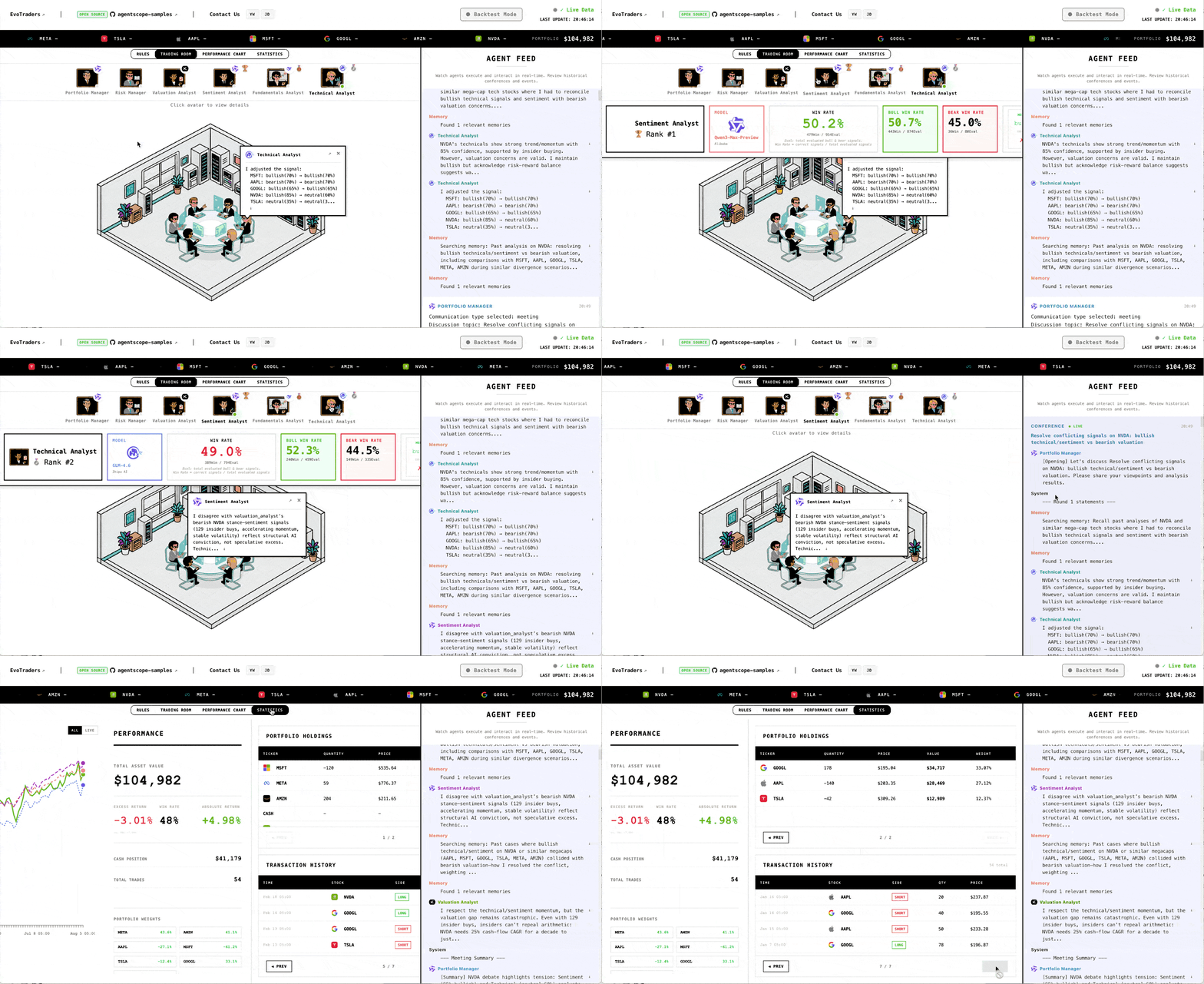 [Visit the EvoTraders website](http://trading.evoagents.cn)
EvoTraders is an open-source financial trading agent framework that builds a trading system capable of continuous learning and evolution in real markets through multi-agent collaboration and memory systems.
Before trading with real funds, please conduct thorough testing and risk assessment. Past performance does not guarantee future returns. Investment involves risks — please make decisions with caution.
## Core Features
**Multi-Agent Collaborative Trading**
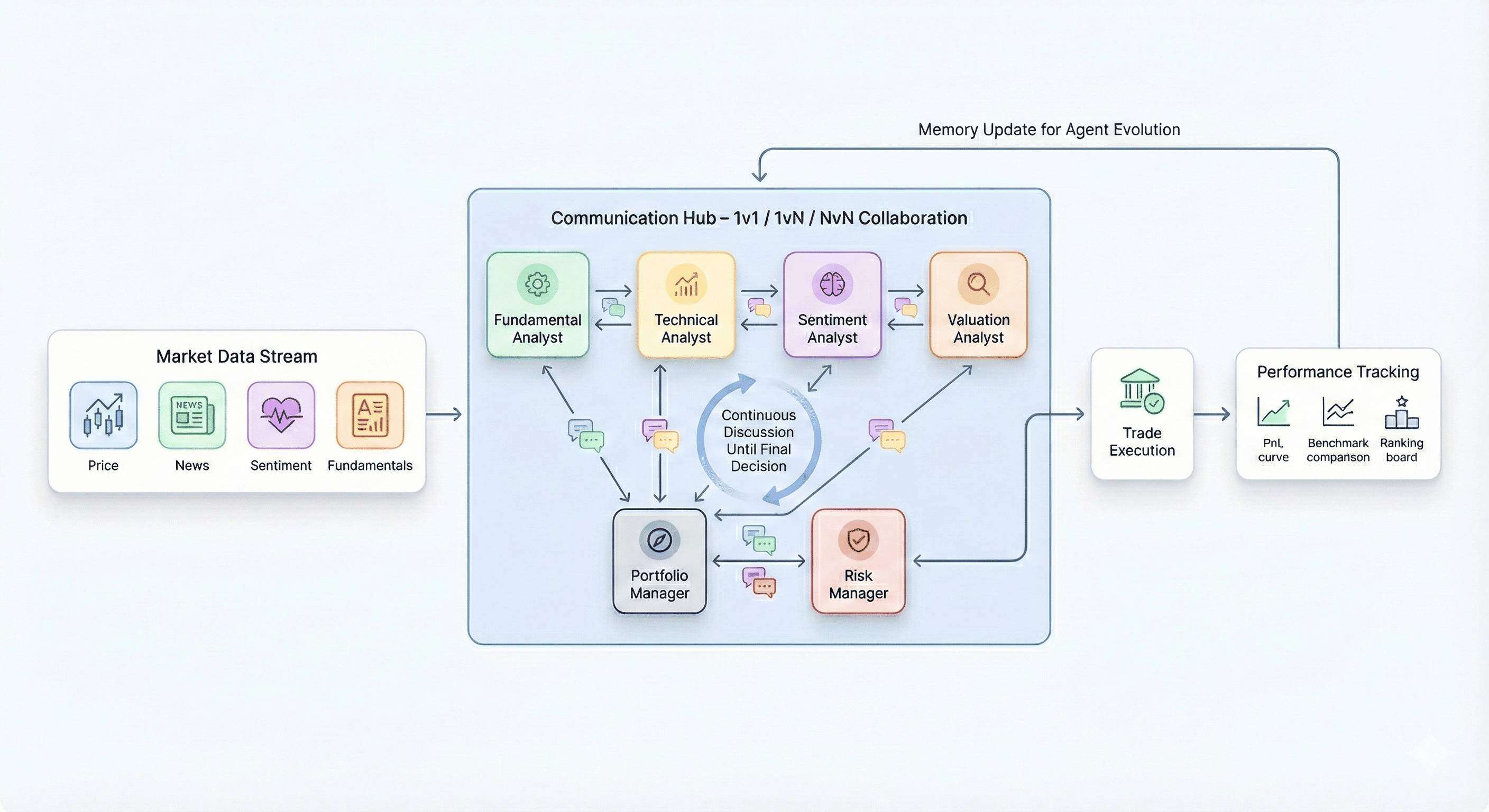
A team of 6 members — including 4 specialized analyst roles (fundamentals, technical, sentiment, valuation), a portfolio manager, and a risk management agent — collaborating to make decisions like a real trading team.
**Continuous Learning and Evolution**
Based on the [ReMe](https://github.com/agentscope-ai/reme) memory framework, agents reflect and summarize after each trade, preserving experience across rounds and forming unique investment methodologies. Through this design, agents gradually develop their own trading styles and decision preferences rather than producing one-time random inferences.
**Real-Time Market Trading**
Supports real-time market data integration with both backtesting mode and live trading mode, allowing agents to learn and make decisions amid real market fluctuations.
**Visualized Trading Information**
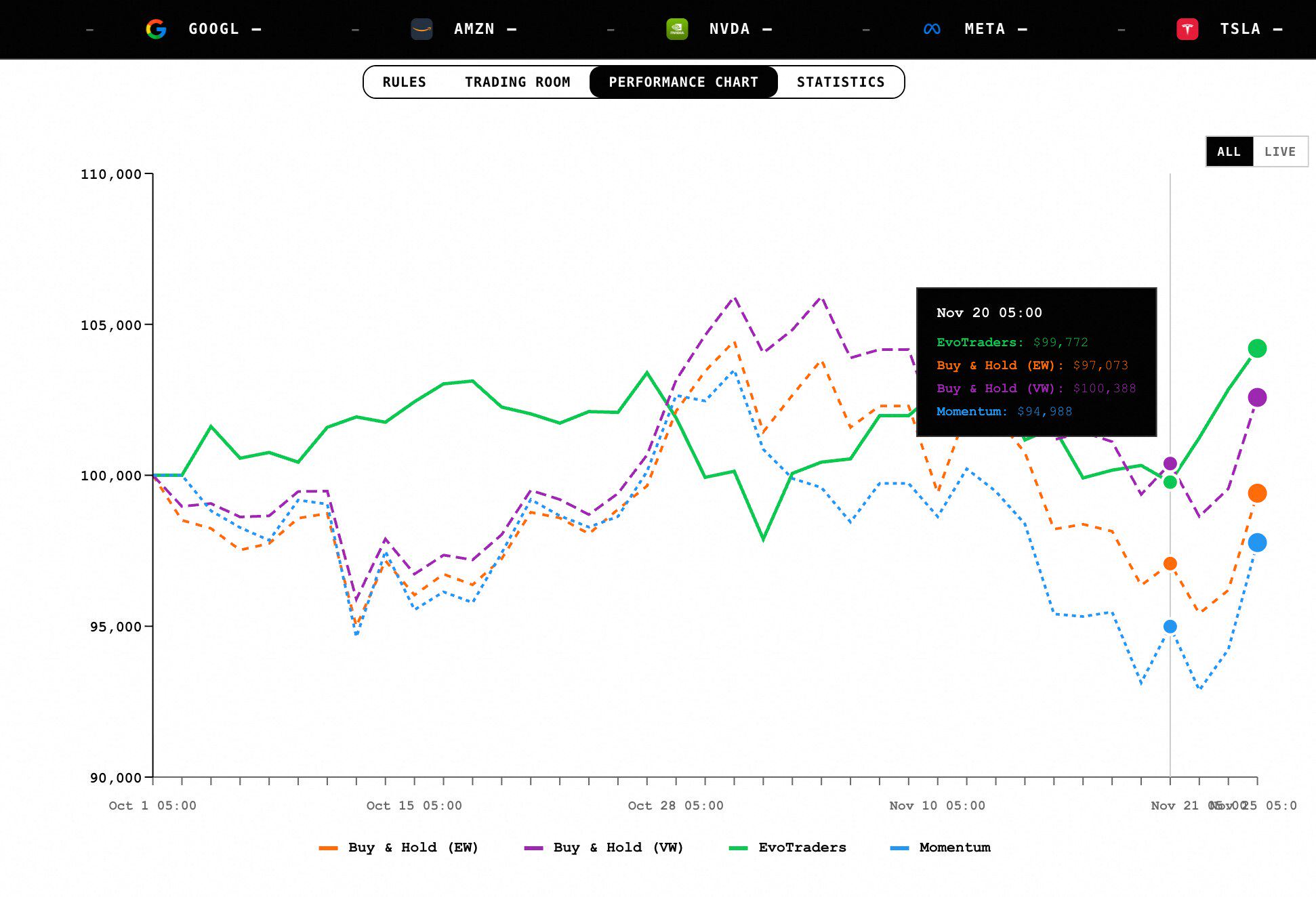
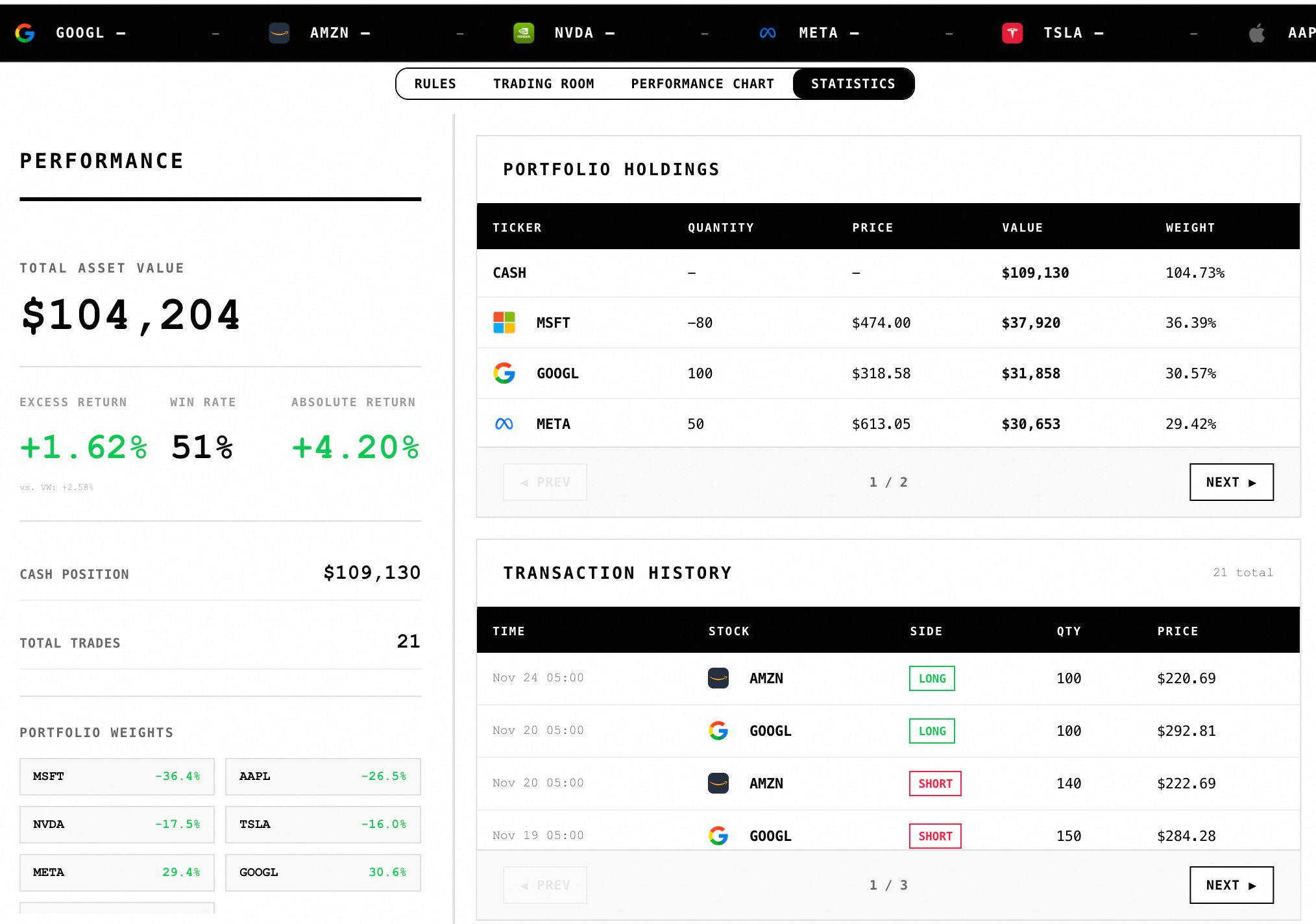
Observe agents' analysis processes, communication records, and decision evolution in real-time, with complete tracking of return curves and analyst performance.
[Visit the EvoTraders website](http://trading.evoagents.cn)
EvoTraders is an open-source financial trading agent framework that builds a trading system capable of continuous learning and evolution in real markets through multi-agent collaboration and memory systems.
Before trading with real funds, please conduct thorough testing and risk assessment. Past performance does not guarantee future returns. Investment involves risks — please make decisions with caution.
## Core Features
**Multi-Agent Collaborative Trading**
A team of 6 members — including 4 specialized analyst roles (fundamentals, technical, sentiment, valuation), a portfolio manager, and a risk management agent — collaborating to make decisions like a real trading team.
**Continuous Learning and Evolution**
Based on the [ReMe](https://github.com/agentscope-ai/reme) memory framework, agents reflect and summarize after each trade, preserving experience across rounds and forming unique investment methodologies. Through this design, agents gradually develop their own trading styles and decision preferences rather than producing one-time random inferences.
**Real-Time Market Trading**
Supports real-time market data integration with both backtesting mode and live trading mode, allowing agents to learn and make decisions amid real market fluctuations.
**Visualized Trading Information**
Observe agents' analysis processes, communication records, and decision evolution in real-time, with complete tracking of return curves and analyst performance.
 ## Quick Start
### Installation
```bash theme={null}
# Clone repository
git clone https://github.com/agentscope-ai/agentscope-samples
cd agentscope-samples/EvoTraders
# Install dependencies (recommended: uv)
uv pip install -e .
# or: pip install -e .
# Configure environment variables
cp env.template .env
```
Edit the `.env` file and fill in your API keys. The following variables are required:
```bash theme={null}
# Finance data API
# At minimum, FINANCIAL_DATASETS_API_KEY is required (FIN_DATA_SOURCE=financial_datasets)
# Recommended: add FINNHUB_API_KEY (FIN_DATA_SOURCE=finnhub)
# Live mode requires FINNHUB_API_KEY
FIN_DATA_SOURCE= # finnhub or financial_datasets
FINANCIAL_DATASETS_API_KEY= # Required
FINNHUB_API_KEY= # Optional
# LLM API for agents
OPENAI_API_KEY=
OPENAI_BASE_URL=
MODEL_NAME=qwen3-max-preview
# LLM & embedding API for memory
MEMORY_API_KEY=
```
### Running
**Backtest Mode:**
```bash theme={null}
evotraders backtest --start 2025-11-01 --end 2025-12-01
evotraders backtest --start 2025-11-01 --end 2025-12-01 --enable-memory # with memory
```
If you don't have market data API keys and just want to try the backtest demo, download the offline dataset:
```bash theme={null}
wget "https://agentscope-open.oss-cn-beijing.aliyuncs.com/ret_data.zip"
unzip ret_data.zip -d backend/data
```
The archive includes basic stock price data so you can run the backtest demo out of the box.
**Live Trading:**
```bash theme={null}
evotraders live # Run immediately (default)
evotraders live --enable-memory # Run with memory enabled
evotraders live --mock # Mock mode for testing
evotraders live -t 22:30 # Run daily at 22:30 local time (auto-converts to NYSE timezone)
```
**CLI Help:**
```bash theme={null}
evotraders --help # Global CLI help
evotraders backtest --help # Backtest mode parameters
evotraders live --help # Live/mock mode parameters
```
**Launch the Visualization Interface:**
```bash theme={null}
# Ensure npm is installed; then run:
evotraders frontend # Connects to port 8765 by default
# Modify ./frontend/env.local to change the port
```
Visit `http://localhost:5173/` to open the trading room. Select a date and click **Run** or **Replay** to observe the decision-making process.
## System Architecture
## Quick Start
### Installation
```bash theme={null}
# Clone repository
git clone https://github.com/agentscope-ai/agentscope-samples
cd agentscope-samples/EvoTraders
# Install dependencies (recommended: uv)
uv pip install -e .
# or: pip install -e .
# Configure environment variables
cp env.template .env
```
Edit the `.env` file and fill in your API keys. The following variables are required:
```bash theme={null}
# Finance data API
# At minimum, FINANCIAL_DATASETS_API_KEY is required (FIN_DATA_SOURCE=financial_datasets)
# Recommended: add FINNHUB_API_KEY (FIN_DATA_SOURCE=finnhub)
# Live mode requires FINNHUB_API_KEY
FIN_DATA_SOURCE= # finnhub or financial_datasets
FINANCIAL_DATASETS_API_KEY= # Required
FINNHUB_API_KEY= # Optional
# LLM API for agents
OPENAI_API_KEY=
OPENAI_BASE_URL=
MODEL_NAME=qwen3-max-preview
# LLM & embedding API for memory
MEMORY_API_KEY=
```
### Running
**Backtest Mode:**
```bash theme={null}
evotraders backtest --start 2025-11-01 --end 2025-12-01
evotraders backtest --start 2025-11-01 --end 2025-12-01 --enable-memory # with memory
```
If you don't have market data API keys and just want to try the backtest demo, download the offline dataset:
```bash theme={null}
wget "https://agentscope-open.oss-cn-beijing.aliyuncs.com/ret_data.zip"
unzip ret_data.zip -d backend/data
```
The archive includes basic stock price data so you can run the backtest demo out of the box.
**Live Trading:**
```bash theme={null}
evotraders live # Run immediately (default)
evotraders live --enable-memory # Run with memory enabled
evotraders live --mock # Mock mode for testing
evotraders live -t 22:30 # Run daily at 22:30 local time (auto-converts to NYSE timezone)
```
**CLI Help:**
```bash theme={null}
evotraders --help # Global CLI help
evotraders backtest --help # Backtest mode parameters
evotraders live --help # Live/mock mode parameters
```
**Launch the Visualization Interface:**
```bash theme={null}
# Ensure npm is installed; then run:
evotraders frontend # Connects to port 8765 by default
# Modify ./frontend/env.local to change the port
```
Visit `http://localhost:5173/` to open the trading room. Select a date and click **Run** or **Replay** to observe the decision-making process.
## System Architecture
 ### Agent Design
**Analyst Team**
| Role | Focus |
| -------------------- | ----------------------------------------------------- |
| Fundamentals Analyst | Financial health, profitability, growth quality |
| Technical Analyst | Price trends, technical indicators, momentum analysis |
| Sentiment Analyst | Market sentiment, news sentiment, insider trading |
| Valuation Analyst | DCF, residual income, EV/EBITDA |
**Decision Layer**
* **Portfolio Manager** — Integrates analysis signals from all analysts, executes communication strategies, and combines analyst/team historical performance with recent investment memories and long-term experience to make final decisions.
* **Risk Management** — Monitors real-time price and volatility, enforces position limits, and issues multi-layer risk warnings.
### Decision Process
```
Real-time Market Data → Independent Analysis → Intelligent Communication (1v1 / 1vN / NvN)
→ Decision Execution → Performance Evaluation → Learning & Evolution (Memory Update)
```
Each trading day progresses through five stages:
Each agent independently analyzes the market using their respective tools and historical experience.
Agents exchange views through private chats, broadcasts, and group meetings.
The portfolio manager makes a comprehensive judgment and issues final trades.
* **Performance Charts** — Track portfolio return curves against benchmark strategies (equal-weighted, market-cap weighted, momentum).
* **Analyst Rankings** — View win rates across bull and bear markets to identify top contributors.
* **Statistics** — Detailed position and trading history for in-depth analysis.
Agents reflect on decisions and summarize experiences based on actual returns, storing insights in the [ReMe](https://github.com/agentscope-ai/reme) memory framework for continuous improvement.
### Module Support
| Module | Project |
| --------------- | --------------------------------------------------------- |
| Agent Framework | [AgentScope](https://github.com/agentscope-ai/agentscope) |
| Memory System | [ReMe](https://github.com/agentscope-ai/reme) |
| LLM Support | OpenAI, DeepSeek, Qwen, Moonshot, Zhipu AI, and more |
## Custom Configuration
### Custom Analyst Roles
**Step 1.** Register the role in `./backend/agents/prompts/analyst/personas.yaml`:
```yaml theme={null}
comprehensive_analyst:
name: "Comprehensive Analyst"
focus:
- ...
preferred_tools: # Select flexibly based on situation
description: |
As a comprehensive analyst ...
```
**Step 2.** Add the role definition in `./backend/config/constants.py`:
```python theme={null}
ANALYST_TYPES = {
"comprehensive_analyst": {
"display_name": "Comprehensive Analyst",
"agent_id": "comprehensive_analyst",
"description": "Uses LLM to intelligently select analysis tools, performs comprehensive analysis",
"order": 15
}
}
```
**Step 3.** *(Optional)* Register the role in the frontend configuration at `./frontend/src/config/constants.js`:
```javascript theme={null}
export const AGENTS = [
{
id: "comprehensive_analyst",
name: "Comprehensive Analyst",
role: "Comprehensive Analyst",
avatar: `${ASSET_BASE_URL}/...`,
colors: { bg: '#F9FDFF', text: '#1565C0', accent: '#1565C0' }
}
]
```
### Custom Models
Configure the model used by each agent in your `.env` file:
```bash theme={null}
AGENT_SENTIMENT_ANALYST_MODEL_NAME=qwen3-max-preview
AGENT_FUNDAMENTALS_ANALYST_MODEL_NAME=deepseek-chat
AGENT_TECHNICAL_ANALYST_MODEL_NAME=glm-4-plus
AGENT_VALUATION_ANALYST_MODEL_NAME=moonshot-v1-32k
```
### Agent Design
**Analyst Team**
| Role | Focus |
| -------------------- | ----------------------------------------------------- |
| Fundamentals Analyst | Financial health, profitability, growth quality |
| Technical Analyst | Price trends, technical indicators, momentum analysis |
| Sentiment Analyst | Market sentiment, news sentiment, insider trading |
| Valuation Analyst | DCF, residual income, EV/EBITDA |
**Decision Layer**
* **Portfolio Manager** — Integrates analysis signals from all analysts, executes communication strategies, and combines analyst/team historical performance with recent investment memories and long-term experience to make final decisions.
* **Risk Management** — Monitors real-time price and volatility, enforces position limits, and issues multi-layer risk warnings.
### Decision Process
```
Real-time Market Data → Independent Analysis → Intelligent Communication (1v1 / 1vN / NvN)
→ Decision Execution → Performance Evaluation → Learning & Evolution (Memory Update)
```
Each trading day progresses through five stages:
Each agent independently analyzes the market using their respective tools and historical experience.
Agents exchange views through private chats, broadcasts, and group meetings.
The portfolio manager makes a comprehensive judgment and issues final trades.
* **Performance Charts** — Track portfolio return curves against benchmark strategies (equal-weighted, market-cap weighted, momentum).
* **Analyst Rankings** — View win rates across bull and bear markets to identify top contributors.
* **Statistics** — Detailed position and trading history for in-depth analysis.
Agents reflect on decisions and summarize experiences based on actual returns, storing insights in the [ReMe](https://github.com/agentscope-ai/reme) memory framework for continuous improvement.
### Module Support
| Module | Project |
| --------------- | --------------------------------------------------------- |
| Agent Framework | [AgentScope](https://github.com/agentscope-ai/agentscope) |
| Memory System | [ReMe](https://github.com/agentscope-ai/reme) |
| LLM Support | OpenAI, DeepSeek, Qwen, Moonshot, Zhipu AI, and more |
## Custom Configuration
### Custom Analyst Roles
**Step 1.** Register the role in `./backend/agents/prompts/analyst/personas.yaml`:
```yaml theme={null}
comprehensive_analyst:
name: "Comprehensive Analyst"
focus:
- ...
preferred_tools: # Select flexibly based on situation
description: |
As a comprehensive analyst ...
```
**Step 2.** Add the role definition in `./backend/config/constants.py`:
```python theme={null}
ANALYST_TYPES = {
"comprehensive_analyst": {
"display_name": "Comprehensive Analyst",
"agent_id": "comprehensive_analyst",
"description": "Uses LLM to intelligently select analysis tools, performs comprehensive analysis",
"order": 15
}
}
```
**Step 3.** *(Optional)* Register the role in the frontend configuration at `./frontend/src/config/constants.js`:
```javascript theme={null}
export const AGENTS = [
{
id: "comprehensive_analyst",
name: "Comprehensive Analyst",
role: "Comprehensive Analyst",
avatar: `${ASSET_BASE_URL}/...`,
colors: { bg: '#F9FDFF', text: '#1565C0', accent: '#1565C0' }
}
]
```
### Custom Models
Configure the model used by each agent in your `.env` file:
```bash theme={null}
AGENT_SENTIMENT_ANALYST_MODEL_NAME=qwen3-max-preview
AGENT_FUNDAMENTALS_ANALYST_MODEL_NAME=deepseek-chat
AGENT_TECHNICAL_ANALYST_MODEL_NAME=glm-4-plus
AGENT_VALUATION_ANALYST_MODEL_NAME=moonshot-v1-32k
```